

The “Iceberg” Danger of Hiring a Web Developer
Many founders treat hiring a web developer like buying software or office furniture — a simple, low‑risk transaction. It isn’t. You’re giving someone access to your IP, customer data, and the systems that keep your business running.
Online platforms make it easy to look professional, but plenty of candidates lack the depth to write secure, scalable, maintainable code, which leads to technical debt, security gaps, and expensive rework later.
Even if you start with drag‑and‑drop or no‑code tools, partnering with the best web development company at the right time can be the difference between a DIY site that quietly cracks under real traffic and a professionally engineered platform that can grow with you.
A cheap or mismatched hire might ship something that seems fine at first but quickly turns into a maintenance and security nightmare as traffic and features grow.
Most guides just list hiring platforms; this one focuses on a Safety‑First Hiring Framework — how to vet real technical competence, protect your code and data, and hire a partner, not a liability, especially if you’ve already seen what can go wrong with a poorly built site on a supposedly simple mobile‑friendly website.
Table of Contents
Start with the real problem
Most founders and marketing leaders don’t struggle to “find” developers; they struggle to choose the right one.
Common worries sound like this:
-
“I don’t know what to write in the job post, so I get random, off-target applicants.”
-
“Everyone says they’re ‘full‑stack’ — how do I tell who actually knows what they’re doing?”
-
“What if they ghost me halfway through or leave me with code nobody else can maintain?”
Those worries are valid. Many post vague roles like “Need a website ASAP,” then end up with mismatched skills, blown budgets, ghosting, or fragile code that breaks every time someone touches it.
The rest of this blueprint combines both perspectives:
-
A step-by-step “how to hire” playbook (scope → channels → screening → budget → contracts).
-
A safety-first layer focused on security, IP, and long-term maintainability, not just getting something “launched.”
Step 1: Scope precisely and choose the right developer
Before you even look at platforms or portfolios, lock down what you’re actually building.
-
Clarify the project type: marketing site, e‑commerce store, SaaS app, custom dashboard, integrations, APIs, etc.
-
Translate “I need a website” into something specific like:
“A React-based e‑commerce site with Stripe integration, user accounts, and target load time under 1s on core pages.”
A simple project usually means basic website development plus light integration of a few new features into an existing site — things like a contact form, newsletter signup, or an extra CTA section, and clear guides to simple website development builds make it easier to benchmark scope and avoid overpaying for small enhancements.
Medium projects usually sit between a simple brochure site and a full custom platform: small web apps, online stores, or marketing sites that need extras like databases, chatbots,
APIs, CRMs, or a CMS. Looking at how popular free CRM solutions plug into websites is a quick way to judge the extra effort and budget these kinds of integrations add.
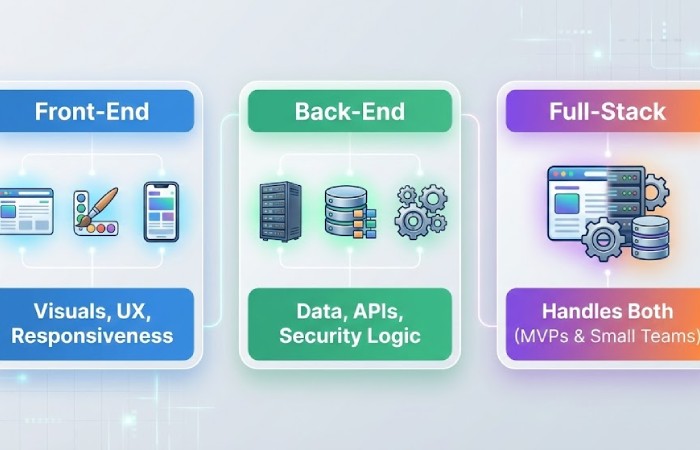
Then decide what kind of developer you really need:
-
Front‑end: UI, UX, responsive layouts, performance in the browser.
-
Back‑end: databases, APIs, business logic, authentication, payments.
-
Full‑stack: can own both sides, useful for MVPs and smaller teams.
A simple spec sheet helps filter out bad fits early:
-
Core features and user flows.
-
Preferred tech stack (e.g., React/Next.js + Node, or WordPress + WooCommerce).
-
Integrations (payment gateways, CRMs, marketing tools).
-
Performance and security expectations (basic measures tied to something like web application security risks).
This one document alone eliminates most scope creep, confusion, and “I thought that was included” fights down the line.
Step 2: Pick hiring channels with eyes open
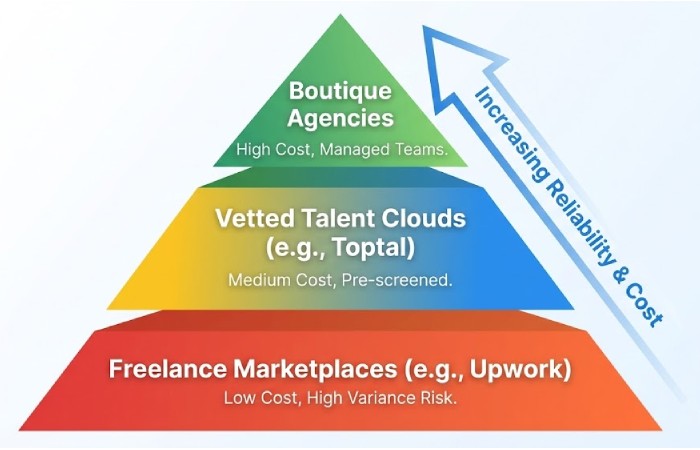
You don’t have to be everywhere; you do need to understand the risk profile of where you look.
Tier 1 – Open freelance marketplaces (Upwork, Freelancer, Fiverr)
-
Pros: Huge pool, fast to start, flexible pricing.
-
Cons: Quality ranges wildly; ghosting and overbooking are real risks; security habits vary.
-
Best for: Small fixes, one-off scripts, non-critical UI tweaks — not your core product.
2 – Vetted talent clouds (Toptal, Arc.dev, Gun.io, etc.)
-
Pros: Pre-vetted candidates, higher average quality; ideal for mission-critical builds.
-
Cons: Higher hourly rates; you pay for the brand and screening as much as the developer.
-
Non‑negotiable: Even with vetting, insist on a clear IP assignment and scope in your own contract, not just the platform boilerplate.
Tier 3 – Boutique agencies and dev shops
-
Pros: You get a team (PM + devs), process, and usually better documentation.
-
Cons: Slower communication loops, higher costs; you talk to a PM, not always the person writing code.
-
Best for: Non‑technical founders who want a managed team and have the budget to pay for it.
A pragmatic strategy is to use at least two channels at once — for example, LinkedIn or direct outreach for long-term hires, plus a vetted platform or niche agency directory like Clutch for specialized or higher-risk work.
Step 3: Write a job description that filters, not invites chaos
A good JD doubles as a filter. Include:
-
Role and engagement: “Senior full‑stack developer, 3‑month contract, possible extension.”
-
Project vision: Why this project matters, who the users are, and what “success” looks like.
-
Tech stack: What they must know vs. what’s nice to have.
-
Deliverables and milestones: Features or modules tied to concrete checkpoints.
-
Budget range and timelines, even if approximate.
Add clear acceptance criteria for each milestone:
-
Example: “Checkout flow is considered complete when a test user can sign up, add a product to cart, pay successfully with Stripe, receive email confirmation, and see the order in the admin dashboard.”
This removes most “we thought it was done” arguments before they start.
Step 4: Screen skills and mindset like a scientist
Skip fluffy questions. Focus on real evidence.
1. Portfolio and live links
-
Look for projects similar to yours (e‑commerce, booking tools, SaaS dashboards, etc.).
-
Check live URLs on different devices; pay attention to performance and UX details.
-
Ask: “Which parts of this project did you actually build?” to separate real experience from team credit.
2. The Git commit audit
You don’t need to read code to learn a lot from GitHub/GitLab:
-
Activity: Regular commits vs. months of silence.
-
Messages: “fix” or “update” everywhere is a red flag; “fixed Stripe API timeout on checkout” shows discipline and clarity.
3. “Code-talk” and problem-solving
Ask questions that force them to explain how they think:
-
“Walk me through how you handle version control and rollback if a deployment breaks.”
-
“Tell me about a time you improved load times or fixed a scaling issue — what exactly did you do?”
If they never mention Git, branches, or any kind of CI/CD pipeline in 2025, that’s a concern for anything beyond a simple brochure site.
4. Security-first questions
Your developer should have at least a working familiarity with common web risks:
-
Ask: “How do you keep user data secure on this app?”
-
Strong answers usually mention things like input sanitization, HTTPS, access control, and keeping dependencies patched — all core ideas reflected in the OWASP Top 10 security risks for web applications.
-
Overly vague responses like “WordPress is secure” without specifics are a red flag.
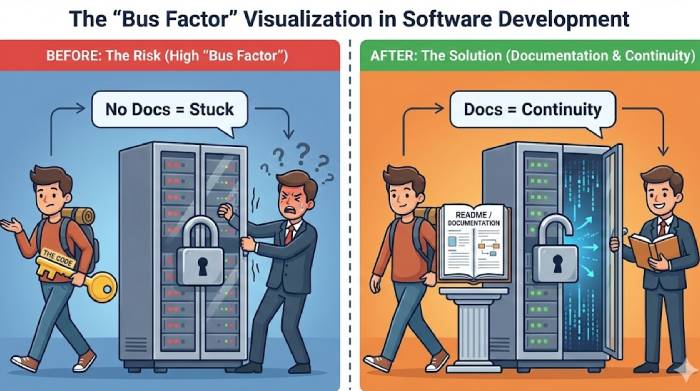
5. The “bus factor” test
Ask: “If you get sick or leave, how does the next developer pick up your work?”
-
Look for habits like writing README docs, commenting tricky sections, and structuring the repo so another dev can get oriented quickly.
Tips & tricks on hiring a web developer
Even with a solid process, many founders still feel unsure about how to hire web developers who actually cover all their requirements, from stack to communication. Practical guides that walk through step‑by‑step how they must hire the web developers are useful as a quick checklist to refine your funnel and improve the quality of candidates you move forward.
Step 5: Use small, paid trial projects
Instead of betting the entire product on a stranger:
-
Start with a “probation project” — one small, self-contained feature (e.g., a “forgot password” flow or a simple admin module).
-
Evaluate not just the code, but:
-
Do they ask clarifying questions?
-
Do they communicate delays early?
-
Do they deliver through the agreed workflow (branching, pull requests, reviews)?
-
This gives you a realistic sample of how collaboration will feel before you commit to the full build.
Step 6: Set terms, contracts, and access the safe way
This is where most generic guides stop; it’s also where you can lose control of your own product if you’re not careful.
1. Intellectual property (IP) and ownership
By default, the person who writes the code often owns the copyright unless your contract clearly transfers it.
-
Include “work made for hire” language and explicit IP assignment upon payment.
-
Make clear that you own the code, designs, and related assets once milestones are paid.
This clause is what protects you if someone ever tries to hold your repo hostage.
2. Access control and the “kill switch”
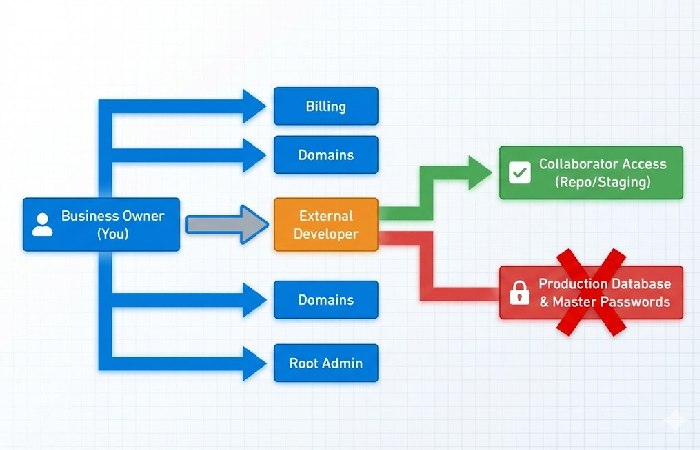
Never give root or full admin rights on day one.
-
Own critical accounts (GitHub, hosting, domain, cloud, payment gateways) yourself.
-
Invite the developer as a collaborator with only the permissions they need.
-
Use role-based access and password managers (e.g., LastPass, 1Password) to share credentials instead of emailing passwords.
If things go south, you should be able to remove access without losing your code or infrastructure.
3. Data privacy, NDA, and environment setup
If your app touches real customer data, you carry the legal and reputational risk.
-
Use an NDA and, where relevant, a data processing or privacy addendum.
-
Whenever possible, give them a staging environment with realistic dummy data instead of live production data.
-
Keep database backups and logs controlled from your side.
4. Payment structure and escrow
Reduce your exposure:
-
Avoid wiring 50% upfront to a stranger.
-
For remote hires, use platforms or payment tools that support escrow so funds are released only when milestones meet the agreed acceptance criteria.
Step 7: Budget with technical debt in mind
Rates vary by region, experience, and type of engagement:
-
Freelancers might range from roughly $20–$120+ per hour globally depending on stack and seniority.
-
In India, recent 2025 guides show juniors around ₹25,000/month, mid‑level developers roughly ₹50,000–₹1,00,000, and seniors above that, especially for modern frameworks and complex projects.
The real cost gap, though, shows up as technical debt:
-
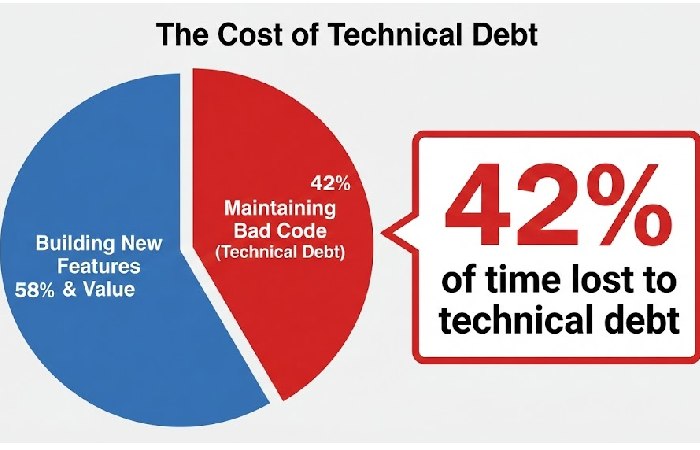
Research building on Stripe’s Developer Coefficient report finds developers spend about 42% of their week dealing with bad code and technical debt instead of shipping new value.
-
A cheap hire who writes tangled, untested code can force the next developer to rewrite large chunks later — effectively making you pay twice.
Plan at least 15–20% of budget for QA, refactoring, and inevitable changes. That buffer pays off when you need to adjust scope or harden security without blowing everything up.
If you want a concrete sense of how tech decisions compound over time, case studies on topics like long‑form content worth SERPs show how investing properly upfront often delivers far better returns than cutting corners and paying for fixes later.
Step 8: Onboarding and long-term collaboration
Once you’ve picked someone, treat the first week like a structured kickoff rather than a casual “you know what to do, right?”
-
Do a live walkthrough of your product vision, users, and constraints.
-
Share your spec, acceptance criteria, and priorities in writing.
-
Agree on communication norms: tools, response times, standups, demo cadence.
After that, keep the loop tight:
-
Ship in small increments, review early, and document as you go.
-
Revisit scope and priorities regularly instead of dumping a massive spec and disappearing.
Key conclusion
-
Be specific about scope and tech stack so you attract the right candidates.
-
Use the right channels for your risk tolerance (marketplaces vs. vetted clouds vs. agencies).
-
Screen via portfolio, Git activity, security awareness, and a paid pilot project, not just a single interview.
-
Protect yourself with IP assignment, limited access, NDAs, and milestone-based payments (ideally via escrow).
High-authority sources to deepen your framework
If you want to go beyond “checklist-level” and build a truly resilient hiring and security process:
-
Use the OWASP Top 10 web application security risks as your baseline for what “security-conscious” looks like in your developers’ thinking and your acceptance criteria.
-
Factor findings from Stripe’s Developer Coefficient into your budgeting and hiring decisions so you’re not blind to the long-term cost of technical debt.
Important FAQs (People Also Ask)
1. Do I really need a web developer, or can I use a website builder?
Use a builder (Wix, Squarespace, etc.) if you just need a simple marketing site and can live with template limits. Hire a developer if you need custom logic, integrations, complex e‑commerce, or long-term scalability.
2. What type of web developer should I hire: front‑end, back‑end, or full‑stack?
Hire front‑end for UI/UX and responsive layouts, back‑end for databases and APIs, and full‑stack when you want one person to own both sides of an MVP or smaller product.
3. How much does it cost to hire a web developer?
Costs depend on region and seniority: global freelancers might range from roughly $20–$120+ per hour, while 2025 India guides show juniors around ₹25,000/month and seniors going well above ₹1,00,000.
4. Where is the best place to find reliable web developers?
For raw volume and flexibility, look at platforms like Upwork and Fiverr; for pre-vetted talent, check networks such as Toptal or specialist vendors; for full, managed teams, use agency directories like Clutch or vendor sites.
5. How do I know if a web developer is good?
Look for similar past projects, clean and active GitHub/GitLab profiles, clear communication, good client feedback, and solid answers to security and architecture questions, ideally validated through a small paid test task.
6. How can I protect my IP and data when working with a developer?
Always own the main accounts (Git, hosting, domains), use collaborator roles instead of sharing root access, sign an NDA plus IP assignment, and give access to production data only when necessary and in a controlled way.
7. How long does it usually take to build a website?
A simple marketing site might take 2–4 weeks, while complex web apps or custom e‑commerce builds can run from a few months to over half a year depending on scope, integrations, and team size.
8. What are the biggest mistakes to avoid when hiring a web developer?
Top mistakes include vague requirements, hiring only on lowest price, skipping technical and security checks, not clarifying IP and ownership, and paying large amounts upfront without milestones or escrow.