

If your small business is struggling with tech, you’re not alone — but the reason may not be what you think.
Most owners assume the problem is not enough tools, outdated software, or the wrong IT provider. So they buy another app, sign another subscription, or hire another vendor. And yet… daily work still feels messy, slow, and stressful.
Here’s the uncomfortable truth in real-world operations:
For many small businesses that already use basic cloud tools and security, technology struggles are caused more by habits and processes than by missing software.
Until those habits change, no new software, AI feature, or managed service will fix the underlying problem.
Table of Contents
Key Takeaways
You can use this almost verbatim 👇
-
Most small businesses struggle with tech because of broken habits, not missing tools.
-
Adding more software often increases complexity before it adds value.
-
Shared access, skipped updates, shadow IT, and poor offboarding cause more damage than outdated systems.
-
Simple, repeatable tech hygiene routines outperform one-time upgrades.
-
AI and managed IT services amplify existing behavior; they do not fix poor processes.
-
Small, incremental changes reduce risk and stress more effectively than large “digital transformation” projects.
Why More Tools Haven’t Fixed Your Tech Headaches
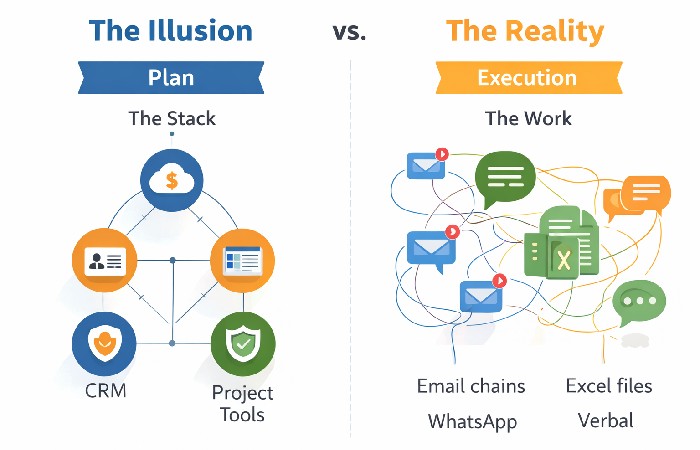
Most small businesses already have plenty of technology:
-
Cloud accounting software
-
A CRM or project tool
-
Email, chat, file storage
-
Antivirus, backups, maybe even an IT provider
On paper, the stack looks modern. In reality, work still happens through:
-
Email chains
-
WhatsApp messages
-
Spreadsheets on personal drives
-
Verbal instructions no one documents
The issue isn’t lack of capability — it’s lack of consistent usage.
When tools exist but:
-
Everyone uses them differently
-
No one owns the “right way” to use them
-
Exceptions become the norm
You end up with friction, duplication, and risk — even with “good” software.
For owners who still need to choose or replace a few core systems, it’s worth pairing this habits-first approach with solid guidance on choosing the right technology for your business.
That way, you’re not just buying better tools—you’re making sure they’re deployed into processes that will actually use them consistently.
The Real Failure Modes (What Actually Breaks Small Business Tech)
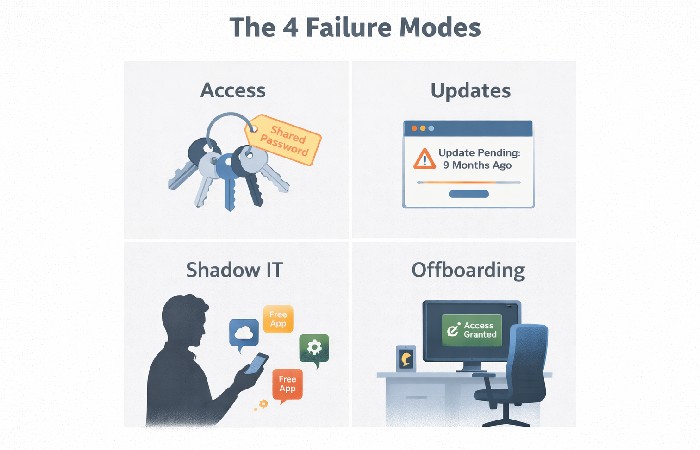
1. Access and Identity Chaos
Shared logins, ex-employees with active accounts, MFA enabled “for some tools but not others.”
Even strong security software fails when:
-
No one regularly reviews access
-
Passwords are reused
-
Ownership is unclear
This is one of the most common ways small businesses get breached — not through Hollywood-style hacking, but through day-to-day neglect.
2. Update and Patch Procrastination
“We’ll update it later” becomes “we haven’t updated it in 9 months.”
Unpatched systems are one of the most common entry points for ransomware and data loss. For many small businesses, going months without updates creates more practical risk than not buying an additional security product.
3. Shadow IT and Rogue Workflows
Employees adopt free tools to “get things done”:
-
Personal Google accounts
-
Free design or automation apps
-
Unsanctioned file sharing
Banning everything doesn’t work. But ignoring it creates data silos, compliance issues, and operational blind spots.
The problem isn’t employees — it’s the absence of clear rules.
4. No Offboarding, No Audits
When someone leaves, access often stays:
-
Email
-
Files
-
SaaS dashboards
-
Customer data
This is both a security risk and a source of potential legal exposure, especially for businesses handling regulated client or financial information.
The Tech Hygiene Routine That Beats Buying Another Platform
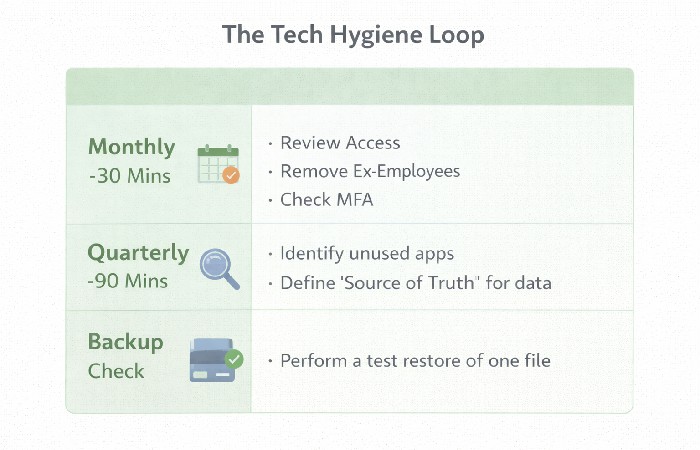
Instead of chasing the next tool, adopt a simple, repeatable hygiene routine. This is where real progress happens.
Monthly (30 minutes)
-
Review who has access to what
-
Remove unused or ex-employee accounts
-
Confirm MFA is enabled where possible
You don’t need new software — a spreadsheet and admin access is enough, and resources like the NIST Small Business Cybersecurity Corner can help you decide where to focus first.
Quarterly (60–90 minutes)
-
List your core tools and what each is actually used for
-
Identify overlaps, abandoned apps, and “email-only” processes
-
Decide which tool is the source of truth for key data
This alone often reduces costs and confusion.
Backup Reality Check
-
Confirm backups exist
-
Test restoring one small file or system
-
Make sure more than one person knows how recovery works
If you’ve never tested a restore, you don’t really have backups in any reliable sense — most small‑business backup best practices emphasise test restores, not just scheduled jobs.
Micro-Training Bursts
Short, focused sessions (15–30 minutes):
-
“How we manage passwords now”
-
“How we store customer data”
-
“How to spot phishing attempts”
These are far more effective than once-a-year training marathons and are exactly the kind of ongoing awareness most small‑business cybersecurity guides recommend, such as the FTC’s Cybersecurity for Small Business.
AI and MSPs: Force Multipliers, Not Crutches
AI tools and managed service providers (MSPs) aren’t magic fixes. They amplify existing behavior.
-
AI trained on messy data produces faster, more polished mistakes
-
MSPs can deploy great security, but shared passwords still break everything
Used correctly, they help. Used prematurely, they scale chaos.
How to use them wisely
-
Ask MSPs to help define processes, not just install tools
-
Use AI for low-risk, internal tasks first: drafts, summaries, SOP creation
-
Clean workflows before automating them
We asked TechQuarters, an IT support and managed service provider that operates in North London, about the steps small businesses can take to get better with technology. As providers of IT support North London businesses have been using to great success for many years, TechQuarters had a few things to say on the matter.
If you’re considering or already using a managed service provider, it also helps to understand the common pitfalls on their side, not just yours.
Resources that unpack the top challenges of managed IT services can sharpen the questions you ask and ensure your MSP relationship reinforces good habits instead of masking weak ones.
According to them, the most important thing for small businesses looking to manage their tech in the right way is to have the right guidance.
Lacking guidance can lead businesses to be hasty with adopting new technologies, which could result in significant losses for the company. Below is what TechQuarters considers the best course of action for managing your tech as a business.
Good habits first. Tools second.
A Practical 90-Day Reset for Small Businesses Struggling With Tech
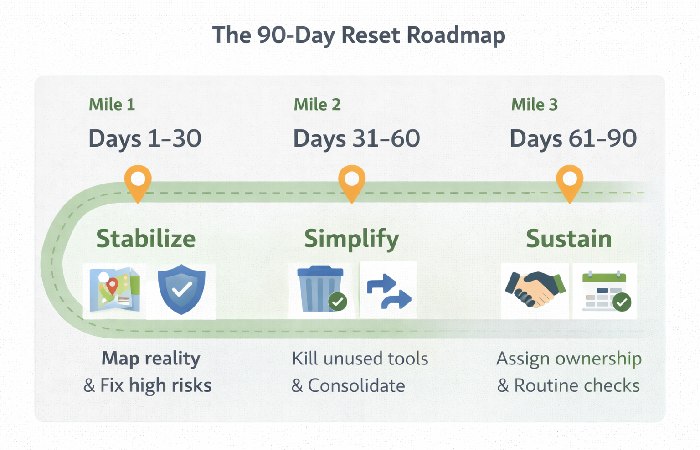
Days 1–7: Map Reality
-
Document how work actually happens
-
Identify 3–5 friction or risk points (missed requests, lost files, access gaps)
Days 8–30: Fix the Highest-Risk Habits
-
Enforce basic access control and MFA
-
Introduce a password manager
-
Run one focused micro-training
Days 31–60: Simplify Before Expanding
-
Kill unused tools
-
Consolidate overlapping software
-
Standardize where key work lives
For most small firms, this is the right moment to start considering new tools or AI pilots.
Days 61–90: Institutionalize the Routine
-
Assign ownership (even if it’s the founder + one power user)
-
Put hygiene checks on the calendar
-
Make them part of management rhythm
In practice if you want to lean even harder into an “expert stance, not universal law,” you can make these microedits.
Final Takeaway
If your small business is struggling with tech, the solution isn’t another platform, subscription, or trend.
It’s ownership, consistency, and habits.
Fix those first — and suddenly:
-
Tools feel easier
-
Security improves
-
Costs stabilize
-
AI and automation actually help instead of adding stress
Technology doesn’t fail small businesses.
Unmanaged behavior does.
FAQ
Use these for FAQPage schema and an on-page FAQ section.
FAQ 1 Why is my small business struggling with technology?
Many small businesses that already use core digital tools struggle with tech due to inconsistent processes, poor access control, shadow IT, and lack of ownership—not because they lack tools.
FAQ 2 Is buying more software the solution to small business tech problems?
No. Adding more tools often increases complexity. Fixing habits, workflows, and usage discipline delivers better results than buying new software.
FAQ 3 What are the most common tech mistakes small businesses make?
Common mistakes include shared logins, skipped updates, unused software, poor offboarding, and relying on email or chat instead of defined workflows.
FAQ 4 How can a small business fix tech problems without hiring an IT team?
By adopting a simple tech hygiene routine: regular access reviews, basic security habits, tool consolidation, and short internal training sessions.
FAQ 5 Can AI help if my small business is struggling with tech?
AI can help only after workflows are cleaned up. Using AI on messy data or broken processes often makes problems worse, not better.
FAQ 6 Should small businesses use managed IT services (MSPs)?
MSPs can help, but they are not a replacement for good internal habits. Poor processes will still cause problems even with an MSP.
Disclosure
This content is based on general technology operations best practices, industry research, and real-world small business case patterns. AI assistance was used to structure, organize, and refine the analysis for clarity and practical application.