
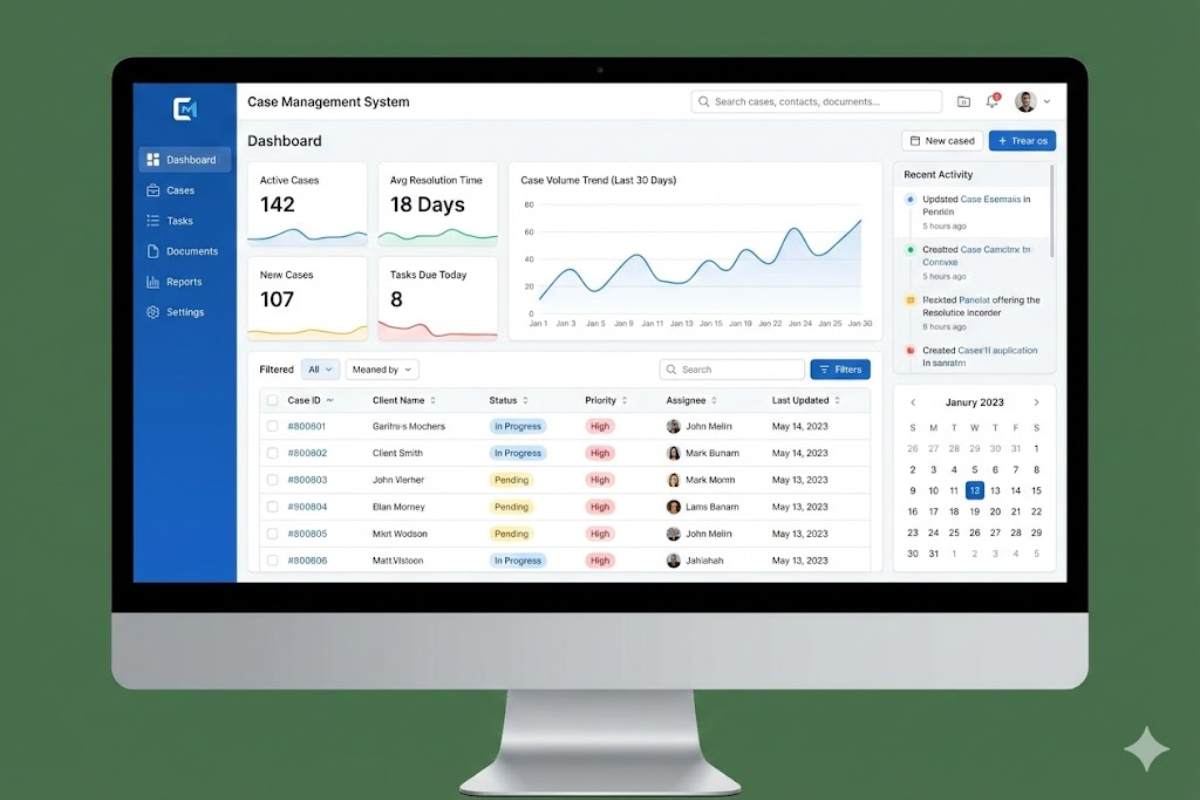
Here’s what nobody tells you: you’ll waste months comparing identical feature lists, watch demos where every vendor claims “AI-powered,” and still pick wrong 40% of the time. Why? Most organizations fail because the software doesn’t match how they actually work.
Your intake process is chaos? That $300/month enterprise platform won’t fix it—it’ll just digitize the chaos.

Read on to discover what you need to know in order to choose the best case management software for your unique team. By focusing on select features that’ll improve organizational efficiency, you’ll reach your goals while tracking client information accurately. Read on to learn all that you need to know to compare and select the best case management systems.
Table of Contents
The 60-Second Answer
The “best” system solves your biggest bottleneck today—usually intake automation or finding documents fast.
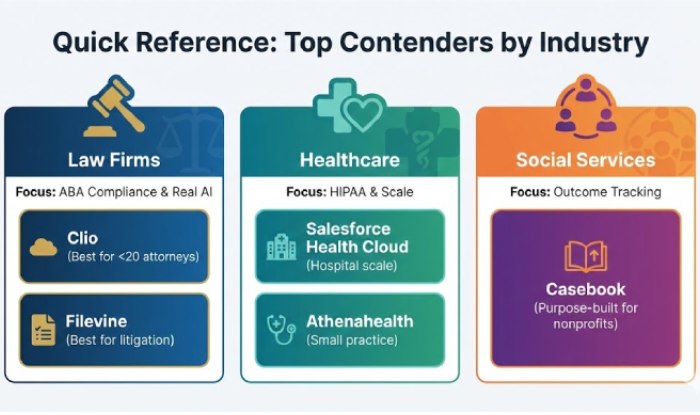
- Law firms: Clio or Filevine. Both handle ABA tech compliance, both have real AI (not marketing fluff). Clio’s better for firms under 20 attorneys—simpler interface, 200+ integrations. Filevine dominates litigation with discovery automation.
- Healthcare: You need HIPAA compliance baked in. Salesforce Health Cloud handles hospital-scale complexity ($300+/user). Athenahealth fits smaller practices better, bundles EHR and practice management.
- Social services: Casebook. Purpose-built for outcome tracking and grant reporting, not retrofitted from CRM. Won’t blow nonprofit budgets.
- Golden rule: Buy for the problem you have right now, not the one you think you’ll have in three years. That “enterprise feature” you might need? You’ll never turn it on.
The AI Problem Nobody Mentions
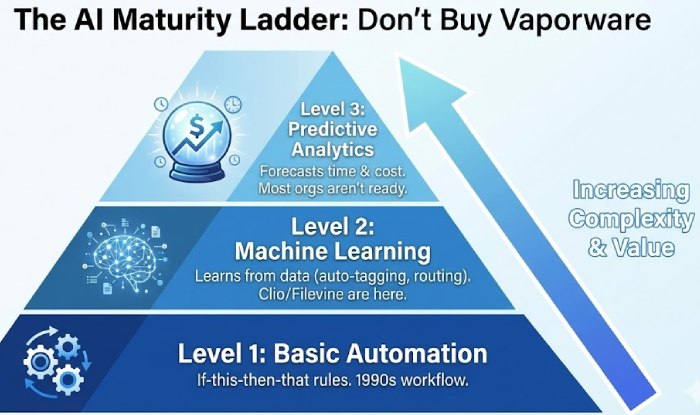
Every vendor claims “AI-powered.” Most of it’s nonsense. Three actual levels exist:
- Level 1: Basic automation. If-this-then-that rules. That’s 1990s workflow software with better marketing.
- Level 2: Machine learning that learns from your data—auto-tagging documents, routing cases by complexity, flagging high-risk situations. Clio and Filevine are here.
- Level 3: Predictive analytics. “This case will take 18 months and cost $47,000.” Insurance companies use this. Most orgs aren’t there yet.
When vendors demo “AI features,” ask: What level? What’s it trained on? What’s the false-positive rate? Watch them squirm. If they can’t answer, it’s vaporware.
How to Actually Choose: 5 Things That Matter
1. Figure Out Your Case Type
Forrester’s research identifies four types:
Process to Decision — Structured workflows (loan approvals, benefits claims). 80% of cases follow the same steps.
Service Requests — Customer-centric with flexibility (IT helpdesk, simple legal matters).
Incident Management — Reactive, time-sensitive (HR complaints, compliance violations).
Clinical/Legal Casework — Long-term, evolving (litigation, patient care). Can run for years.
Your case type determines everything. Personal injury firms need Filevine’s litigation tools. Family law practices doing routine divorces would overpay for features they’ll never use.

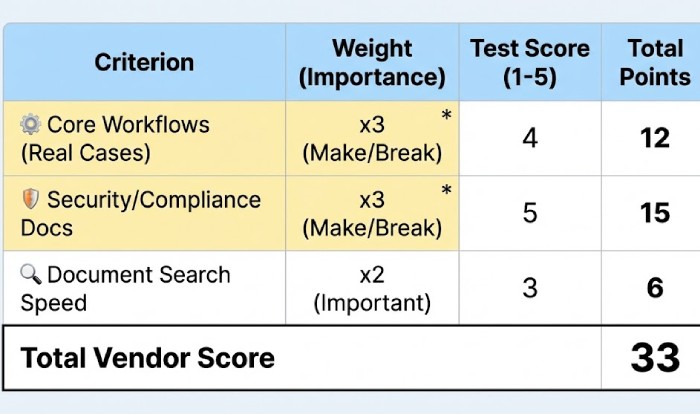
2. Build a Weighted Scorecard
| Criterion | Weight | How to Test |
|---|---|---|
| Core workflows | Make/break | Run 3-5 real cases (messy ones) through the trial |
| Security/compliance | Make/break | Request ISO 27001, SOC 2 reports, actual docs |
| AI capabilities | Important | Ask for training data, false-positive rates |
| Integrations | Important | Test each one your team uses—don’t trust “we integrate with everything” |
| Document search | Important | Search for a phrase during demo. Time it. Over 3 seconds? Move on |
| Mobile access | If field staff | Test offline mode yourself—not watching demos |
| Pricing transparency | Important | Total cost: per-user, implementation, training, storage. In writing |
If a vendor fails core workflows or security, move on. Nothing else matters.
3. Security Isn’t Optional
For healthcare:
HIPAA compliance requires:
-
Encryption at rest (FIPS 140-2, AES-256) and in transit (TLS 1.2+)
-
Audit trails logging every PHI access
-
Business Associate Agreements with vendors AND subcontractors
-
Breach notification: 60 days for patients, immediate HHS reporting (500+ affected)
-
Patient data access within 30 days
If the sales rep can’t explain each without checking with tech team, red flag.
For law firms:
ABA Rules 1.1 and 1.6 make you liable for vendor security failures. ABA Formal Opinion 477R requires risk assessments, encryption, MFA, and documented vendor vetting.
Attorneys have lost malpractice cases from system breaches where they couldn’t prove “reasonable” due diligence.
For everyone:
-
ISO 27001 certification (third-party audited, not self-certified)
-
SOC 2 Type II reports (ongoing controls, not point-in-time)
-
Penetration testing results with remediation timelines
-
99.9% uptime SLA minimum with incident history
No documentation? Run away.

4. Test Your Integrations
CB Insights shows integration problems are the #2 failure reason. You’ll hear “we integrate with everything!” Translation: they have an API and maybe 5-10 pre-built connectors. Everything else needs custom development at $150-250/hour.
Must-haves:
-
Identity: SSO via Okta, Azure AD, Google Workspace
-
Communication: Email (Outlook/Gmail) with two-way sync, calendar integration
-
Documents: SharePoint, Google Drive, Dropbox with version control
-
Financial: QuickBooks, Xero (trust accounting for legal)
-
Industry-specific: Epic/Cerner for healthcare, DocuSign for legal
During trials, have actual users test every integration. Don’t watch the vendor do it—the demo works perfectly; reality is messier.
5. Pilot With Real Users
Run a structured pilot before signing:
-
Pick 5-10 users across roles (include the tech-resistant ones)
-
Run 3-5 actual cases with all complications
-
Measure: task time vs. old system, error rates, user satisfaction (1-10)
-
Test mobile in real scenarios (courthouse parking lot, client homes)
If it feels intuitive to IT but confusing to frontline staff, you’ve got problems. Research shows poor user adoption is the #1 failure factor.
The Vendors (Straight Talk)
Legal
Clio ($39-129/user/month)
Best for: 1-50 attorney firms
AI works: task automation, document classification, billing predictions
200+ integrations including everything you use
Downside: Matter-centric approach limits complex litigation
Compliance: ABA compliant, ISO 27001
Filevine (~$80-150/user/month)
Best for: Litigation-heavy practices
Visual timelines, AI discovery tools, evidence tagging
Downside: Overkill for transactional work
Compliance: ABA, ISO 27001
Healthcare
- Salesforce Health Cloud ($300+/user/month)
- Enterprise-grade: 360° patient views, care coordination
- Integrates Epic/Cerner via HL7
- HIPAA mature: encryption, audit trails, BAAs standard
- Downside: Expensive, complex. 6-12 month implementation
Athenahealth (custom pricing, revenue cycle model)
- Best for: Ambulatory care, specialty practices
- Bundles EHR + practice management + revenue cycle
- Downside: Less flexible, locked into ecosystem
Social Services
- Casebook (~$50-100/user/month)
- Outcome tracking, grant reporting, multi-agency collaboration
- FERPA, Title IX, HIPAA-ready
- Downside: Only works for social services workflows
Implementation Reality Check
Vendors say 30 days. Reality: 6-12 months. Research shows 30-40% of projects run over because data migration is underestimated.
Quick timeline:
-
Months 1-3: Planning, scoring, pilots, contracts
-
Months 4-7: Configuration, integrations (always longer than expected)
-
Months 5-7: Data migration—start with 10-20 closed cases, validate, then expand. Run systems in parallel. Budget 20-30% more time than vendor estimates
-
Months 8-9: Training, phased rollout, super-user network
Keep read-only access to old system for 6-12 months—you’ll find missing data later.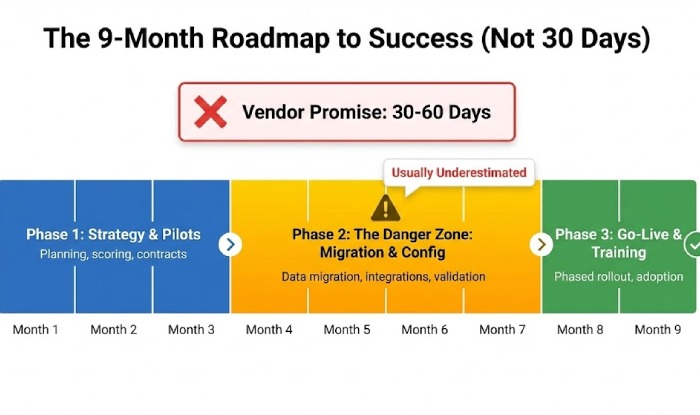
Red Flags That Should Make You Walk
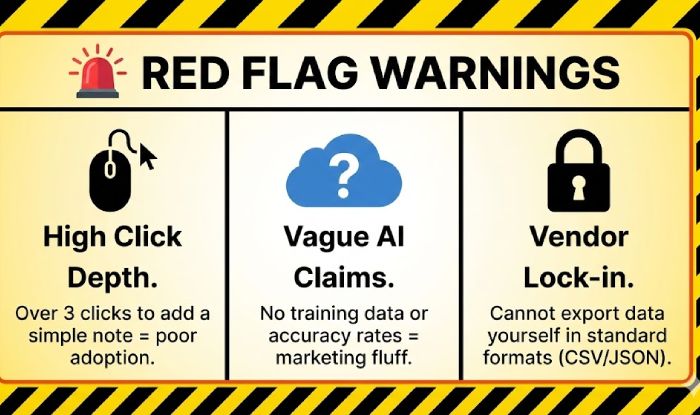
- High click depth: Over 3 clicks to add a note? Team abandons it
- Opaque pricing: “Custom quote” often means hidden fees for storage, integrations, support
- Bad/no mobile app: Field staff can only use it 40% of work hours
- Vague AI claims: No specifics on training data or false-positive rates = vapor
- No uptime SLA: Under 99.9% is unacceptable (8.76 hours downtime/year)
- Vendor lock-in: Can’t export data in standard formats (CSV, JSON, FHIR)? Trapped.
- “We’ll customize everything!” Early over-customization kills upgrades
- Dismissive about migration: “Just upload a CSV” = disaster waiting to happen
Your Pre-Purchase Checklist
☐ Tested real workflows with actual users
☐ Security docs verified (ISO 27001, SOC 2, HIPAA)
☐ All critical integrations work in your environment
☐ Pricing documented in writing (including hidden fees)
☐ Migration plan includes parallel operation + validation
☐ Mobile app works offline
☐ Search returns results under 3 seconds
☐ 99.9% uptime SLA with incident history
☐ MFA and role-based access controls
☐ Data export in standard formats
☐ Training covers all user roles
☐ Verified vendor financial stability
Can’t check every box? Don’t sign yet.
Bottom Line
Best system = what your team will use + solves your specific bottleneck + won’t blow up in six months.
- Most small law firms: Clio
- Litigation practices: Filevine
- Healthcare organizations: Salesforce Health Cloud or Athenahealth (by scale)
- Social services: Casebook
But process matters more than vendor. Use the scorecard. Test integrations. Run real pilots. Budget realistic timelines. Verify security before signing.
Buyer’s remorse is expensive at $50,000+ annually with 6-12 month implementations. Do it right the first time.
FAQ: Case Management Systems
1. How much does it cost?
$39-150/user/month for cloud systems. Legal starts at $39 (Clio), healthcare at $150+ (Salesforce Health Cloud). Add $2K-10K for implementation and $1K-5K for data migration.
2. How long is implementation?
6-12 months. Vendors claim 30-60 days but ignore data migration and training time. Budget 30% extra beyond vendor estimates.
3. Why do implementations fail?
Poor user adoption (48%) and integration issues (52%). Teams quit when systems are confusing or don’t sync with Outlook/QuickBooks.
4. Do I need AI features?
Only if handling 50+ cases/year or document-heavy work. AI auto-tags documents and predicts timelines. Ask vendors for training data and accuracy rates.
5. Cloud or on-premise?
Cloud. Costs $2K-3K/year vs. $25K-35K for on-premise. Choose on-premise only if legally required to keep data on-site.
6. What certifications matter?
Healthcare: HIPAA BAA, FIPS 140-2, SOC 2 Type II. Legal: ISO 27001, ABA Rules 1.1/1.6, SOC 2. Everyone: 99.9% uptime SLA.
7. Will it integrate with my tools?
Test email, calendar, QuickBooks, and document storage during trial. Have staff test—don’t watch vendor demos. Pre-built integrations are free; custom costs $5K-20K.
8. Can I switch vendors later?
Check export formats first (CSV, JSON, FHIR). Ensure attachments and audit trails export. Switching costs $5K-15K and takes 2-4 months.
9. How do I ensure adoption?
Test the 3-click rule: common tasks in 3 clicks or less. Pilot with frontline staff using real cases. If they’re confused, they won’t use it.
10. Case management vs. practice management?
Case management tracks cases (documents, deadlines). Practice management runs business (billing, scheduling). Get both in one (Clio, Filevine).