

Buying a used iPad Pro 11-inch can feel deceptively simple: check the model, storage size, cosmetic condition, and battery percentage — and you’re set. But veteran buyers know the experience rarely matches the promise.
Two iPads with identical specs and surface condition can behave very differently in the real world. One might sail through heavy creative workflows; the other may drain quickly, run hot, and feel sluggish under sustained load.
This article goes beyond spec sheets and basic checklists to examine the hidden internal wear — battery efficiency, thermal behavior, and performance under sustained use — that actually determines whether a used iPad Pro is worth buying.
Table of Contents
The Limits of Traditional Checklists
Most used-buying advice focuses on visible and basic functional checks:
-
Screen integrity and button responsiveness
-
Cameras, speakers, and connectivity
-
No iCloud/Activation Lock
-
Correct iPad model and storage reporting
These steps are necessary but far from sufficient. They tell you what the device looks like, not what it will feel like days, weeks, or months after purchase, especially compared with broader guides on ways technology is impacting the restaurant industry that focus on business outcomes rather than device‑level wear.
Why Battery Condition Is More Than a Percentage

Lithium-ion batteries are consumables — all rechargeable batteries wear out over time. Apple now includes a Battery Health section in Settings for newer iPads, letting you view maximum capacity and cycle count.
But there are important nuances:
-
Capacity % is only part of the story: A figure like “80 % battery health” may sound acceptable, but it doesn’t tell you how the battery performs under sustained workloads — exactly where professionals stress an iPad, as Apple’s own iPad Battery Health and charging guidance explains.
-
Older units may hide battery data: Not all models expose Battery Health in Settings. You might need analytics logs or third-party tools to infer condition. Anker
-
Charge cycles matter: Each 100 % equivalent of use counts as one cycle. Batteries designed to retain ~80 % capacity for ~1,000 cycles will inevitably decline over two to three years of heavy use.
Real-world example: Even an iPad Pro with ~87 % capacity can show noticeably shorter uptime and heavier drain under pro workloads if cycle count is high — the same percentage on a lightly used unit may feel substantially better, as discussed in this user-reported 2018 iPad Pro battery life thread on MacRumors.
Thermal Behavior Under Load: A Hidden Performance Factor
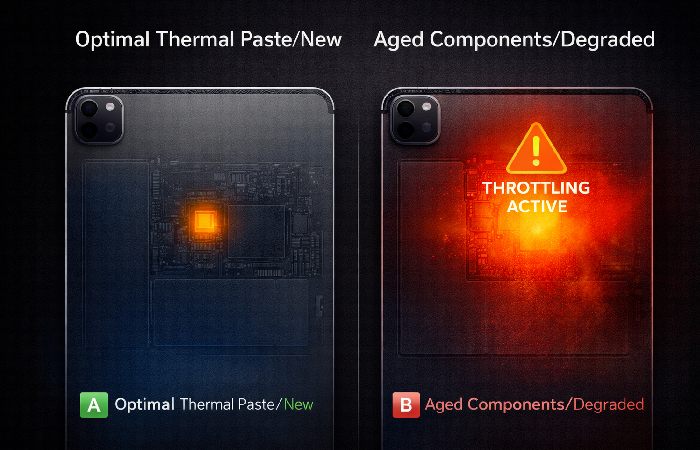
Benchmarks and surface tests tell you whether the device boots or runs casual tasks — but they say little about thermals and sustained performance.
Pro applications like video editing, large digital canvases, or long multitrack audio sessions stress both the CPU and battery over time. Thin, powerful devices like the iPad Pro dissipate heat well when new, but as internal components age, heat builds faster and performance throttles sooner.
This isn’t captured by basic checks like “everything works,” yet it’s one of the most common reasons a used device feels slower than expected even when specs are decent.
Storage Wear: The Silent Drag on Responsiveness
Storage health is seldom discussed in used iPad checklists — yet it matters.
Flash NAND storage wears down as it undergoes write/erase cycles. Heavy past workloads like video projects, large media libraries, or frequent app installs increase that wear. As storage cells degrade, latency rises, which can show up as:
-
Sluggish app launch times
-
Delays during file operations
-
UI hiccups during multitasking
These performance characteristics get misdiagnosed as software “lag,” but they reflect wear, not inherent hardware limits.
Refurbished vs Private Used: Reality Check
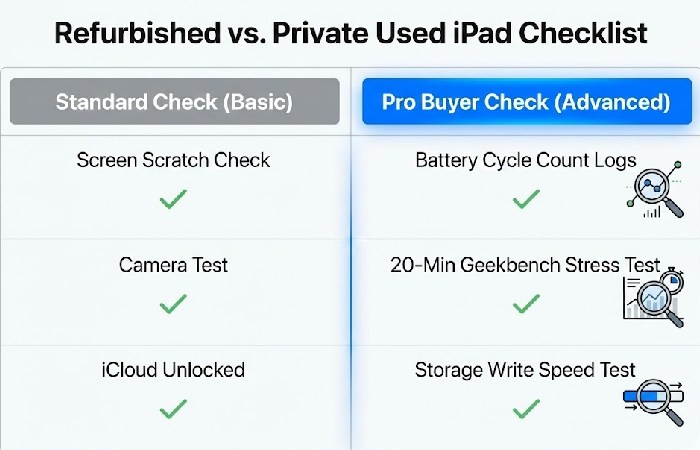
Many guides imply refurbished units are safer than private used units, and to an extent they are — but only to a point.
Refurbished devices are typically cleaned, inspected, and sometimes had batteries replaced. However:
-
The depth of internal diagnostics varies by seller. Some focus more on cosmetics than performance longevity. ZUGU
-
Warranties attached to refurbished products may not cover subtle performance degradation.
-
A used unit with excellent battery and low storage wear might outperform a refurbished unit with a replaced battery but high storage or thermal wear.
Recent and reputable refurbishers tend to test more deeply — but no refurbished iPad is guaranteed immune to the effects of past use.
The Real Cost Equation: Performance Resilience Over Price
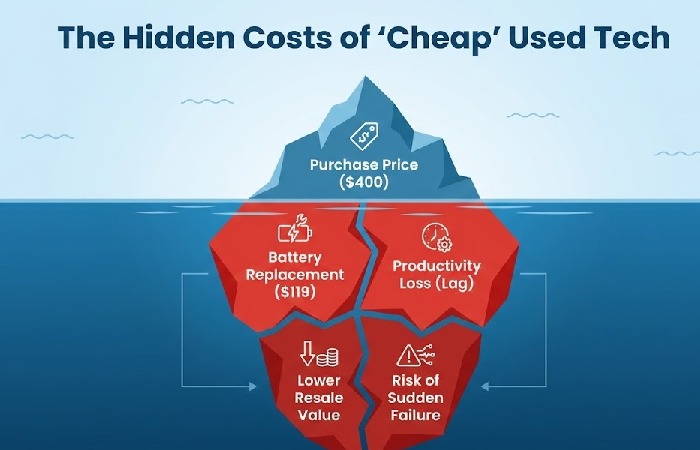
Traditional pricing logic in the used market is mostly based on:
-
Model generation
-
Storage size
-
Cosmetics
-
Age
But none of these address remaining performance resilience. A slightly more expensive unit with a healthier internal profile (better battery efficiency, stronger sustained performance, less storage degradation) can be far better value long-term than the cheapest unit available.
Experienced buyers should consider:
-
Expected remaining battery life under real tasks
-
Thermal performance under sustained use
-
Estimated responsiveness of internal storage
-
Likelihood of future battery replacement
If you also care about how smart home hardware ages over time, a broader hardware‑focused view like the smart home 2025 guide can help you think about long‑term value beyond the iPad ecosystem.
This reframes “good deal” from lowest price to longest usable performance window.
Conclusion
For experienced buyers, the used iPad Pro 11-inch market is full of nuance. Cosmetic condition and spec sheets tell only a small part of the story. The actual user experience — especially under demanding workloads — is heavily influenced by internal wear patterns that are invisible in basic checklists.
Shifting the focus from superficial checks to performance resilience will not only help you avoid disappointing purchases, it will help you identify devices that deliver professional-level performance long after the sale.
Advanced FAQ (High-Intent Used-Buyer Queries)
What battery health should I expect for a used iPad Pro 11-inch?
Apple’s Battery Health shows maximum capacity and cycle count for newer models. A reading above ~80 % can be acceptable, but assessing efficiency under load is equally important for sustained tasks.
How do I check a used iPad’s battery if there’s no Battery Health setting?
For older models without a Battery Health screen, analytics data or third‑party tools (e.g., coconutBattery or iMazing) are needed to interpret battery condition, as outlined in this step‑by‑step guide to checking iPad battery health from Anker.
Is choosing refurbished always safer than buying used?
Refurbished units may include cosmetic reconditioning and sometimes battery replacement, but the extent of performance testing varies by seller. Refurbished status doesn’t inherently guarantee deeper internal health checks, as highlighted in this guide to buying a used iPad in 2025 from ZUGU Case.
Can storage performance impact everyday responsiveness?
Yes. Flash storage ages with use, leading to increased latency that can slow app launches and file operations — effects that aren’t visible in basic cosmetic or spec checks.
What should I check regarding locks and activation before buying?
Ensure the iPad isn’t linked to another Apple ID or iCloud Activation Lock before purchase — otherwise, it may be unusable.
Disclosure
This article is based on publicly available technical documentation, third‑party battery and device‑care guides, and real‑world user reports about iPad performance and longevity.
Drafting and editing were assisted by AI tools to organize, fact‑check, and clarify the content, but all recommendations were reviewed and adapted for accuracy and practical relevance to used iPad Pro 11‑inch buyers.
About the Author
Abdul Rahman is a professional content creator and blogger with over four years of experience writing about technology, health, marketing, productivity, and everyday consumer products.
He focuses on turning complex topics into clear, practical guides that help readers make informed decisions and improve their digital and daily lives.