
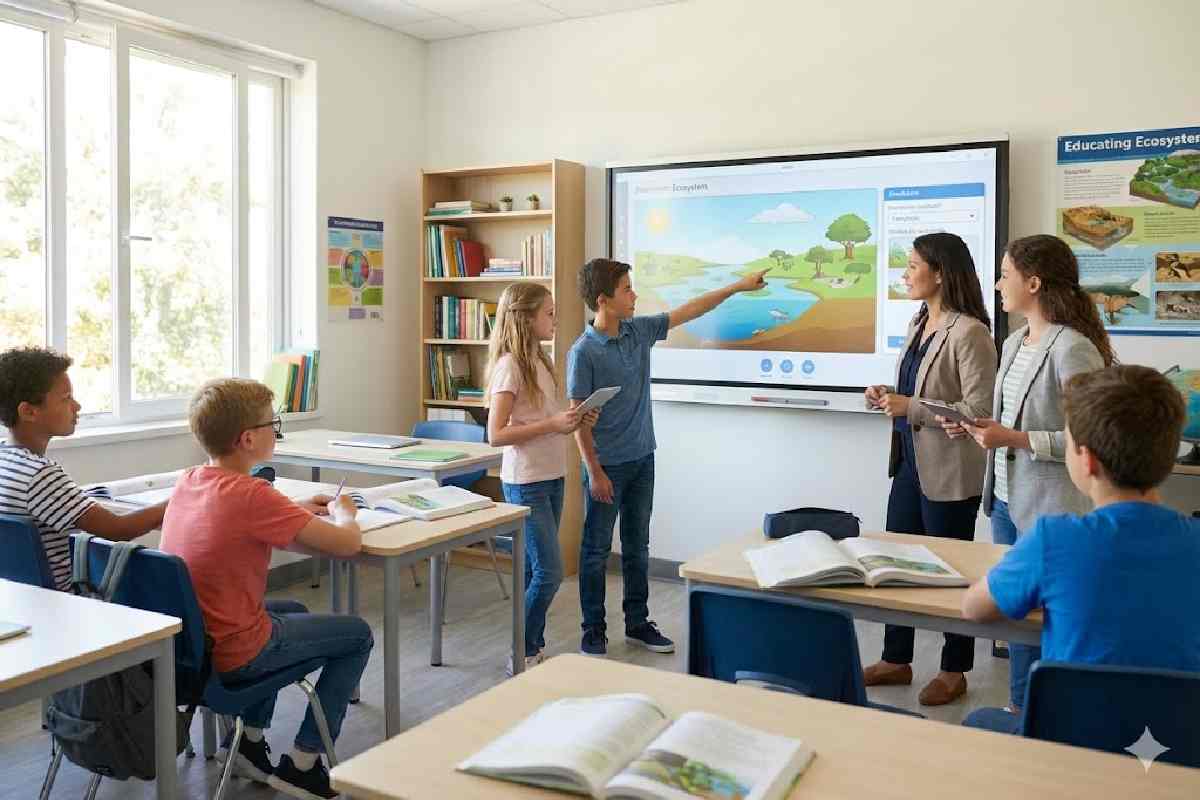
Gameplay in classroom learning can improve motivation and learning, but results are mixed and depend heavily on how well the game is aligned with clear objectives, timely feedback, and assessment.
Used casually as “fun extras,” games often add distraction and workload without boosting retention or transfer.
Table of Contents
The real classroom problem
Teachers are not fighting ignorance as much as fragmented attention and fatigue. Phones, tabs, and background stress compete with every explanation and worksheet, so traditional lessons can feel dull even when the content is solid. In that context, gameplay looks like a natural fix—but without structure, it often turns into noise rather than learning.
-
Many “gamey” lessons add points and leaderboards but leave understanding unchanged.
-
Some classes light up and learn; others spiral into distraction or shallow recall.
Why gameplay so often misfires
A big part of the problem is how online advice frames “games in the classroom.” Popular guides tend to blur key distinctions, oversell motivation, and underplay design and assessment.
Common pitfalls in top‑ranking content:
-
Confusing gamification with game‑based learning.
-
Focusing on fun and engagement, not retention and transfer.
-
Ignoring cognitive load (how hard students are working just to manage the game).
-
Rarely discussing when games underperform or even hurt learning.
When teachers copy those surface tactics, students play, but scores often barely move.
Quick answer
Gameplay in classroom learning most reliably improves outcomes when the game is tightly aligned with a specific learning objective, builds in frequent feedback, and reflects the kinds of tasks students will meet in assessment.
Large evidence syntheses, such as the OECD’s report on the impact of digital technologies on students’ learning, highlight that design and implementation quality are decisive for whether technology actually raises attainment.
Used loosely as a “fun extra,” gameplay often raises engagement without consistent gains in understanding or transfer.
Large reviews from organisations such as the Education Endowment Foundation (EEF), OECD, and independent research teams report small to moderate positive effects for well‑designed game‑based interventions, alongside many neutral or inconsistent results where design or implementation are weak.
What “gameplay in learning” actually means
Gameplay in classroom learning is not just anything that feels fun or competitive. It is the deliberate use of game mechanics to structure how students encounter content and practice skills.
Not gameplay in this sense:
-
Random quizzes with points but no clear learning target.
-
Token “fun Friday” icebreakers.
-
Homework turned into a leaderboard with no change in task quality.
What counts as structured gameplay:
-
Clear rules, goals, and consequences linked to a curriculum target.
-
Progress systems where advancing in the game reflects genuine skill growth.
-
Built‑in feedback and opportunities to try again after mistakes.
Two models are especially important to separate.
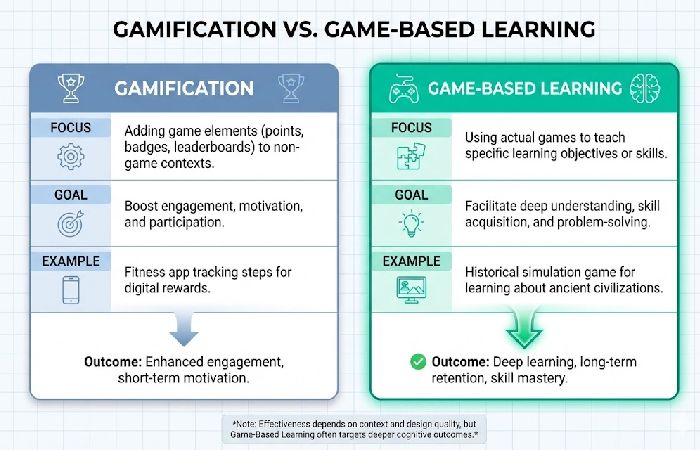
Gameplay vs gamification
Gamification and game‑based learning often get used interchangeably, but the evidence base treats them differently.
| Approach | What it adds | Main focus | Evidence pattern* |
|---|---|---|---|
| Gamification | Points, badges, timers, streaks | Motivation/engage. | Modest and variable gains, especially if tasks themselves are unchanged. |
| Game‑based learning | The game itself is the learning system | Thinking/transfer | More consistent positive effects when tightly designed around clear objectives and feedback. |
What research actually shows
Across meta‑analyses, systematic reviews, and large trials, the pattern is nuanced: games can help, but not automatically and not always.
1. Engagement improves quickly
-
Many studies report higher enjoyment, persistence, and on‑task behaviour when lessons incorporate digital games or structured game activities.
-
Motivation gains are common but do not guarantee better test scores.
2. Retention improves when feedback is built in
-
Trials where games provide immediate or frequent corrective feedback tend to show stronger gains in retention and performance than comparable non‑game tasks.
-
When feedback is delayed or minimal, games often show little or no advantage over traditional worksheets, especially beyond the short term.
3. Transfer benefits depend on reflection
-
Game‑based learning is more likely to support transfer when students explicitly discuss or write about how strategies in the game connect to real‑world or curriculum problems.
-
Without debrief or reflection, students can become good at “playing the game” without being able to explain or generalise what they learned.
Evidence snapshots you can safely reference:
-
EEF‑funded Mathematical Reasoning trials, which include online game components, found additional months of progress in maths when the programme was integrated into teaching and included structured practice and feedback.
-
Randomised trials of maths apps and game‑like tools for primary students report small to moderate gains in attainment when used regularly under teacher guidance.
-
Recent studies on digital game‑based learning for topics like digital etiquette show improved skills and motivation compared to traditional approaches, again under careful design.
For an accessible overview of how game mechanics, feedback, and reflection interact with motivation and memory, see the American Psychological Association’s article on how video games can help kids learn and grow.
The missing piece: cognitive load
Even well‑intentioned games can quietly overload students’ working memory.
Cognitive load theory explains that learners have limited mental capacity; any effort spent on navigating confusing rules or busy visuals is effort not spent on actual content.
Gameplay tends to increase extraneous cognitive load when:
-
Rules and win conditions are complex or poorly explained.
-
Interfaces are visually noisy, with frequent pop‑ups and animations.
-
Competitive pressure dominates, pushing students to rush rather than think.
Findings aligned with work cited by organisations such as the APA and OECD suggest that:
-
Learning suffers when students invest more effort in managing the game environment than in understanding ideas.
-
Simpler, tightly focused games often outperform flashier, highly stimulating ones on academic outcomes, even if they feel less exciting.
For a research‑grounded overview of how digital games affect students’ learning and cognitive load, see the OECD report on the impact of digital technologies on students’ learning.
The takeaway: less spectacle, more clarity.
The Layered Gameplay Learning Model
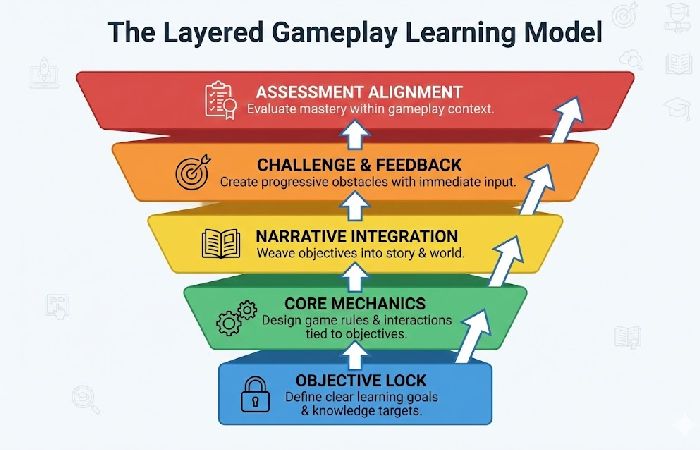
To avoid random “fun add‑ons” and design games that actually teach, you can use a layered structure. This is a practical framework, consistent with design principles in game‑based learning and cognitive load research.
Layer 1: Objective lock
-
One primary learning goal per game, stated in plain language (e.g., “factorising quadratics” or “using past tense verbs correctly”).
-
Resist the urge to bundle three or four curriculum targets into one activity.
2: Constraint design
-
Limit the number of actions students can take and the time they have, but in a way that supports the learning goal.
-
Make failure states clear and recoverable (“lose a life, replay the problem”) rather than punitive.
3: Feedback loop
-
Build in instant or very rapid feedback: correct answers, hints, or demonstrations of the right method.
-
Avoid designs where students complete entire game rounds before discovering what they misunderstood.
Layer 4: Reflection bridge
-
Add a short debrief after gameplay: quick write‑ups, pair discussions, or whole‑class explanations.
-
Prompt students to explain why strategies worked in the game and how they connect to normal tasks or exams.
Layer 5: Assessment alignment
-
Check whether doing well in the game predicts doing well on tests, essays, or performance tasks that matter.
-
If high performers in the game are not high performers in assessment, the game is teaching something else—or only teaching how to play itself.
Where gameplay tends to work best
Evidence is strongest or most promising in domains where practice, feedback, and simulation are central.
Typical sweet spots:
-
Mathematics problem solving and fluency
Drill‑and‑practice games, reasoning games, and structured apps can support both procedural fluency and problem‑solving when used consistently and guided by teachers.
-
Language acquisition and basic literacy
Vocabulary, spelling, grammar, and early reading skills often benefit from game‑like repetition, immediate feedback, and adaptive difficulty.
-
Science simulations
Simulations let students manipulate variables, test hypotheses, and see consequences in complex systems (e.g., ecosystems, physics, or disease spread).
-
Computational thinking and digital skills
Programming puzzles, logic challenges, and digital citizenship games show promising effects on skills such as algorithmic thinking and digital etiquette.
OECD and other international syntheses highlight these areas as examples where digital technologies and games can add value when integrated into broader teaching.
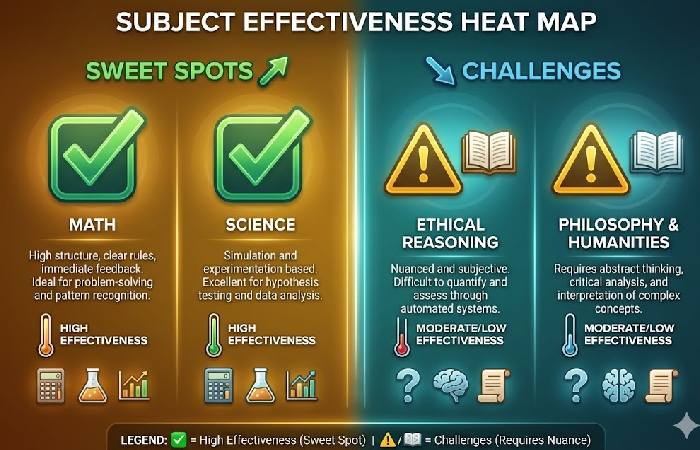
Where gameplay is more challenging
There is comparatively weaker or more mixed evidence in domains that require extended, quiet, or highly nuanced thinking—though there are interesting exceptions.
Areas to treat cautiously:
-
Deep reading comprehension
Most robust reading gains still come from explicit strategy instruction, guided reading, and rich discussion; game‑based tools can help with engagement and surface skills but have mixed results on deeper inference and analysis.
-
Ethical reasoning and values education
Serious games can frame ethical dilemmas and spark reflection, but translating play into lasting ethical reasoning requires careful facilitation and structured writing or discussion.
-
Long‑form writing
Some projects use games to inspire narrative writing or argumentative pieces, but sustained improvements in writing quality generally rely on drafting, feedback, and explicit teaching that extend beyond the game itself.
-
High‑stakes exam cramming
For last‑minute preparation, games rarely outperform focused revision, past papers, and targeted feedback; they may even waste limited time if design is loose.
The key nuance: there are games designed for reading, ethics, and writing—with some encouraging results—but the evidence base is smaller and outcomes depend heavily on teacher‑led reflection and integration with conventional tasks.
Tools teachers commonly use
The following table expands on the summary image, detailing the most effective tools currently used by educators in 2026. These tools are categorized by their primary function: Gamification (adding game mechanics to traditional lessons) versus Game-Based Learning (using actual games to teach concepts).
Different platforms embody different design choices and trade‑offs.
| Tool | Main strengths | Main risks/limits |
|---|---|---|
| Kahoot‑style quizzes | Rapid engagement, quick checks for recall. | Can stay at surface‑level; needs explanation/debrief for deeper learning. |
| Minecraft Education | Open‑ended projects, systems thinking, collaboration. | High setup and class‑management load; learning impact depends on task design. |
| Class‑style gamification platforms | Behaviour tracking, participation incentives. | Heavy reliance on extrinsic rewards; unclear academic impact if tasks stay unchanged. |
| Custom simulations / serious games | Strong alignment to specific concepts, rich feedback. | High development cost; impact not guaranteed without integration and reflection. |
Implementation Strategy: Picking the Right Tool
To ensure these tools aren’t just “digital distractions,” consider the Learning Objective first:
-
Need a 5-minute exit ticket? Use Kahoot! or Wayground.
-
Teaching a 2-week unit on Architecture or Chemistry? Integrate Minecraft.
-
Struggling with classroom culture? Layer in Classcraft.
Pro Tip: Don’t turn every task into a game. The most effective teachers use a “hybrid” approach, rotating between traditional direct instruction and gamified sessions to prevent student burnout.
No tool can fix weak curriculum design or unclear objectives; it can only amplify what is already there.
First‑time implementation checklist
Stepping into game‑based learning or gamification can feel like a big leap. This checklist helps make a first session manageable and focused on learning, not chaos.
Phase 1: Pre‑game (planning)
-
Define the “why”: review and recall (gamification) vs exploring a concept more deeply (game‑based learning).
-
Check the tech: device access, logins, and Wi‑Fi capacity for your chosen tool.
-
Set a time limit for play and for debrief so the game does not swallow the whole lesson.
2: Tutorial (intro)
-
Establish simple “game manners” (noise level, turn‑taking, screen‑down signals).
-
Model one short practice round on the main screen so everyone understands the interface.
-
If using teams, assign them quickly to avoid delays or social exclusion.
Phase 3: Match (execution)
-
Circulate rather than sitting at the desk so you can spot tech issues and misconceptions.
-
Let confident students act as “tech helpers” for peers once they are on task.
-
Watch for frustration or boredom and adjust difficulty, pacing, or hints if needed.
Phase 4: Debrief (post‑game)
-
Ask 1–2 focused questions connecting the game to the lesson objective.
-
Glance at the tool’s reports to see which items most students missed.
-
If you use rewards, keep them simple and tied to effort or improvement, not just winning.
Best Free Tools for Gameplay in Classroom Learning
Finding high-quality content shouldn’t require navigating risky websites. To implement gameplay in classroom learning effectively, teachers can leverage these professionally vetted, free-to-use platforms:
-
STEM & Science: PhET Interactive Simulations — Excellent for physics and chemistry modeling.
-
Mathematics: GeoGebra — Visualizes complex algebraic and geometric concepts.
-
Coding & Logic: Scratch (MIT) — Allows students to learn by building their own games.
-
History & Culture: Smithsonian Learning Lab — Interactive discovery through digitized artifacts.
-
All-in-One: PBS LearningMedia — A massive library of K-12 curriculum-aligned digital interactives.
When gameplay is not a good fit
Gameplay in classroom learning may be a poor choice, or at least a low priority, when:
-
Students already struggle with attention and self‑regulation, and the game is complex or highly stimulating.
-
Stakes are very high (e.g., exit exams) and time is short.
-
Curriculum time is extremely limited, and core content has not yet been securely learned.
In these cases, stripping back to clear explanations, guided practice, and targeted feedback often produces more reliable gains than adding game layers.
Practical FAQs for teachers
Does gameplay improve academic performance?
Sometimes. Trials and reviews show small to moderate gains when games are well‑designed, closely tied to objectives, and used regularly with feedback and reflection.
Is gameplay suitable for all ages?
Not universally. Much of the positive evidence comes from primary and lower‑secondary learners; results in older, exam‑focused cohorts are more mixed and sensitive to time pressures.
How often should games be used?
Sparingly and purposefully. Think reinforcement, diagnosis, or application—not wholesale replacement of teaching.
Can gameplay replace teaching?
No. Major reviews emphasise that digital tools and games are most effective when they support, not substitute, high‑quality instruction and formative assessment.
Parent communication template (optional)
If you want to reassure families about why you’re using classroom games, you can adapt this short parent letter:
Subject: How we’re using game‑based learning in class
Dear Parents and Guardians,
This term, our class will be using selected game‑based learning and gamified activities (for example, tools like Minecraft: Education Edition and Kahoot!) to support the curriculum. These are not “just games,” but structured resources that help students apply concepts, get instant feedback, and work together on meaningful tasks.We will use these tools in balance with our usual lessons in reading, writing, discussion, and hands‑on work; they supplement, not replace, traditional teaching. Our goal is to make learning more engaging while keeping expectations, routines, and safety clear. If you have any questions about how these tools work or how you can support your child at home, please feel free to contact me.
Best regards,
Final takeaway
Gameplay in classroom learning is a tool, not a teaching philosophy or shortcut. When designed around a single clear objective, constrained for low cognitive load, rich in immediate feedback, bridged by reflection, and aligned with assessment, it can sharpen understanding and make practice more engaging.
When treated as generic “fun,” copied from trending advice without alignment or reflection, it mainly consumes time and attention students could spend on more effective learning activities.
Disclosure:
This guide is an independent, informational resource and is not affiliated with or endorsed by any of the tools or organisations mentioned. It was created using publicly available research, reputable third‑party sources, and AI assistance, and should not be taken as legal, policy, or professional educational advice.
About the Author:
Abdul Rahman is a professional content creator and blogger with over four years of experience writing about technology, health, marketing, productivity, and everyday consumer products. He focuses on turning complex topics into clear, practical guides that help readers make informed decisions and improve their digital and daily lives.