
In the current digital landscape, video content is king. Whether you are documenting a vacation or building a brand on social media, audience expectations are higher than ever. It is scientifically proven that high-quality visuals engage humans more effectively than text; however, with millions of creators online, your video quality must stand out to survive the algorithm.
To compete with viral content, you need a video editor that balances professional features with ease of use. While professional software often comes with a steep learning curve and a high price tag, Wondershare Filmora (formerly known as Filmora X) promises a sweet spot: advanced editing capabilities at an affordable price.
But does it hold up in 2025? Let’s break down the features, performance, and value to help you decide.
Clickhere to download Filmora(Win) for free>>>
Click here to download Filmora(Mac) for free>>>
Table of Contents
Part1: What is Filmora?
Filmora is a video editing suite designed to bridge the gap between basic mobile editors and complex professional software like Adobe Premiere Pro. It is famous for its “drag-and-drop” philosophy, allowing users with modest computer configurations to create stunning videos without needing a degree in film editing.
While the software is free to download and use, the free version places a large watermark on your exported videos. To remove this and unlock premium assets, a paid subscription or perpetual license is required.
Part2: Key Features of Filmora X
Filmora has evolved significantly from its earlier versions. Here are the standout features that keep it relevant today:
1. Motion Tracking
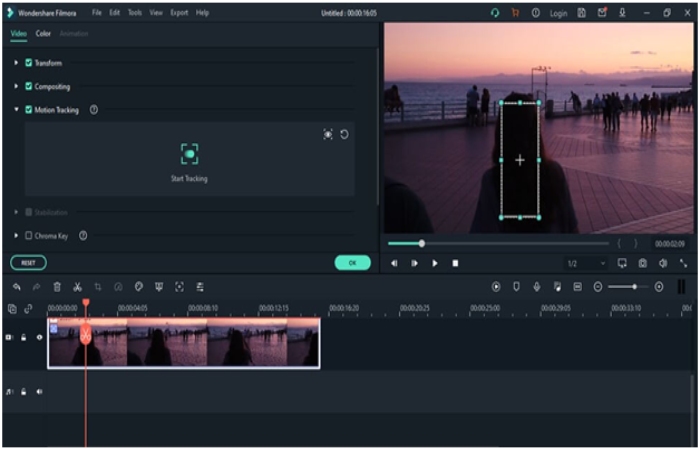
Motion tracking used to be exclusive to high-end software. Filmora makes it accessible with a single click. You can track a moving object (like a person or a car) and pin text, stickers, or effects to it. For example, you can have a “name tag” follow a person as they walk across the screen. It is intuitive and adds a professional dynamic to travel vlogs and tutorials.
2. Advanced Keyframing

Filmora allows you to animate clips using keyframes. You can adjust the position, rotation, scale, and opacity of a clip at specific points in time, and the software automatically smoothes the transition between them.
-
What it’s good for: Custom zoom effects, flying text, and creating unique transitions that aren’t available in the preset library.
3. Color Match & Correction
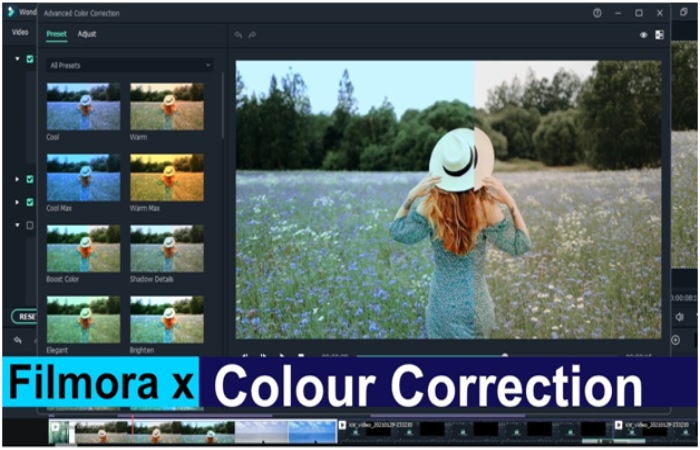
Color grading can be intimidating. Filmora solves this with Color Match. If you have footage from two different cameras (or different times of day), you can select a “reference” clip, and Filmora will automatically adjust the colors of the second clip to match the first. This ensures visual consistency across your entire video.
4. Audio Ducking
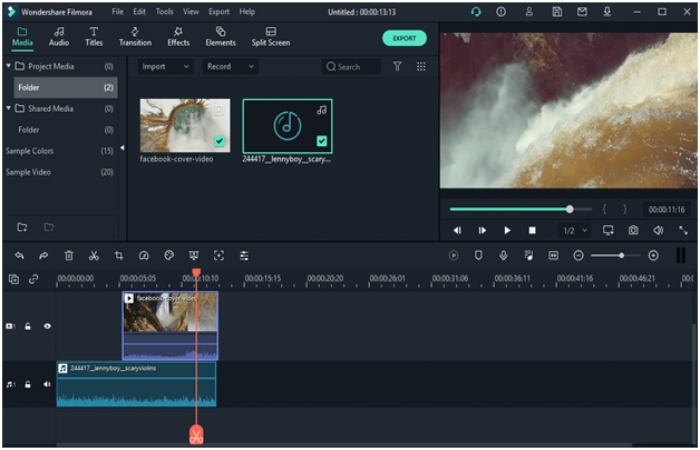
Sound design is half the battle in video editing. Filmora includes Audio Ducking, a feature that automatically lowers background music when a voiceover or dialogue is detected. This saves you from manually adjusting volume envelopes for every sentence spoken.
Part 3: System Requirements (2025 Update)
Filmora is known for being lightweight, but for smooth 1080p or 4K editing, you need decent hardware.
Windows:
-
OS: Windows 10 or Windows 11 (64-bit)
-
Processor: Intel i5 (6th Gen) or Ryzen 5 or newer
-
RAM: 8 GB (16 GB required for HD/4K videos)
-
Disk: SSD recommended for speed
Mac:
-
OS: macOS V10.15 or newer (Compatible with Apple M1/M2/M3 chips)
-
RAM: 8 GB (16 GB for HD/4K videos)
Should I Buy It?
If you are just starting your video editing career, then Filmora X is a perfect choice for you. The interface is pretty straightforward, and it is easy to learn. There are plenty of features using which you can enhance your creativity. Now you might be thinking if you should purchase this software or not.
Suppose you are new to video editing and want video editing software that can provide you with various functionalities. In that case, Filmora X is definitely a go-to choice. If you compare its price with its features, you will find that this software is definitely a value-for-money video editor. Everyone can easily learn this software by watching simple tutorials and start editing videos like a professional in just a few days.
Final Verdict: Should You Buy It?
If you are a YouTuber, social media influencer, or small business owner, Filmora is an excellent investment. It offers 80% of the power of professional software for 20% of the difficulty.
While it may lack the granular control of DaVinci Resolve or Adobe Premiere, it makes up for it in speed. You can edit a high-quality video in Filmora in half the time it takes in more complex tools.
Key Takeaways
-
User-Friendly: Filmora is designed for creators who want speed and simplicity without sacrificing quality.
-
Cost-Effective: It is significantly cheaper than Adobe Creative Cloud, with options for both annual subscriptions and lifetime licenses.
-
AI & Automation: Features like Audio Ducking, Color Match, and Motion Tracking automate tedious tasks.
-
Watermark: The free version offers all features but exports with a large watermark. You must pay to remove it.
-
Performance: It runs well on mid-range laptops, unlike heavier professional software.
Frequently Asked Questions (FAQs)
Q: Is Filmora X different from the current Filmora?
A: Yes. “Filmora X” was version 10 (released circa 2020). The software is updated annually. If you download it today, you will get the latest version (e.g., Filmora 13 or 14), which includes AI features not present in Filmora X.
Q: Is Filmora completely free?
A: No. Filmora is “Freemium.” You can edit freely, but you cannot export a clean video without paying. The free version stamps a large brand watermark over your content.
Q: Can I use Filmora for professional YouTube videos?
A: Absolutely. Many successful YouTubers use Filmora because it includes built-in effects, royalty-free music, and transitions that speed up the workflow.
Q: Which is better: Filmora or CapCut?
A: CapCut is better for quick, trendy TikTok/Reels editing on a phone. Filmora is better for longer-form content (YouTube, documentaries, corporate videos) on a desktop computer, offering more precision and better audio tools.