

In 2025, the “return to office” debate has settled into a permanent reality: Hybrid is the standard. However, as companies move from experimental policies to long-term operations, a new crisis has emerged—the “Ghost Office.”
Walking into a crowded office with no free desks—or conversely, paying for a half-empty floor—is both a productivity and budget killer. A Desk Booking System has evolved from a pandemic-era safety tool into a critical piece of the 2025 corporate tech stack, designed to bridge the gap between employee flexibility and real estate efficiency.
Table of Contents
What is a Desk Booking System? (2025 Definition)
A desk booking system is a workspace reservation platform that allows employees to book desks, meeting rooms, or workstations via web, mobile, or integrated calendar apps.
Unlike the basic “hot desking” of the past, modern 2025 platforms are high-intelligence tools featuring:
-
Interactive 3D Floor Plans: Visual maps showing live occupancy.
-
Auto-Release & Check-In: Using QR codes or sensors to release “ghosted” bookings after 15 minutes.
-
Presence Indicators: The ability to see where teammates are sitting to coordinate “team days.”
-
Deep Integrations: Native sync with MS Teams, Slack, Outlook, and HRIS systems (like Workday or HiBob).
Why Hybrid Teams Need a Booking System in 2025
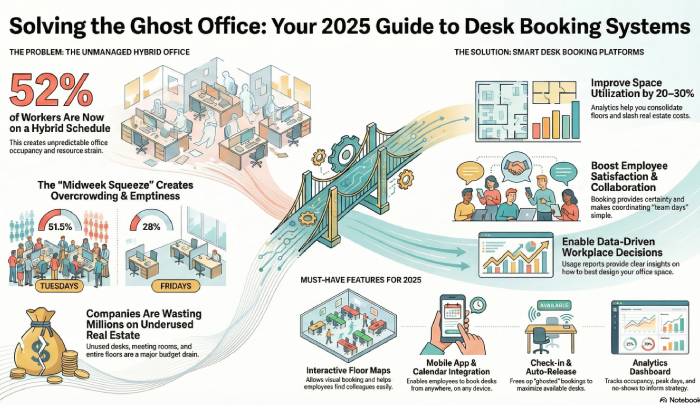
The numbers tell the story. According to Gallup’s August 2025 data, 52% of remote-capable workers now follow a hybrid schedule.
Furthermore, Robert Half’s Q3 2025 reports show that 24% of all new job postings are hybrid.
Without a system in place, companies face three major risks:
-
The “Midweek Squeeze”: Data from 2025 reveals that Tuesday occupancy often hits 51.5%, while Fridays languish at 28%. A booking tool prevents Tuesday overcrowding.
-
Wasted Real Estate Spend: Industry benchmarks show that organizations using desk booking improve space utilization by 20–30%, allowing them to consolidate floors or exit expensive leases.
-
Employee Friction: “Commute dread” is real. If an employee travels 45 minutes only to find no desk near their team, engagement drops. Booking systems provide certainty.
-
Desk sharing also allows employees to work together, enhancing collaboration between team members. Collectively, both outcomes boost productivity for employees.
Market snapshot and 2025 trends
The desk booking software market is no longer niche:
-
A 2025 industry analysis from 360iResearch on desk booking software market size estimates the market at around USD 165–166 million in 2025, up from about USD 153 million in 2024, with healthy growth projected through 2032.
-
Buyers are increasingly choosing tools that span desk, room, and resource booking rather than point solutions, often as part of a broader workplace experience or resource booking platform.
Key 2025 trends include:
-
AI‑assisted suggestions (e.g., “book near your project team on Tuesdays”).
-
Sensor integrations (occupancy sensors, badge data) to validate bookings vs. actual use.
-
All‑in‑one platforms that combine desk booking, visitor management, room scheduling, and sometimes parking or lockers.
Proven benefits backed by 2025 data
Desk booking systems deliver more than just reservations; they underpin hybrid‑work strategy. Synthesizing 2025 buyer guides, market analyses, and category reviews:
-
Better space utilization and real‑estate savings
-
Occupancy analytics and heat maps help companies safely increase desk‑sharing ratios and cut unused space, with many case‑studies citing 20–30% better space utilization after rollout.
-
-
Higher employee satisfaction and collaboration
-
Well‑designed desk booking also supports safety and comfort by preventing overcrowding and making it easier to enforce capacity or zoning rules when needed. When employees feel their workplace is safe and well managed, they are more likely to come in regularly and stay engaged, which is strongly linked to higher productivity and business performance, as shown in Gallup’s research on employee engagement and growth.
-
-
Reduced no‑shows and seat conflicts
-
Check‑in workflows, QR codes, and auto‑release features significantly limit desks being “held” but unused, increasing the number of usable seats each day.
-
-
Data‑driven workplace decisions
-
Usage reports make it easier to decide which floors to close, which areas to turn into collaboration zones, and what days need extra seating—supporting more confident CRE and HR decisions.
-
-
Seamless daily experience via integrations
-
Tight integration with Microsoft 365, Google Workspace, and collaboration tools is now table‑stakes for adoption; platforms with poor integrations tend to see lower long‑term usage.
-
Impact depends on adoption and change management, but high‑rated tools consistently score in the high 8s to 9+ range on “ease of use” on software review platforms.
Must‑have features for 2025 (hybrid‑focused)
When shortlisting tools, prioritize capabilities that directly support hybrid work patterns:
-
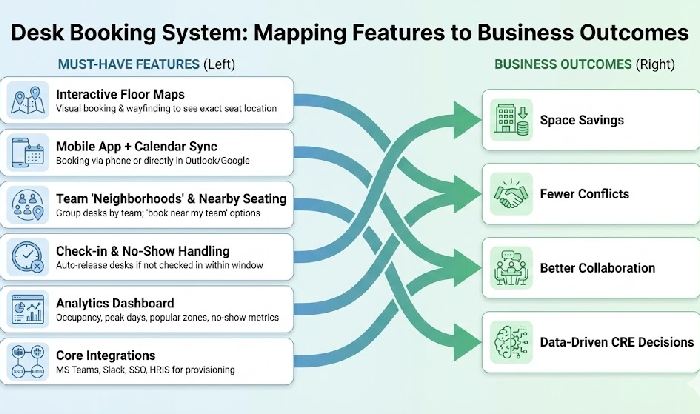
Interactive floor maps – Visual booking and wayfinding so people can see exactly where they’ll sit.
-
Mobile app + calendar sync – Booking from phone or directly in Outlook/Google.
-
Team “neighborhoods” and nearby seating – Group desks by team/department and allow “book near my team” options.
-
Check‑in and no‑show handling – Auto‑release desks if not checked in within a window.
-
Analytics dashboard – Occupancy, peak days, popular zones, and no‑show metrics.
-
Core integrations – Microsoft Teams, Slack, SSO, HRIS/IDP for user provisioning.
Nice‑to‑have trends: AI suggestions (“book your usual spot Tuesdays”), sensor support, simple visitor/meeting room add‑ons, and basic parking or resource booking in the same interface.
Top desk booking systems compared (2025 snapshot)
Data from G2, Capterra, and independent 2025 roundups show a cluster of frequently recommended tools; here is a simplified comparison, not an exhaustive list.
| Tool | Typical G2 Ease of Use (2025) | Notable strengths | Best for |
|---|---|---|---|
| Archie | ~9.6 / 10 | Very intuitive maps, strong Microsoft 365 & Slack/Teams integration, flexible neighborhoods | Growing hybrid teams wanting UX first |
| OfficeSpace | ~9+ / 10 | Mature space planning and analytics, robust floor‑plan tools | Mid‑size and larger offices |
| Robin | High 8s–9s | Flexible workflows, strong meeting room + desk combo, enterprise controls | Mid‑market to enterprise |
| Envoy | High 8s–9s | Hot desking plus visitor management and workplace experience features | Flexible, visitor‑heavy workplaces |
| Kadence | High 8s–9s | Simple UI, good focus on hybrid “team days” and presence coordination | Productivity‑focused hybrid teams |
| deskbird | High 8s–9s | EU‑friendly (GDPR), fast rollout, strong mobile experience | European and privacy‑sensitive orgs |
A 2025 G2 desk booking category overview shows Archie leading ease‑of‑use scores while competitors like OfficeSpace, Robin, Envoy, Kadence, and deskbird perform strongly on features, integrations, and scalability.
Future-Proofing Your Office: Beyond Simple Reservations
While basic desk booking is the foundation, the leading platforms in 2025 offer strategic capabilities that solve deeper operational challenges. To maximize your ROI, look for these three emerging features that separate standard tools from enterprise-grade solutions:
1. The ESG & Sustainability Link
Leading systems now support ESG reporting. By tracking which floors are underutilized on Fridays, facilities managers can shut down HVAC and lighting in those zones, directly supporting carbon reduction goals and LEED/BREEAM certifications.
2. Solving the “Ghost Meeting” Problem
Current data shows that 34% of meeting room use is actually a single person taking a video call. Advanced 2025 systems prompt users to book a “Focus Booth” instead of a 10-person boardroom, preserving collaborative space.
3. Inclusion and DEI Features
Modern maps now allow employees to filter for ADA-accessible desks, “Quiet Zones” for neurodivergent workers, or desks with specific ergonomic equipment (e.g., standing desks or dual monitors).
Step‑by‑step framework to choose the right system
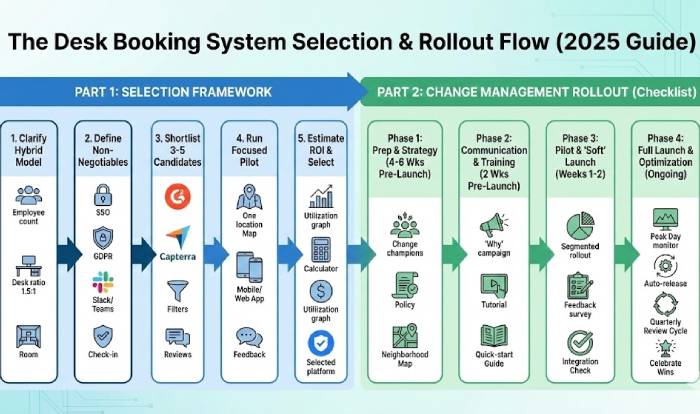
Instead of jumping straight into demos, run through this selection path:
-
Clarify your hybrid model and numbers
-
How many employees, desks, and locations?
-
Target desk‑sharing ratio (e.g., 1.5:1, 2:1)?
-
Are you mainly desk‑only, or do you also need rooms, parking, and visitors?
-
-
Define non‑negotiable requirements
-
SSO, data residency, privacy needs.
-
Required integrations (Microsoft 365, Google, Slack, HRIS).
-
Must‑have features (team neighborhoods, check‑in, analytics depth).
-
-
Shortlist 3–5 candidates
-
Use G2 and Capterra filters for company size, region, and key features.
-
Check recent reviews for comments on performance, support, and update cadence.
-
-
Run a focused pilot
-
Start with one or two locations and a mix of teams.
-
Measure adoption: are people using web, mobile, calendar, or all three?
-
Collect qualitative feedback on maps, speed, and friction points.
-
-
Estimate ROI with real data
-
Compare pre‑ vs post‑utilization and no‑show rates.
-
Model scenarios: closing a floor, consolidating space, or repurposing low‑use areas.
-
-
Roll out with change management
-
Communicate clear booking and no‑show policies.
-
Train “champions” in each team.
-
Use analytics to refine policies (e.g., shorter hold windows, better team neighborhoods).
-
Change Management Checklist: Rolling Out Your Desk Booking System
Phase 1: Preparation & Strategy (4–6 weeks pre‑launch)
-
Identify change champions from key departments to act as early adopters and internal experts.
-
Define booking rules (same‑day limits, a 15–30 minute check‑in window) to prevent “ghost desks.”
-
Set a realistic desk‑sharing ratio (e.g., 1.5 employees per desk) based on current hybrid patterns.
-
Map team “neighborhoods” with department heads so collaborative groups can sit together.
Phase 2: Communication & Training (2 weeks pre‑launch)
-
Explain “the why”: more certainty, better collaboration, and smarter use of space—not surveillance.
-
Announce the rollout via Slack/Teams, email, and all‑hands to reach everyone.
-
Run short, 15‑minute drop‑in demos focused on mobile booking and floor‑map navigation.
-
Publish a one‑page quick‑start (SSO login, app links, calendar sync steps).
Phase 3: Pilot & Soft Launch (weeks 1–2)
-
Start with one floor or department to surface friction before full rollout.
-
Collect quick feedback on mobile ease of use and map accuracy.
-
Verify that Teams/Slack notifications and Outlook/Google sync work reliably.
Phase 4: Full Launch & Optimization (ongoing)
-
Monitor peak days (often Tuesday–Thursday) and adjust booking limits or zones when areas are overcrowded.
-
Turn on auto‑release for no‑shows once people are used to check‑ins.
-
Review analytics quarterly to spot consolidation opportunities or to create new “focus” or collaboration zones.
-
Share simple wins with the company (e.g., utilization gains, fewer conflicts, better team coordination).
Pitfalls to avoid and ROI tips
Common pitfalls:
-
Choosing a feature‑heavy but clunky tool – If it’s not easy for employees to book via phone or calendar, adoption will stall, no matter how powerful the admin features are.
-
Ignoring change management – Launching without explaining why and how to use it leads to low usage and complaints about “extra steps.”
-
Not tuning policies – Overly long reservation holds or no check‑in rules recreate the “ghost desk” problem you’re trying to solve.
To maximize ROI:
-
Start with simplest possible rules (e.g., same‑day bookings allowed, 15–30 minute check‑in window).
-
Use utilization reports quarterly to adjust desk ratios and floor plans.
-
Combine desk booking data with HR and badge/sensor data where possible to validate patterns before making big real‑estate moves.
Frequently asked questions
-
What is it?
Software to reserve desks with maps, check-ins, and calendar sync.
-
Main benefits?
Better space use, fewer seat conflicts, and data for real-estate decisions.
-
Is there a single “best” tool?
No. Archie leads in UX, while OfficeSpace and Robin excel in enterprise features and meeting room combos.
Bottom line
n 2025’s hybrid world, a desk booking system is becoming a baseline requirement for organizations that want to cut wasted office spend while keeping employees confident about where they’ll sit on in‑office days. The market is growing, with research from 360iResearch on desk booking software pointing to steady expansion as more companies formalize hybrid policies. At the same time, software review platforms such as the G2 desk booking category give clear signals about which tools users find easiest to adopt in real offices.
For hybrid teams, the winning move is to pick a platform that fits your tech stack and culture, pilot it thoughtfully, and use the data it generates to keep refining how, when, and where people work together.