
A laptop graphics card, also called a GPU (Graphics Processing Unit), is the specialized processor responsible for laptop graphics cards performance when rendering images, videos, and 3D graphics on your laptop’s display.
It handles the heavy visual and parallel computing tasks that a regular processor can’t do as efficiently, making it crucial for gaming, creative workloads, video playback, and even AI-accelerated applications. Laptop GPUs may be integrated into the CPU (sharing system memory and power) or dedicated (with their own memory and power delivery for higher performance).
When most people shop for a new laptop, they gravitate toward familiar graphics card names: RTX 4060, RTX 4070, Radeon RX 6600M, and so on.
But here’s the hard truth: just seeing a “4070” label isn’t enough to guarantee a certain level of performance. In laptops especially, the same GPU name can hide very different real-world performance results — sometimes even between two laptops sitting next to each other on the same shelf.
This article explains why that happens, what really drives graphics performance in laptops, and how you can use that knowledge to make smarter buying decisions.
Table of Contents
Key Takeaways
-
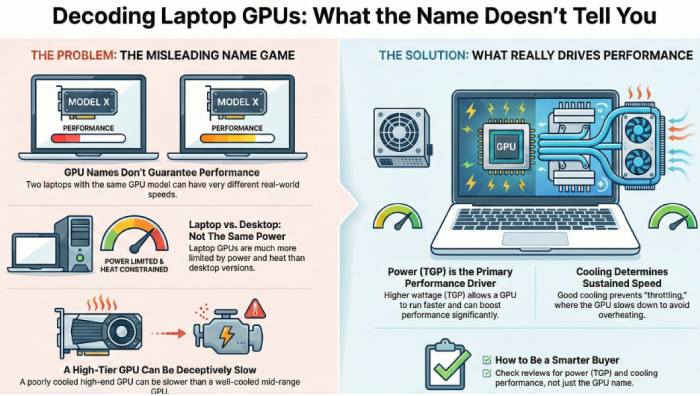
Laptop graphics card names do not guarantee performance. Two laptops with the same GPU model can deliver very different real-world results.
-
TGP (power limits) is a primary performance driver. Higher-wattage GPU configurations can outperform lower-wattage versions of higher-tier GPUs.
-
Cooling design determines sustained performance. Thin or poorly cooled laptops may throttle under load, reducing frame rates and rendering speed over time.
-
Chassis design creates unavoidable trade-offs. Portability, noise, battery life, and peak GPU performance cannot all be maximized at once.
-
Laptop and desktop GPUs with the same name are not equivalent. Laptop GPUs operate under far stricter power and thermal limits.
-
A well-cooled mid-tier GPU can beat a throttled high-tier GPU. Real-world performance stability matters more than peak benchmark numbers.
-
Specs must be read in context. GPU name, TGP range, cooling system, and real-world reviews together determine actual performance.
-
Smarter buying starts with workload clarity. Choosing the right GPU begins with understanding your gaming, creative, or professional needs—not chasing model numbers.
The Myth of the “Same” Laptop GPU
It’s tempting to think that an RTX 4060 in one laptop will perform roughly the same as an RTX 4060 in another. In desktops, where power and cooling are relatively standardized, this assumption comes close to reality. Laptop GPUs, however, live in a very different world.
Even when two laptops carry the same nominal GPU, the way that GPU is configured for power and cooling can create large performance disparities in gaming, rendering, or creative applications.
That’s because in laptops:
-
GPU power limits vary widely
-
Cooling capacity varies by design
-
Chassis size dictates thermal behavior
-
OEM tuning often caps performance for efficiency
Understanding these variables is the key to decoding real performance.
TGP, Cooling, and Chassis: The Real Performance Trifecta
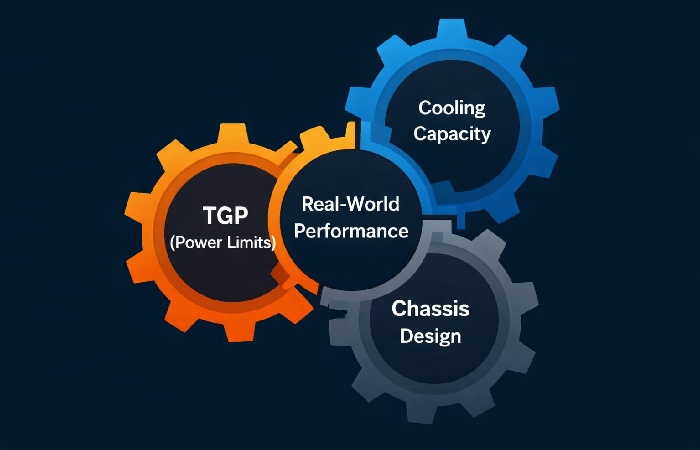
1. Power Limits (TGP) — The Hard Ceiling on Performance
Total Graphics Power (TGP) is the maximum amount of power a laptop GPU is allowed to draw, measured in watts, and directly affects achievable clocks and sustained performance, as Microsoft’s own GPU power management guidance highlights.
🏎️ Higher TGP ⇒ Higher possible clock speeds and sustained performance
⚡ Lower TGP ⇒ Lower clocks and often earlier throttling
Laptop GPU power limits can vary dramatically even for the same nominal model. For example, an RTX 4060 might be configured around 80–115 W in many gaming laptops (with some designs going even lower or higher), depending on the laptop’s design.
Because higher TGP lets a GPU sustain higher clock speeds and better performance, two laptops with the same “4060” name but different TGPs will not perform the same.
In practice, higher‑wattage GPUs generally outperform lower‑wattage variants — for example, a well‑cooled 115 W RTX 3060 can outpace a heavily power‑limited higher‑numbered GPU simply because it is allowed to draw more power.
Why this matters:
A higher TGP allows the GPU to actually use its potential rather than being throttled early, while a lower TGP variant gets pushed into performance limitations almost immediately under sustained load.
2. Cooling Determines Sustained Performance
Power is only half the story — how well a laptop dissipates that power as heat is the other.
Imagine two laptops with the same GPU and the same TGP setting. If one uses a robust cooling system (thick heat pipes, larger fans), it might sustain its high power draw and clock speeds for long gaming sessions. Meanwhile, a thinner, more portable design may heat up faster, triggering thermal throttling that drags performance down.
This is why two machines with the “same GPU” and similar TGP numbers can still deliver different real-world benchmarks and frame rates — one can keep its clocks high longer, while the other has to slow down to stay safe.
Bottom line: Power plus cooling equals performance, and you can’t have one without considering the other.
3. Chassis Design and Priorities
The physical design, weight, and size of a laptop influence cooling capability:
-
Ultrathin laptops often prioritize portability and battery life; as a result, they usually run GPUs at lower sustained clocks.
-
Thicker gaming laptops have room for more advanced cooling, allowing GPUs to maintain higher sustained performance.
This is why some models with “boosted” GPU specs on paper still underperform in extended gaming sessions — they reach a thermal limit quickly and reduce clock speeds mid-game to stay cool.
Practical takeaway: Never judge a laptop GPU purely by name — always consider chassis and cooling design when comparing performance.
Laptop vs Desktop GPUs: The Branding Trap
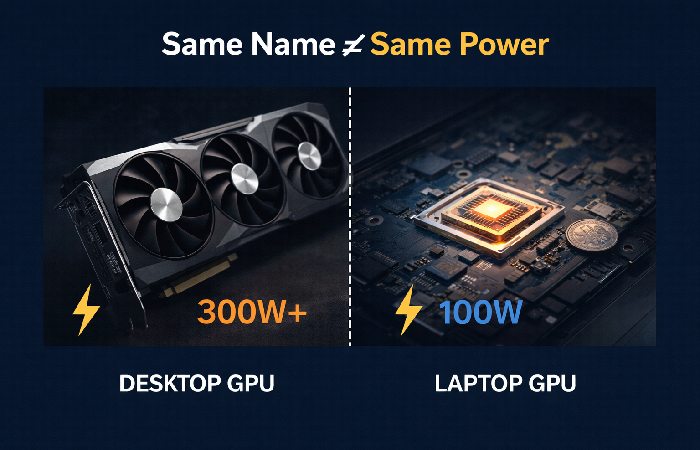
Another source of confusion is how laptop GPUs compare to desktop parts.
A laptop RTX 4060 is not the same as a desktop RTX 4060. Laptop variants have much lower TGP limits, meaning they run slower even when configured optimally.
For example, desktop GPUs often operate at significantly higher power levels — sometimes up to roughly double typical laptop GPU power budgets — which translates to noticeably better performance in many scenarios.
This branding gap means you cannot directly compare two GPUs with the same name across laptop and desktop platforms — and doing so will almost always lead to incorrect expectations.
RTX 4060 vs 4070 Laptop GPU Performance (2026 Snapshot)
To make all of this more concrete, here’s how laptop graphics cards performance can shift between two popular 2026 GPUs.
| GPU (laptop) | Typical TGP range (W) | FPS gain in modern games | When it makes sense |
|---|---|---|---|
| RTX 4060 | ~45–140 W | Baseline 1080p/1440p at high settings in most AAA | Great for value-focused 1080p or 1440p gaming in mid-thick laptops |
| RTX 4070 | ~80–175 W | Roughly 10–25% higher FPS than RTX 4060 | Worth it for high-refresh 1440p or if you want extra headroom |
The key point is that a high‑watt RTX 4060 in a well‑cooled chassis can get surprisingly close to, or occasionally beat, a low‑watt RTX 4070 in a thin‑and‑light laptop, especially in longer gaming sessions where thermal throttling kicks in.
How to Read Specs Like a Pro
When you’re comparing laptops, here’s what really matters beyond model names:
1. Check the TGP Figures
If available, look at the TGP range or listed power limit. A higher number usually means more thermal headroom and better sustained performance.
If a vendor doesn’t list the TGP, rely on independent reviews or follow practical guides that show you exactly how to check GPU power limits on a laptop using monitoring tools instead of marketing copy.
2. Examine Cooling Design
Look for indicators of a strong thermal solution — more heat pipes, better airflow design, and even mention of vapor chambers can signal a laptop that keeps up its performance longer under load.
3. Benchmark Readings
Short burst tests can be misleading. Look for longer gaming or real-world workloads in reviews to see if the GPU maintains performance — or throttles.
4. Chassis Considerations
Heavier gaming laptops tend to perform more consistently at higher GPU power because they can provide better cooling. Ultraportables may sacrifice a bit of that performance for lighter weight and smaller footprint.
When a Lower Tier GPU Can Outperform a Higher One
Here’s a counterintuitive truth:
✔ A well-cooled mid-tier GPU with a high TGP can outperform a poorly cooled higher-tier GPU with a lower TGP.
That’s because the mid-tier GPU can sustain its performance and avoid throttling, while the supposedly more powerful GPU never gets to show its full capabilities due to power or thermal constraints.
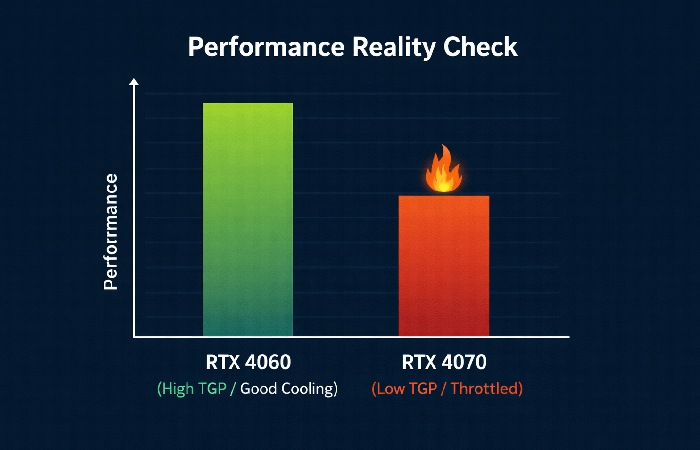
This effect is especially noticeable when comparing gaming results for laptops that emphasize thin design versus ones built for raw performance.
Decision Framework for Smart Buyers
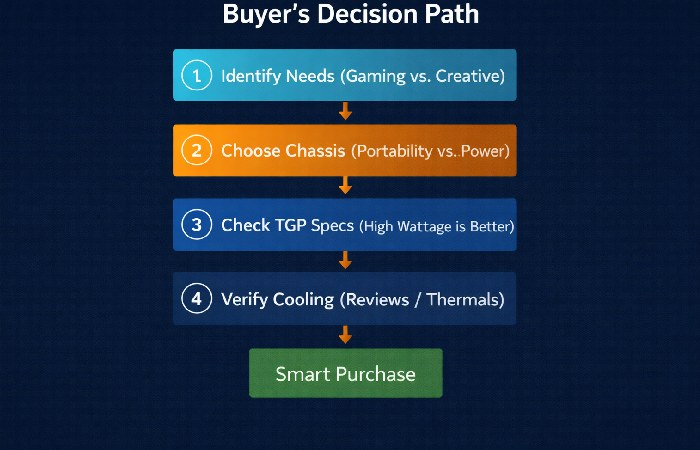
Here’s a step-by-step checklist to make informed GPU-based laptop choices:
-
Define your real needs: Are you targeting high-end AAA gaming, esports titles, creative workloads, or casual graphics tasks?
-
Pick a chassis class first: Decide if portability or maximum performance is more important — that decision shapes your GPU choices.
-
Review TGP and cooling: Look at specs and trusted reviews to assess how much power the GPU can actually use and how well the laptop manages heat.
-
Compare real benchmarks: Don’t rely solely on model names — check actual performance tests across workloads similar to your use case.
In 2026, that often means shortlisting one or two RTX 4060 and RTX 4070 laptops in your budget, then comparing their TGP limits, cooling design, and real‑world benchmarks instead of assuming the 4070 model is always faster.
Conclusion
Laptop graphics cards are far more complex in practice than their names suggest. Two laptops with the “same GPU” can perform very differently because of power limits (TGP), cooling solutions, and chassis constraints. Understanding these variables gives you a clear edge when comparing machines and ensures you choose a laptop that genuinely delivers the performance you expect.
Instead of focusing only on model names, focus on how that GPU is implemented — that’s where real performance lives.
Frequently Asked Questions
Here are some of the most common questions people ask when shopping for or learning about laptop GPUs, explained simply and practically:
1. What’s the difference between integrated and dedicated laptop graphics?
Integrated GPUs are built into the processor and share system memory, making them power‑efficient and suitable for everyday tasks like browsing, video playback, and light gaming, which aligns with recent breakdowns comparing integrated vs dedicated GPUs.
Dedicated GPUs have their own memory and processing hardware, making them much stronger for gaming and 3D or creative workloads, but they draw more power and generate more heat, so they are usually found in thicker laptops with shorter battery life.
2. Does a laptop with the same GPU name always perform the same as others?
No. Laptop GPUs often come in different power configurations (TGP) depending on the laptop’s chassis, cooling system, and OEM tuning. A “RTX 4060” in one laptop might be configured with a higher power budget than in another, leading to significantly different real-world performance even though the model name is identical.
3. Why do laptop GPUs run slower than desktop GPUs with the same model name?
Laptop GPU variants are designed for lower power and heat limits because of space and battery constraints. Even if the name matches a desktop GPU (e.g., RTX 4070), the laptop version typically runs at lower power, resulting in lower performance when compared to the desktop equivalent.
4. Can modern integrated graphics handle gaming?
Yes — modern integrated graphics solutions have improved significantly and can handle esports titles (like Valorant or Rocket League) at modest settings and resolutions. However, they usually cannot match the performance of dedicated GPUs for AAA games or demanding creative workloads.
5. What specs are most important when comparing laptop GPUs?
Beyond model names, pay attention to:
-
TGP (Total Graphics Power) — higher values usually allow better sustained performance.
-
Cooling design — effective heat dissipation keeps GPUs from throttling.
-
Memory type and size (VRAM) — more VRAM benefits high-resolution gaming and creative apps.
-
Real-world benchmarks — look for sustained performance results, not just peak FPS numbers.
6. Should I prioritise GPU or CPU for gaming laptops?
For gaming performance, the GPU typically has the greatest impact because it directly handles graphics rendering. However, a balanced system also requires a capable CPU to avoid bottlenecks, especially in CPU-intensive scenarios or open-world titles.
7. Are higher-end laptop GPUs worth the price?
That depends on your needs. If you want high-resolution gaming, ray tracing, or workflows like 3D rendering and video editing, investing in a higher-tier GPU with a robust chassis and cooling makes sense. But for casual gaming or productivity, mid-range GPUs often provide excellent value.
8. Do laptop GPUs affect battery life a lot?
Yes. Running a laptop GPU (especially dedicated ones) at high performance consumes more power and reduces battery life compared to integrated graphics. Many laptops implement GPU switching that toggles between integrated and discrete GPUs to save energy when full performance isn’t needed.
If you’d like, I can also add visual tables illustrating typical TGP ranges, GPU tiers by use-case, and VRAM recommendations by workload to make the article even more actionable. Just let me know!
Disclosure
This content is based on technical information and insights from reputable hardware and technology sources, and was prepared with the help of AI tools to organize and simplify complex concepts. Performance will vary between laptop configurations due to factors like firmware, power limits, software, and cooling, so any performance examples here should be treated as indicative, not guaranteed.
About Technologyford
Technologyford publishes practical, easy‑to‑understand content across health, technology, business, marketing, and lifestyle. The site relies primarily on reputable, publicly available sources, using AI tools only to assist with research, organisation, and clearer explanations. That way, every article stays focused on real‑world usefulness instead of jargon or unnecessary complexity.