
Most people have heard of a VPN. Far fewer understand what one actually does—or doesn’t do.
VPN marketing is aggressive and often misleading. Phrases like “military-grade encryption” and “complete anonymity” get thrown around freely, leaving everyday users unsure whether they need one at all—or which of the hundreds of providers to trust.
This guide has VPN explained properly: what it is, how the encryption tunnel works under the hood, which protocol is right for which situation, the real limitations no provider advertises, and an honest framework for deciding whether you need one in 2026.
No sales pitch. Just clarity.
Table of Contents
Key Takeaways
- What is a VPN? → An encrypted tunnel between your device and a remote server that masks your IP address and secures your traffic in transit.
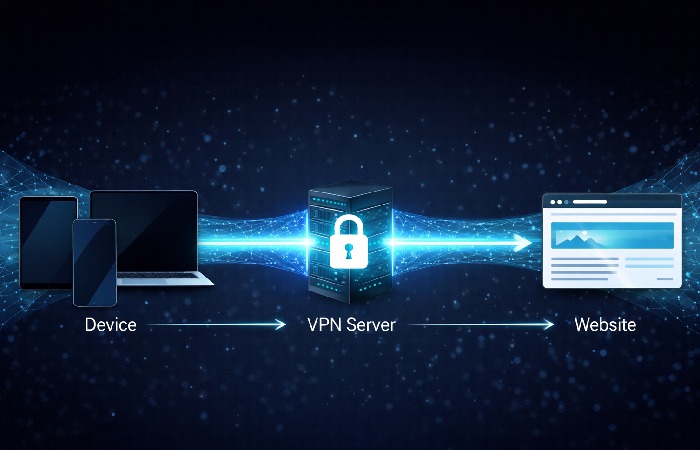
- How does it work? → Your data is encrypted on your device, routed through a VPN server, then forwarded to its destination. Websites see the server’s IP—not yours.
- Who genuinely needs one? → Remote workers, frequent public Wi-Fi users, and privacy-conscious individuals. Most home-only users have limited need.
- Global scale in 2026? → 1.5 billion users worldwide; global VPN market valued at ~$54 billion, growing at 15–17% annually.
- Critical limitation? → A VPN shifts trust from your ISP to your VPN provider. It does not prevent malware, phishing, or tracking by logged-in accounts.
What Is a VPN? The Plain-Language Definition
A Virtual Private Network (VPN) is a secure, encrypted connection between your device and a remote server operated by a VPN provider. It routes your internet traffic through that server before it reaches its destination—masking your real IP address and encrypting data in transit so it cannot be read by anyone between you and the server.
According to the NIST-standardized definition of a Virtual Private Network, a VPN is “a virtual network built on top of existing physical networks that can provide a secure communications mechanism for data and IP information transmitted between networks.”
In everyday terms: your device speaks privately to the VPN server. The wider internet sees only the server—not you. What you’re doing and where you’re doing it from becomes your business, not your ISP’s.
How a VPN Works: The 3-Step Mechanism
Step 1: Encryption at the Device Level
Before your data leaves your device, the VPN client software encrypts it using a cipher. Most modern VPNs use AES-256 (Advanced Encryption Standard, 256-bit key)—the same standard used by governments and financial institutions globally.
Even if someone intercepts your traffic on a coffee shop’s open Wi-Fi, what they capture is computationally unreadable ciphertext—not your browsing session.
Step 2: The Encrypted Tunnel
Encrypted data travels through a dedicated “tunnel” between your device and the VPN server. Different protocols build this tunnel differently (more on that below). The critical result: your Internet Service Provider (ISP) can see that you’re connected to a VPN server—but cannot see which sites you’re visiting or what you’re transmitting.
As documented in Cloudflare’s technical breakdown of VPN tunneling protocols, VPNs operate at Layer 3 of the OSI model, encapsulating and encrypting IP packets before they traverse the public internet.
Step 3: Exit, IP Masking, and Destination
Your data exits the VPN server and continues to its destination. The receiving website sees the VPN server’s IP address—not yours. This is the mechanism behind both privacy (hiding your real location) and geo-unblocking (appearing to browse from a different country).
VPN Protocols Compared: WireGuard vs OpenVPN vs IKEv2
Most “VPN explained” guides skip this entirely. But the protocol your VPN uses determines speed, security, and compatibility. Here’s a practical 2026 comparison.
| Protocol | Speed | Security Level | Best Use Case | Platform Support |
|---|---|---|---|---|
| WireGuard | Very Fast | Excellent (modern cryptography) | Everyday use, mobile, streaming | All major platforms |
| OpenVPN | Moderate | Excellent (battle-tested, 20+ years) | Corporate networks, high-security needs | All major platforms |
| IKEv2/IPSec | Fast | Excellent | Mobile devices, frequent network switching | iOS, Android, Windows |
| L2TP/IPSec | Moderate | Good (dated) | Legacy systems only | Most platforms |
| PPTP | Fast | Weak — avoid entirely | Not recommended | Legacy only |
The 2026 recommendation: Use WireGuard where available. It’s faster, has a far smaller and more auditable codebase than OpenVPN, and uses elliptic-curve cryptography that’s better positioned against emerging computational threats. If your provider doesn’t support WireGuard, OpenVPN remains the trusted fallback.
Why People Use VPNs: 5 Real-World Use Cases
1. Securing Public Wi-Fi Connections
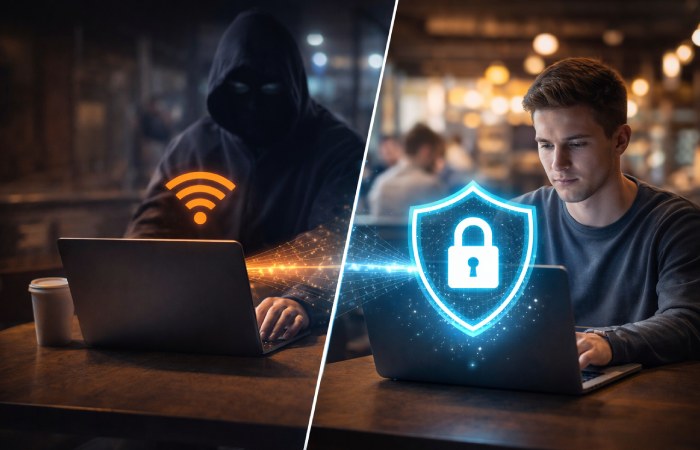
Open Wi-Fi at airports, cafés, and hotels is inherently untrusted. An attacker on the same network can execute a man-in-the-middle attack—intercepting traffic between your device and the router.
A VPN encrypts traffic before it even leaves your device. Interception becomes useless. This is the single most concrete, practical reason to have a personal VPN subscription.
2. Remote Work and Corporate Network Access
Enterprise VPNs let employees securely connect to internal systems—file servers, intranets, internal apps—as if physically in the office. But here’s the distinction that matters: this is a fundamentally different technology from consumer VPNs. Corporate deployments prioritise access control and auditability. Not anonymity.
3. ISP Privacy and Data Collection
In many jurisdictions, ISPs are legally permitted to log and monetise your browsing history. A VPN prevents your ISP from seeing the content of your traffic. The trade-off: that visibility shifts to your VPN provider instead. The question is which entity you trust more—and whether your provider has a verified, independently audited no-logs policy.
4. Geo-Unblocking Content
By routing traffic through a server in another country, a VPN makes you appear to browse from that location. This unlocks region-locked streaming libraries and bypasses geographic content restrictions. Worth noting: this may violate the Terms of Service of some platforms.
5. Preventing ISP Bandwidth Throttling
Some ISPs deliberately slow down specific traffic types—streaming, gaming, P2P. Since a VPN hides your traffic content, it removes the ISP’s ability to throttle by protocol. Your overall speed may still be affected by the VPN itself, but the throttling bottleneck is gone.
What a VPN Cannot Do: The Honest Limitations
This is the section most VPN providers would prefer you skip.
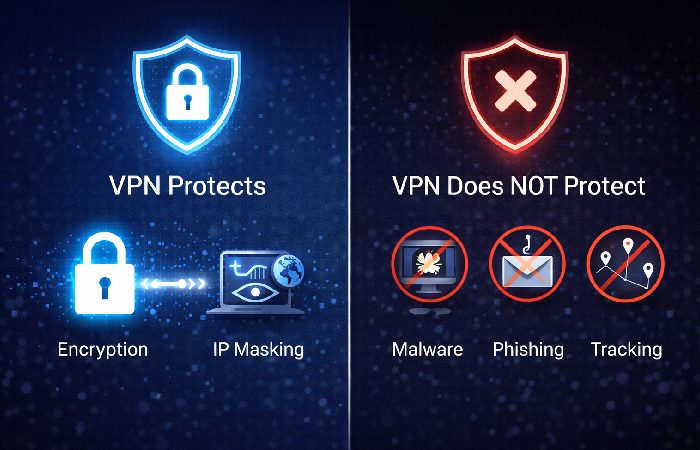
A VPN does not make you anonymous. It shifts visibility from your ISP to your VPN provider. As the FTC’s consumer guidance on VPN privacy claims makes clear, many consumer VPN products do not deliver the privacy protections they advertise—with significant gaps between marketing claims and actual data handling practices.
A VPN does not stop malware or phishing. Clicking a malicious link happens at the application layer. VPN encryption operates at the network layer. It has no visibility into what files you open or what credentials you enter on fake websites.
A VPN does not defeat browser-level tracking. If you’re logged into Google, Facebook, or any platform, your activity is attributed to your account regardless of your IP address. Cookies, browser fingerprinting, and login sessions identify you independently of IP masking.
Free VPNs typically cost your data, not money. Many free VPN apps monetise by logging and selling user data—exactly what a VPN is supposed to prevent. Some have been documented injecting ads, reselling bandwidth, and logging traffic. Avoid them categorically.
A VPN adds latency. Encryption and routing through an additional server are not free operations. WireGuard minimises the overhead (typically 5–15% speed reduction on fast connections), but no VPN is faster than no VPN.
Five Eyes, Nine Eyes, Fourteen Eyes: Why Jurisdiction Matters
Here’s a dimension almost entirely absent from basic VPN guides—and one of the most important for anyone serious about privacy.
VPN providers are subject to the laws of their home country. The Five Eyes alliance (US, UK, Canada, Australia, New Zealand) involves mutual intelligence-sharing agreements. A VPN headquartered in the US can be compelled to hand over data under legal process, which may then be shared with other alliance members.
| Alliance | Member Countries | Privacy Risk Level |
|---|---|---|
| Five Eyes | US, UK, Canada, Australia, New Zealand | Highest — mutual surveillance sharing |
| Nine Eyes | Five Eyes + France, Denmark, Netherlands, Norway | High |
| Fourteen Eyes | Nine Eyes + Germany, Belgium, Italy, Sweden, Spain | Elevated |
| Outside Alliances | Switzerland, Panama, Iceland, BVI | Lower — stronger domestic privacy laws |
Practical implication: For maximum legal privacy protection, choose a VPN headquartered outside the Five Eyes framework—Switzerland (Proton VPN), Panama (NordVPN), or the British Virgin Islands (ExpressVPN). This isn’t paranoia. It’s understanding the legal environment your data operates in.
The Post-Quantum VPN Consideration (2026 and Beyond)
Here’s the angle most VPN articles in 2026 still haven’t caught up to.
Current VPN encryption—AES-256 for the tunnel itself, RSA or ECDH for key exchange—is secure against classical computers. But sufficiently powerful quantum computers could theoretically break the asymmetric key exchange that establishes the tunnel. This is the “harvest now, decrypt later” scenario: adversaries intercept and store encrypted VPN traffic today, planning to decrypt it once quantum capability matures.
What this means practically right now:
- For most users: no immediate action required. Quantum computers capable of breaking current asymmetric encryption are still years from practical deployment.
- For high-value targets—government, legal, financial, journalism contexts: awareness of post-quantum cryptography (PQC) is increasingly relevant. NIST finalised its first post-quantum cryptography standards in 2024.
- For VPN selection: WireGuard’s modern cryptographic primitives are better positioned for future post-quantum transitions than legacy OpenVPN configurations.
This won’t affect your Netflix streaming decisions. But if you’re evaluating VPNs for sensitive professional use, it’s worth knowing where the technology is heading.
How to Choose a VPN: A 4-Question Decision Framework
Before subscribing to anything, answer these four questions.
1. What is your primary use case?
- Public Wi-Fi security → Any reputable paid provider with WireGuard support
- Streaming and geo-unblocking → Providers with a proven, consistent track record of bypassing geo-restrictions
- Maximum legal privacy → Providers outside the Five Eyes, with independently audited no-logs policies
- Corporate network access → Your employer’s IT policy determines this; a consumer VPN is not a substitute
2. Has the no-logs policy been independently verified? Marketing claims are cheap. Third-party security audits by firms like Cure53 or KPMG are meaningful. Look for published audit reports—not policy PDFs written by the VPN company’s own lawyers.
3. Which jurisdiction is the provider based in? For privacy-conscious users, jurisdiction is a genuine differentiator. The Five Eyes table above is a practical guide.
4. Does it support WireGuard? If a provider doesn’t support WireGuard in 2026, ask why. There are legitimate reasons (some enterprise deployments prefer OpenVPN’s proven track record), but for consumer use it should be a yellow flag.
Common Mistakes to Avoid
Trusting “military-grade encryption” copy AES-256 is used across banking, healthcare, and consumer software worldwide. The phrase is marketing, not a technical differentiator. Every reputable VPN uses it—so does your bank.
Activating a VPN only when you remember The highest-risk moments—public Wi-Fi, hotel networks, airport lounges—are exactly when people forget to turn it on. Enable auto-connect on untrusted networks in your VPN app settings.
Disabling the kill switch A kill switch cuts your internet connection if the VPN drops unexpectedly, preventing your real IP from leaking during the reconnect window. Many users disable it to avoid brief disconnections. If privacy is your goal, leave the kill switch on.
Using one tool for all use cases A consumer VPN optimised for streaming is not the right tool for corporate remote access. And neither is sufficient for high-anonymity use cases without additional privacy layers.
Assuming HTTPS makes a VPN redundant on public Wi-Fi HTTPS encrypts the content of your traffic, but not the metadata—which domains you’re visiting, how long you spend on each, traffic patterns. A VPN encrypts all of that too. On untrusted networks, both matter.
Who Should Use a VPN — And Who Probably Doesn’t Need One
Best for:
- Remote workers accessing corporate systems over home or public networks
- Frequent travellers using hotel, airport, and café Wi-Fi regularly
- Privacy-conscious individuals who don’t want their ISP profiling browsing habits
- Streamers and cord-cutters accessing region-locked content
- Journalists, researchers, and activists operating in high-surveillance environments
Probably unnecessary if:
- You only browse at home on a trusted connection and have no specific privacy concern
- Your primary concern is malware or account compromise — a VPN addresses neither
- You expect to browse anonymously while logged into personal accounts — your login defeats the anonymity independently of your IP
Final Verdict: Is a VPN Worth It in 2026?
With 1.5 billion users globally and a market valued at approximately $54 billion—growing at 15–17% annually—VPNs have moved firmly from niche tool to mainstream infrastructure.
But mainstream adoption doesn’t mean universal need. Here’s the honest summary of VPN explained:
A VPN is worth it if your threat model includes untrusted networks, ISP surveillance, or geo-restrictions. It provides a clear, demonstrable benefit in those scenarios. It is not a comprehensive privacy solution, not a malware defence, and not a substitute for good security hygiene.
Practical recommendation for 2026: A paid consumer VPN at $3–10/month, with WireGuard support, an independently audited no-logs policy, a kill switch, and headquarters outside the Five Eyes alliance covers the vast majority of legitimate use cases. Avoid free VPNs entirely.
For corporate deployments, use enterprise-grade remote access solutions—not consumer apps.
Match the tool to the threat. A VPN is a powerful, proven instrument when used for what it’s actually designed to do.
Frequently Asked Questions
Q: What does VPN stand for?
A: VPN stands for Virtual Private Network—a technology that creates an encrypted tunnel between your device and a remote server, masking your IP address and protecting your internet traffic from third-party observation, including your internet service provider.
Q: Does a VPN hide my activity from my internet provider?
A: Yes. A VPN prevents your ISP from seeing which websites you visit or what content you access. Your ISP can still see that you’re connected to a VPN server. Your browsing activity becomes visible to your VPN provider instead—which is exactly why a verified, audited no-logs policy matters.
Q: Is using a VPN legal?
A: VPN use is legal in most countries, including the US, UK, Canada, Australia, and most of Europe. Some countries—China, Russia, North Korea, and Iran among them—restrict or prohibit VPN use. Always verify local regulations before using one internationally.
Q: What is the best VPN protocol in 2026?
A: WireGuard is the recommended protocol for most users. It’s faster than OpenVPN, uses modern elliptic-curve cryptography, and has a significantly smaller, more auditable codebase. Most major providers now support it. If yours doesn’t, it’s worth asking why.
Q: Can I be tracked even when using a VPN?
A: Yes—in several ways. Your VPN provider can see your activity if they keep logs. Browser fingerprinting, cookies, and logged-in accounts identify you independently of your IP address. A VPN is one layer of privacy, not a complete anonymity solution.
Q: Does a VPN slow down my internet?
A: Yes, slightly. Encryption and routing through an additional server add some latency—typically 5–15% on fast connections when using WireGuard. On public Wi-Fi, where the security benefit is most tangible, the trade-off is clearly worth it.
About Technologyford.com
Technologyford.com publishes practical, easy-to-understand content on health, technology, business, marketing, and lifestyle. Articles are based mainly on reputable, publicly available information, with AI tools used only to help research, organise, and explain topics more clearly so the focus stays on real‑world usefulness rather than jargon or unnecessary complexity.
Disclaimer
This guide is for general information only and is not legal, financial, or cybersecurity advice. VPN laws and practices vary by country and can change, so always check local rules and consult a professional for guidance on your specific situation.