
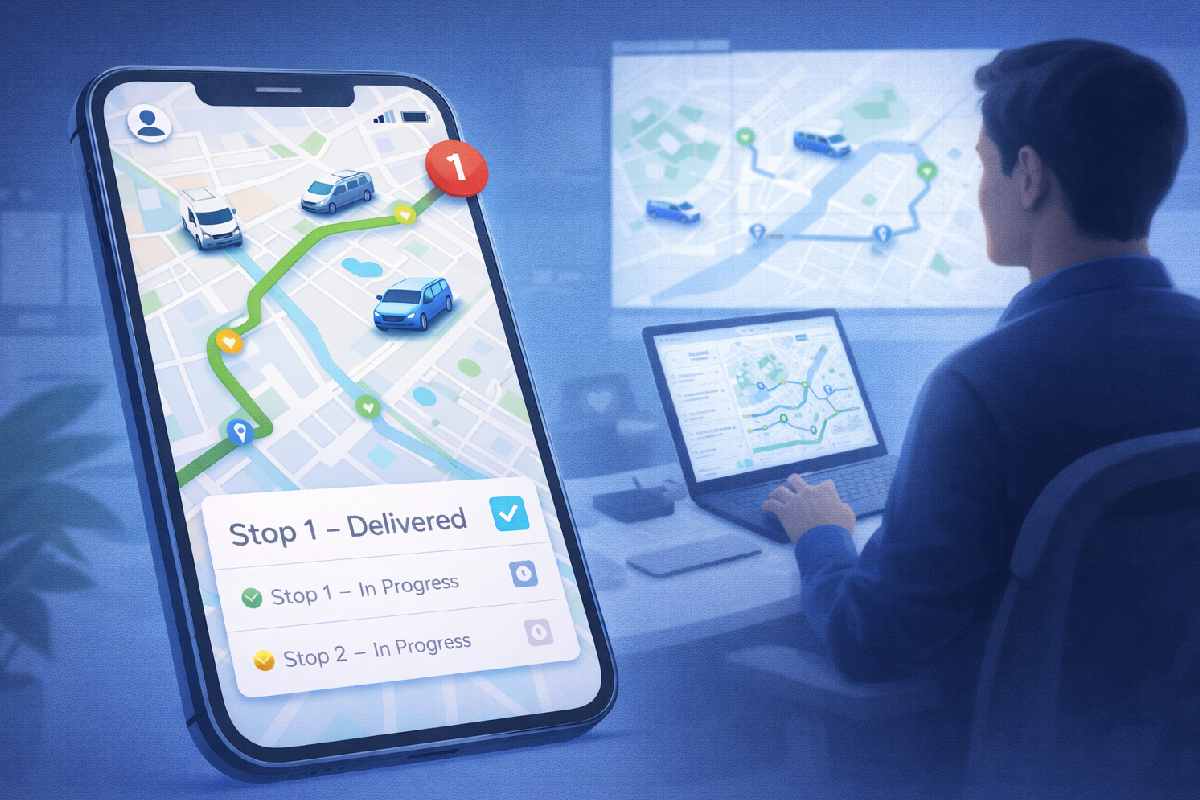
Mobile apps in GPS tracking are most valuable when they turn raw location data into real-time decisions and workflows for drivers, field staff, and managers. A map full of moving dots is not enough; the real impact comes when those dots are connected to jobs, alerts, and actions that improve safety, efficiency, and customer experience.
If you’re exploring GPS tracking for your fleet or field teams—and wondering how mobile apps should fit into that picture—this guide will walk you through the key use cases, technical choices, and rollout steps so you can get real value, not just another app on a phone.
Disclosure
This guide was created with the help of AI-assisted research and writing and is intended for general informational purposes only. It is not legal, financial, or professional advice. GPS tracking, mobile apps, and data-privacy requirements can vary by country, region, and industry, and they change over time. Always verify current platform policies and consult qualified legal or compliance professionals before implementing GPS tracking or employee monitoring in your organization.
Table of Contents
Key Takeaways
- Mobile apps in GPS tracking are most valuable when they turn location data into jobs, alerts, and decisions—not just dots on a map.
- The best apps support real workflows for drivers, technicians, and managers: routes, job details, proof of service, and safety.
- You don’t have to build everything from scratch; you can buy, customize, or build on top of existing GPS platforms.
- Success depends on more than tech: you need clear goals, a pilot rollout, training, and metrics like on-time rate and safety events.
- Privacy and employee trust are critical; always align tracking with local laws and clear internal policies.
Who This Guide Is For (And What You’ll Learn)
This guide is for:
- Fleet managers and logistics or transport operators
- Field service and delivery leaders
- Product and IT managers evaluating GPS-enabled mobile solutions
You might be in one of these situations:
- You already have GPS devices in vehicles but still struggle with late deliveries, missed appointments, or poor visibility.
- You’re considering a GPS tracking system and want to understand what the mobile app should actually do for drivers and managers.
- You’re using basic tracking today but want to add workflows, proof of service, or safety features.
In this article, you’ll learn:
- The core use cases for mobile apps in GPS tracking
- How apps connect drivers and field staff with your tracking platform and back-office systems
- Key technical and privacy considerations
- How to plan, roll out, and measure a GPS-enabled mobile app in your business
Why Mobile Apps Matter in GPS Tracking
Mobile apps in GPS tracking exist to solve a simple problem: vehicles and field staff are constantly moving, and businesses need a reliable way to see what’s happening and respond in real time. GPS hardware alone can show you where something is, but it doesn’t tell you what’s happening or what to do next.
Choosing the right stack and rollout approach matters just as much as the app itself, especially if you’re already working through how to choose the right technology for your business.
Problem
Many businesses rely on vehicles and field staff but lack real-time visibility into where they are, what jobs they’re on, and whether they’re on schedule. GPS devices may be installed in vehicles, yet managers still juggle phone calls, spreadsheets, and guesswork. Drivers and technicians often work from printed routes or outdated instructions, and customers are left wondering when someone will arrive.
Agitation
The result is late deliveries, missed appointments, and safety incidents that could have been prevented with earlier intervention. Managers only find out about problems after customers complain or when a driver calls in from the road. Drivers feel frustrated by last-minute changes and unclear expectations, and customers lose trust when they can’t get accurate ETAs. “We need better tracking” becomes a recurring theme—but without a clear plan for how mobile apps should help.
Solution
Mobile apps connected to a GPS tracking system can give drivers and field staff live routes, job details, and simple ways to update status, while giving managers real-time visibility, alerts, and context to act quickly. When designed around real workflows, these apps turn GPS data into decisions: who to dispatch, which route to adjust, which customer to notify, and how to keep people safer on the road.
Core Use Cases for Mobile Apps in GPS Tracking
Typical use cases include the following, though your priorities may differ based on your industry and operating model.
A good GPS-enabled mobile app does more than show a map. It supports the daily work of drivers, technicians, and managers.
Real-Time Location and Status for Fleets and Field Teams
For drivers and field staff:
- See today’s route, stops, and priorities in one place.
- Get turn-by-turn navigation or links to preferred navigation apps.
- Update job status (en route, arrived, completed) with a few taps.
For managers:
- View live positions of vehicles and staff on a map.
- Monitor ETAs and identify potential delays early.
- Reassign jobs or adjust routes based on real-time conditions.
Job Management and Proof of Service
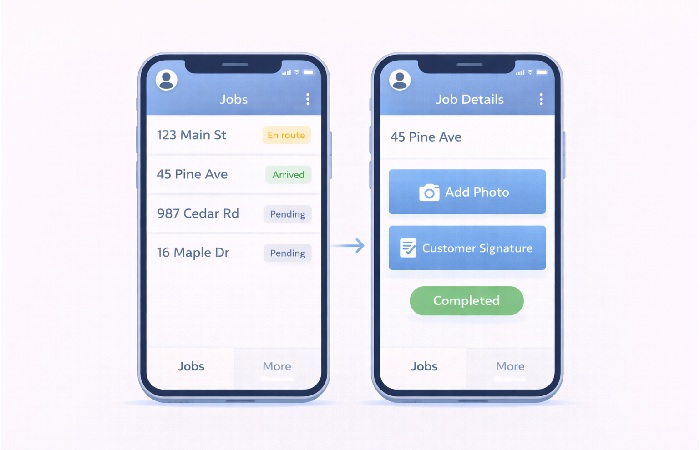
Mobile apps can act as the primary interface for job management:
- Assign jobs to specific drivers or technicians through the app.
- Provide job details: address, contact info, instructions, and notes.
- Capture proof of delivery or service with photos, signatures, and timestamps.
This information can sync back to your CRM, ERP, or dispatch system, reducing manual data entry and disputes about whether a job was completed.
Safety, Compliance, and Driver Behavior
GPS-enabled apps can support safety and compliance efforts:
- Alert managers to speeding, harsh braking, or route deviations.
- Help enforce geofences around restricted or high-risk areas.
- Support checklists for pre-trip inspections or safety checks.
In some regions and industries, there may be specific rules about driver hours, rest breaks, or vehicle inspections. While this guide is not legal advice, it’s important to understand your obligations and design your app and policies accordingly.
Customer Experience and Communication
Mobile apps can also improve customer experience:
- Send customers notifications when a driver is on the way or nearby.
- Provide live tracking links so customers can see ETAs without calling.
- Enable two-way communication (chat or call) through the app, rather than relying on personal phone numbers.
When implemented and adopted well, these features often help reduce “where is my order?” calls and build trust through clearer ETAs and transparency, although the impact depends on data quality, connectivity, and consistent use.
How Mobile Apps Connect to GPS Tracking Systems
To understand mobile apps in GPS tracking, it helps to see the bigger picture: hardware, platform, and app.
GPS Hardware vs Smartphone GPS
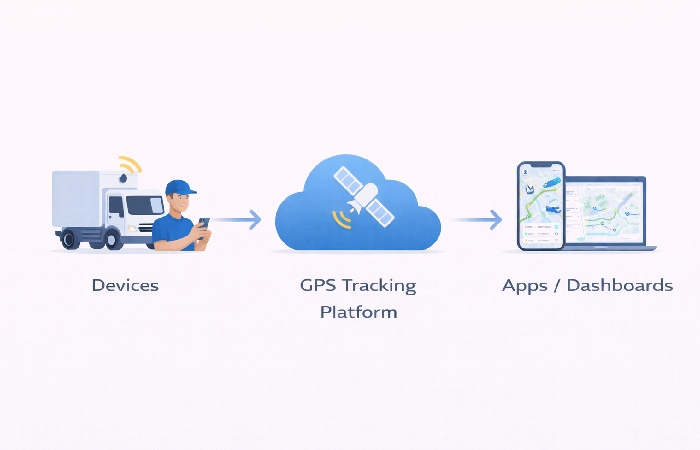
There are two main ways to capture location:
- Dedicated GPS devices installed in vehicles or assets.
- Smartphone GPS from the driver’s or technician’s device.
In many deployments, dedicated vehicle GPS devices tend to provide more consistent, harder‑to‑tamper‑with tracking compared with relying solely on smartphone‑based tracking, while smartphone‑based tracking is more flexible but depends more on device settings, battery, and user behavior.
PAJ GPS: Redefining Vehicle Tracking
One notable player in the GPS tracking market is the German manufacturer, PAJ GPS. What sets PAJ GPS apart is its comprehensive suite of mobile and desktop applications that empower users to stay connected with their vehicles like never before.
Let’s explore the key features that make PAJ GPS a game-changer:
Typical PAJ GPS app capabilities include:
- Live tracking and route history** so users can see where a vehicle is now and where it has been over a selected time period.
- Configurable alerts** for events such as movement, geofence entry/exit, or low battery, helping users respond quickly to unusual activity.
- Multi-device access** via mobile apps and web dashboards, so location and status information is available whether you’re on the road or at a desk.
Backend Platforms and APIs
The mobile app is usually a client to a GPS tracking platform:
- GPS devices send data to the platform.
- The platform processes and stores location and event data.
- The mobile app and web dashboards consume this data via APIs.
A robust backend platform and stable APIs are critical. They ensure that location updates, job assignments, and status changes flow reliably between devices, apps, and back-office systems.
Online/Offline and Network Considerations
Field work often happens in areas with poor connectivity:
- Apps should handle temporary offline situations gracefully.
- Key actions (e.g., job completion, photos) can be cached and synced when the network is available.
- Location updates may be delayed in low-signal areas, so expectations should be set accordingly.
Designing for real-world network conditions is essential for user trust and data quality.
Choosing the Right Mobile App Approach for GPS Tracking
Once you know your use cases, you can decide how to build or choose the app.
Native vs Cross-Platform for GPS-Heavy Apps
- As of the mid‑2020s, many organizations still choose native apps (built separately for iOS and Android) for the most demanding sensor use, complex offline behavior, or performance‑critical scenarios, though modern cross‑platform frameworks such as Flutter increasingly cover many of these needs and continue to evolve. These trade‑offs between native, hybrid, and cross‑platform development echo the broader decisions teams face when evaluating mobile app development approaches.
- Cross‑platform frameworks such as Flutter or React Native can be a good fit for many fleet and field apps, enabling shared code and potentially faster multi‑platform delivery when teams already have cross‑platform expertise.
The right choice depends on how demanding your use cases are, how diverse your devices are, and how much you value performance vs speed to market.
Build vs Buy vs Customize
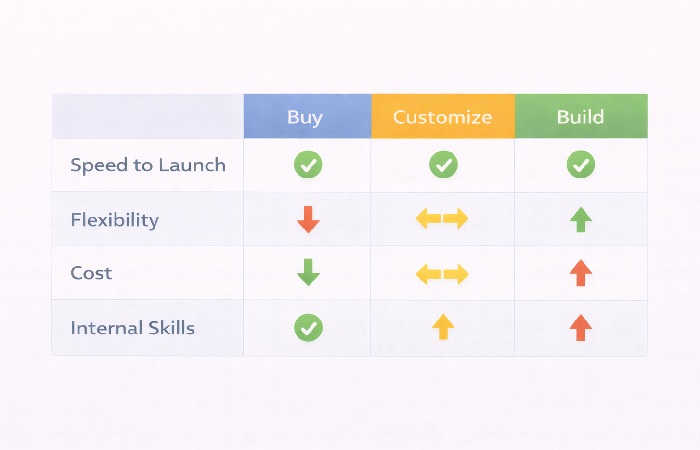
You have several options:
- Buy an off-the-shelf GPS tracking solution with its own mobile app.
- Typically faster to start than a full custom build, though real‑world speed and the depth of customization or integration vary by vendor.
- Build a custom app on top of a GPS platform’s APIs.
- More tailored to your workflows; requires development resources. A custom build only pays off if your requirements are clear and you can sustain ongoing maintenance.
- Use no-code/low-code tools for internal tools and prototypes.
- Good for simpler internal apps; may be outgrown as needs become more complex.
No‑code and low‑code tools work well for simpler internal apps or prototypes, but teams sometimes outgrow certain platforms as branding, scalability, or integration needs become more complex. How far you can go with no‑code or low‑code depends heavily on the specific platform and architecture, not just the development approach.
Your decision should consider scale, complexity, need for differentiation, internal skills, and budget.
A Simple Decision Lens
Ask:
- Do we need advanced device features or just basic location and job management?
- How many platforms do we need to support (iOS, Android)?
- Do we have internal developers, or will we rely on a partner?
- How unique are our workflows compared to standard fleet/field operations?
For many small and mid‑sized businesses, a cross‑platform app built with an agency or experienced partner can be a practical starting point, especially when no suitable off‑the‑shelf solution exists and internal development capacity is limited.
Key Features to Prioritize in a GPS-Enabled Mobile App
The features below are common patterns in fleet and field operations; your own “must‑have” list may look different depending on your risk profile, scale, and customer expectations.
Not every feature is equally important. Focus on what directly supports your goals.
Common Must‑Have Features
Treat these as a starting template; your actual must‑have list should be driven by your own risk, compliance, and customer requirements.
- Clear route and job list for drivers or field staff.
- Simple status updates (en route, arrived, completed).
- Proof of service (photos, signatures, notes, timestamps).
- Reliable location sharing tied to jobs and shifts.
Nice-to-Have Features
- In-app messaging between drivers and dispatch.
- Access to documents or instructions.
- Driver scorecards and feedback.
Avoiding Feature Bloat
It’s tempting to add every idea into version one. Instead:
- Start with features that directly support safety, efficiency, and customer experience.
- Use analytics and feedback to decide what to add next.
- Remember that every extra feature adds complexity for users and for maintenance.
Security, Privacy, and Regulatory Considerations
GPS tracking involves sensitive data, especially when it relates to people.
Location Data and Employee Privacy
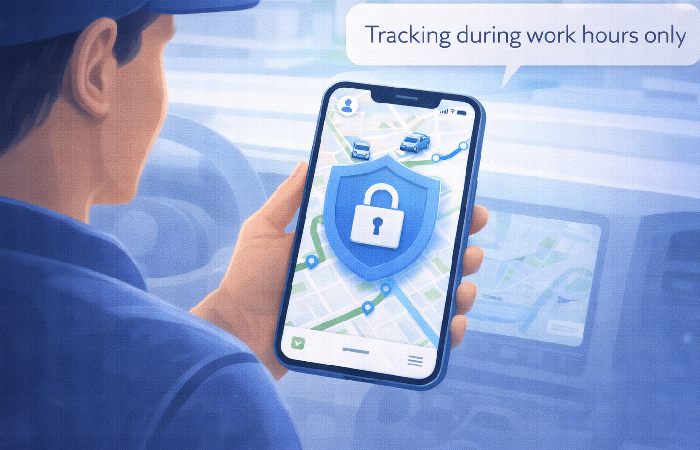
In many jurisdictions, regulators treat location data as personal data for privacy purposes, but the exact definitions and obligations vary by region.
- Be clear about when and how tracking occurs (e.g., during work hours, on work devices).
- Communicate the purpose of tracking (safety, efficiency, customer service).
- Involve HR and legal teams when designing policies.
Many regions have specific rules about employee monitoring and data retention; requirements differ by country or state and should be checked against up‑to‑date local laws. It’s important to understand local laws and labor regulations before rolling out tracking widely.
This section is a high‑level overview, not a legal guide. Always validate your GPS tracking and employee monitoring approach with up‑to‑date local regulations and professional legal advice. These practices are a useful starting point, but regulatory expectations can be stricter or different in your jurisdiction.
Data Protection and Access Control
Good practices include:
- Secure authentication and role-based access to apps and dashboards.
- Encrypting data in transit and limiting who can see detailed location history.
- Avoiding unnecessary retention of detailed location data.
Depending on your region and industry, you may need to comply with privacy laws such as the General Data Protection Regulation (GDPR) at the time of reading, as well as any sector‑specific rules for health, financial, or children’s data; always confirm current requirements with qualified legal or compliance professionals.
Implementation and Rollout: From Pilot to Full Deployment
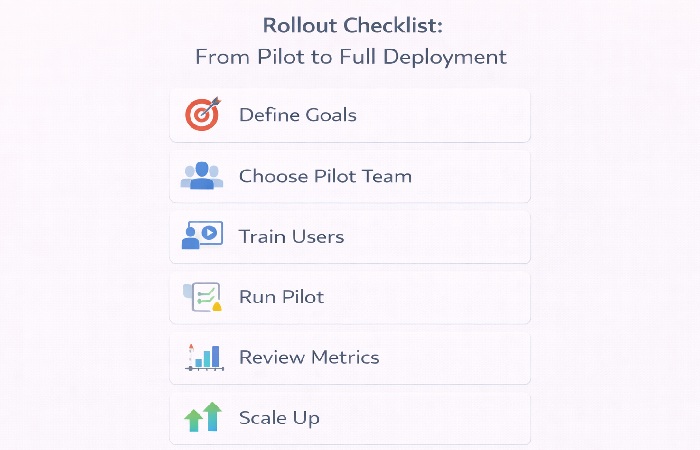
A thoughtful rollout can make the difference between adoption and resistance.
Start with a Pilot Group
- Choose a subset of vehicles or teams that represent typical use cases.
- Validate usability, data quality, and impact on workflows.
- Gather feedback from both managers and drivers/field staff.
Training and Change Management
- Provide clear training on how to use the app and why it’s being introduced.
- Address concerns about tracking and privacy openly.
- Set up support channels for questions and issues.
Scaling Up
- Roll out to more teams or regions in phases.
- Monitor performance, adoption, and feedback.
- Adjust configurations, workflows, and training materials as needed.
Measuring Success: What to Track Beyond “Dots on a Map”
Success is not just about having an app installed; it’s about outcomes.
Operational Metrics
- On-time delivery or service rate.
- Average route time, idle time, or distance per job.
- Number of jobs completed per shift.
Safety and Compliance Metrics
- Number of speeding or harsh braking events.
- Adherence to planned routes or geofences.
- Incident reports and near-miss trends.
Customer and Employee Experience
- Customer satisfaction scores and feedback.
- Driver/field staff feedback on the app’s usability.
- App usage metrics (how often key features are used).
Iteration Based on Data
Use these metrics to decide:
- Which features to improve or simplify.
- Where additional training is needed.
- Whether to expand the app’s role in your operations.
Common Mistakes with Mobile Apps in GPS Tracking
These are frequent pitfalls teams report when rolling out GPS mobile apps, not an exhaustive list.
Learning from common pitfalls can save time and frustration.
Focusing Only on Location, Not Workflows
- Treating the app as a map viewer instead of a work tool.
- Ignoring job management, proof of service, and communication.
Ignoring Driver and Field Staff Experience
- Complex interfaces that require too many taps.
- Poor offline behavior that frustrates users in low-signal areas.
Underestimating Privacy and Communication
- Rolling out tracking without clear communication about why and how.
- Failing to address concerns about monitoring and data use.
Treating the App as a One-Time Project
- No budget or plan for updates, OS changes, or feature improvements.
- Letting the app stagnate as devices and expectations evolve.
Checklist – Are You Ready to Use Mobile Apps in GPS Tracking?
Use this quick checklist before you commit:
- We have clear goals for GPS tracking and how mobile apps will support them.
- We know who will use the app (drivers, technicians, managers) and their key tasks.
- We understand the basic architecture: hardware, platform, and app.
- We are aware of privacy and regulatory considerations in our region.
- We have a plan for a pilot, training, and ongoing updates.
If you can tick most of these boxes, you’re generally in a solid position to start serious conversations with vendors, partners, or internal teams.
Conclusion – Make Mobile Apps the Frontline of Your GPS Strategy
Mobile apps are the human interface to GPS tracking. They turn location data into routes, jobs, alerts, and decisions that affect safety, efficiency, and customer experience.
If you:
- Start from clear goals and user workflows,
- Choose an app approach that fits your technical and operational context,
- Roll out thoughtfully and commit to learning and iteration,
your GPS-enabled mobile app can become a genuine asset—not just another icon on a device. The next step is to map your current workflows and identify where a GPS-enabled app could remove friction or risk, then design your pilot around those high-impact areas.
FAQs on Mobile Apps in GPS Tracking
1. What are the main benefits of using mobile apps in GPS tracking?
Mobile apps in GPS tracking help turn raw GPS data into real-time decisions by giving drivers and field staff clear routes, job details, and simple ways to update status. Managers gain live visibility into locations, ETAs, and exceptions, which supports faster responses and better planning. When designed well, this can improve safety, efficiency, and customer experience.
2. Do I need dedicated GPS hardware if I use a mobile app?
You don’t always need dedicated GPS hardware, but many businesses benefit from using both. Smartphone GPS can be enough for some use cases, especially for smaller teams or lighter tracking needs. In many deployments, dedicated vehicle GPS devices tend to provide more consistent, harder-to-tamper-with tracking compared with relying solely on smartphone-based tracking, while mobile apps add job context and workflows on top.
3. Is a custom GPS tracking mobile app better than the default app from a vendor?
A custom GPS tracking app can be better if your workflows are unique or you need tight integration with your own systems. Off-the-shelf apps from GPS vendors are typically faster to start than a full custom build and usually cover common fleet and field scenarios, though customization and integration depth vary by vendor. The right choice depends on how much you need to differentiate and how much development capacity you have.
4. How do GPS tracking mobile apps improve driver and field staff productivity?
GPS tracking mobile apps can reduce paperwork and phone calls by putting routes, job details, and proof-of-service tools in one place. Drivers and technicians can update status, capture photos or signatures, and receive new assignments without returning to the office. This reduces idle time and helps them complete more jobs per shift.
5. What privacy issues should I consider when tracking employees via mobile apps?
Tracking employees’ locations raises privacy and trust questions, especially if tracking extends beyond work hours or onto personal devices. You should be clear about when and why tracking occurs, limit it to legitimate business purposes, and comply with local privacy and labor laws. It’s wise to involve HR and legal teams and communicate openly with staff before rollout.
6. Are native apps always better than cross-platform apps for GPS tracking?
Native apps can offer advantages for very demanding use cases, such as advanced sensor use or heavy offline functionality. However, cross-platform apps are often sufficient for typical fleet and field scenarios and can be faster to build for both iOS and Android when teams already have cross-platform expertise. The best choice depends on your performance needs, device diversity, and long-term plans.
7. How long does it take to implement a GPS-enabled mobile app?
Timelines vary widely, but in practice a focused first version for a relatively straightforward implementation at a typical business often falls somewhere between several weeks and a few months, though timelines can be shorter or longer depending on scope, integrations, and team capacity. Off-the-shelf solutions can be deployed faster, while custom apps require more time for design, development, and testing. It’s important to plan for a pilot phase and gradual rollout rather than expecting an instant, full-scale deployment.
8. What metrics should I track to see if my GPS mobile app is working?
You should track metrics that match your goals, such as on-time delivery or service rates, average route time, and jobs completed per shift, which are commonly cited in fleet performance best‑practice guides. Safety metrics like speeding events or route deviations also matter, and customer satisfaction plus feedback from drivers or field staff show whether the app is improving real-world experience.
9. Can no-code or low-code tools handle GPS tracking apps?
No-code and low-code tools can work well for simpler internal apps that use GPS, such as basic check-in or job logging. For more complex, large-scale, or highly branded consumer apps, teams sometimes outgrow these platforms and move to custom development. If you start with no-code, it’s helpful to plan for how you might migrate if your needs become more advanced.
10. How should I start if I’ve never used GPS tracking or mobile apps before?
Start by clarifying your goals and the problems you want to solve, such as late deliveries, lack of visibility, or safety concerns. Talk to a few vendors or partners to understand what their mobile apps can do and how they integrate with your existing systems. Then design a small pilot with a subset of vehicles or teams, measure the impact, and refine your approach before scaling up.