
Mobile app development for business is only worth the investment if it leads to real results, not just a shiny icon in the app store. Many businesses that decide to “build an app” start from the wrong place: they think in terms of features and technology, not business outcomes. A mobile app only makes sense when it is treated as a product and a capability that supports clear goals, real users, and measurable results.
If you’re wondering whether your business should invest in a mobile app—and what that actually involves—this guide will walk you through the key decisions from idea to real ROI.
Disclosure:
This content is based on publicly available information and AI-assisted research and writing. It is intended as a general guide, not as professional, medical, financial, or legal advice. Products, services, pricing, features, and regulations can change over time, so always check official sources and, where appropriate, consult a qualified professional before making decisions or using any tool for commercial purposes.
For mobile app projects, always verify current platform policies (Apple, Google), data‑privacy laws in your region, and any industry‑specific compliance requirements.
Table of Contents
Who This Guide Is For (And What You’ll Learn)
This guide is for:
- Business owners and founders
- Non-technical CEOs and COOs
- Marketing and product managers in small and mid-sized companies
You might be in one of these situations:
- Competitors have apps and you feel pressure to “catch up”.
- Customers keep asking for a better mobile experience.
- Internal processes are stuck in email and spreadsheets, and you think an app could help.
The core problem is simple: you suspect a mobile app could help, but you’re not sure what it should do, how to build it, or how to make sure it pays off.
In this article, you’ll learn:
- When a mobile app actually makes sense for your business
- How to define the right app for your customers or employees
- The main development options and what they mean in practice
- How to plan, budget, launch, and measure success
Why Businesses Want Mobile Apps
Mobile app development for business exists to solve a simple problem: customers and employees expect to do important tasks quickly on their phones, and many companies still make that hard. A well-designed app can help make your business easier to work with and easier to work in.
Problem
Customers are used to ordering, booking, and managing their lives from their phones, and many of them already rely on mobile communication in business to stay connected with brands day to day.. Internally, your teams may be juggling email threads, spreadsheets, and legacy systems that don’t work well on mobile. You feel the gap every time a customer abandons a clunky mobile website or an employee delays updating information until they’re back at a desk.
Agitation
You see competitors launching apps and promoting “seamless mobile experiences.” Your own customers complain about friction, or quietly drift to alternatives that are easier to use. Internally, managers struggle to get real-time data from the field, approvals get stuck, and simple tasks require too many steps. “We should build an app” becomes a recurring topic—but without a clear plan.
Solution
A business-focused mobile app can help improve customer experience, streamline operations, and contribute to new revenue or retention channels—but only if it’s tied to specific goals and real user needs. The rest of this guide will help you think about mobile app development as a business product, not just a tech project.
Match the App to a Real Business Goal (Not Just “We Need an App”)
Before you talk about features or technology, you need to answer one question:
What business outcome should this app improve?
Common Business Goals for Mobile Apps
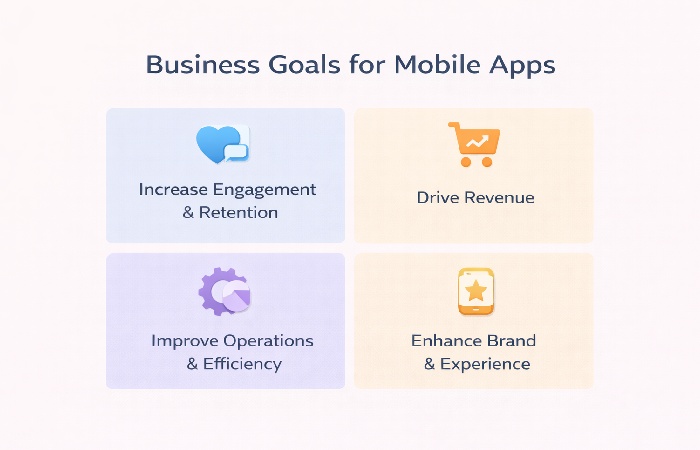
Typical goals include:
- Increase customer engagement and retention
- Loyalty programs, personalized offers, push notifications
- Drive revenue
- Mobile ordering, bookings, subscriptions, in-app purchases
- Improve operations and efficiency
- Field service apps, inventory tools, approval workflows
- Enhance brand and customer experience
- Self-service support, account management, content access
A Simple Goal-Setting Framework
For each app idea, write down:
- Primary business metric
- Examples: repeat purchase rate, average order value, time-to-approve, number of support tickets.
- Primary user
- Customers, partners, or employees.
- Primary job the app will do for them
- “Let customers reorder in a couple of taps.”
- “Let field staff submit reports on-site.”
- “Let managers approve requests from their phone.”
If you can’t clearly state the user, the job, and the metric, you’re not ready to build. You’re still at the “idea” stage.
Understand Your Users and Use Cases
A business app that doesn’t fit into real daily behavior will be installed once and forgotten.
Customer-Facing Apps
Common use cases:
- Ordering and booking (food, services, appointments)
- Loyalty and rewards
- Account management and self-service
- Content and community (news, courses, forums)
Key questions:
- How often will customers realistically use this app?
- Why would they install it instead of just using your mobile website?
- What can the app do better than your current channels?
Employee-Facing Apps
Common use cases:
- Field reporting and inspections
- Task and job management
- Internal communication and approvals
- Inventory and asset tracking
Key questions:
- What slows employees down today?
- What information do they need on the go?
- How will the app fit into their existing workflow, not fight it?
Prioritizing Features
Start with 3–5 core use cases that directly support your main business goal. Avoid the temptation to cram every idea into version 1. A focused app that does a few things very well is more valuable than a bloated app that tries to do everything.
Choosing the Right Development Approach
Once you know why you’re building an app and who it’s for, you can think about how to build it.
Native, Cross-Platform, or Web?
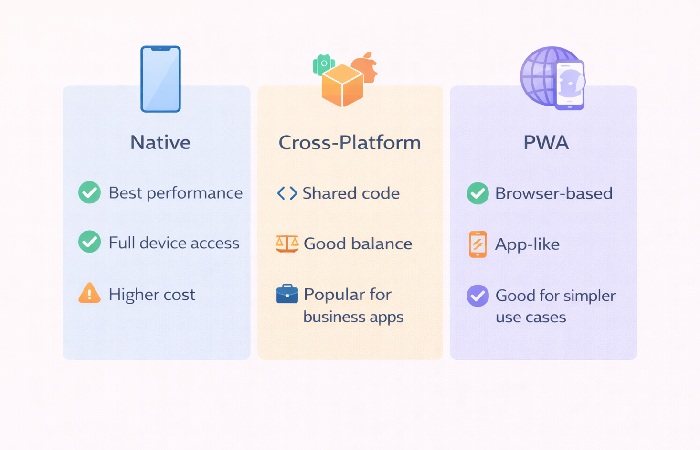
- Native apps (iOS and Android separately)
- Best performance and access to device features.
- Higher cost and more code to maintain.
- Cross-platform frameworks (e.g., Flutter, React Native)
- One codebase for multiple platforms.
- Often a good balance of performance and cost for many business apps.
- Progressive Web Apps (PWA)
- Web apps that behave more like native apps in the browser.
- Often enough for simpler use cases where app store presence is less critical.
If you are still weighing up whether a native or hybrid route makes more sense, this breakdown of mobile app development hybrid vs native offers a practical comparison you can use alongside this guide.
Build In-House, Hire an Agency, or Use No-Code/Low-Code?
- In-house development
- More control and closer alignment with your business.
- Requires hiring and retaining a team; higher ongoing commitment.
- Agency or development partner
- Access to experienced designers and developers.
- You must manage scope, communication, and handover carefully.
- No-code/low-code platforms
- Faster and cheaper for internal tools and simple apps.
- Can work well for simpler internal tools and prototypes; for complex, highly customized, or large-scale consumer apps, teams often outgrow these platforms and move to custom development.
A Simple Decision Lens
Ask yourself:
- How complex is the app?
- How critical is performance and UX?
- Do we have internal technical skills?
- How long do we plan to support and evolve this app?
For many small and mid-sized businesses, a cross-platform app built with an agency or experienced partner is often a practical starting point, especially for customer-facing apps.
Planning the First Version (MVP) of Your Business App
Your first version should be a Minimum Viable Product (MVP): the smallest version of the app that delivers real value to your primary users and supports your main business goal.
Define the MVP Scope
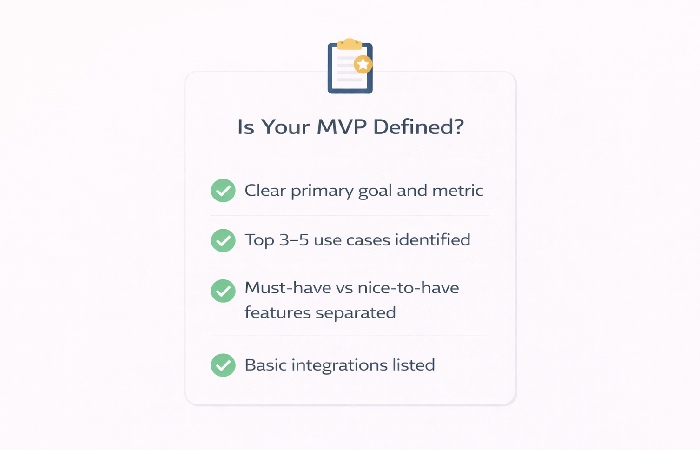
- Focus on the top 3–5 use cases you identified earlier.
- Avoid “nice to have” features that don’t directly support your core metric.
- Example MVPs:
- A loyalty app that lets customers view points, redeem rewards, and receive offers.
- A field reporting app that lets staff submit reports with photos and location.
UX and Flows Before Screens
Before you design screens, map out:
- How users discover and open the app
- The steps they take to complete the main task
- What they see when something goes wrong (errors, offline, etc.)
Simple flow diagrams or even sketches on paper are enough at this stage. The goal is to ensure the app is easy to use for the main job, not just visually attractive.
Technical Considerations for MVP
- What systems does the app need to talk to? (CRM, ERP, payment gateways, booking systems)
- How will users log in? (email, SSO, social login)
- Do you need offline support or is always-online acceptable?
These decisions affect both cost and complexity.
Budgeting and Timelines for Mobile App Development
There is no single “standard price” for a business app, but you can understand what drives cost and time.
What Drives Cost
- Number of platforms (iOS, Android, web)
- Feature complexity and integrations
- Custom design and branding requirements
- Security and compliance needs
- Ongoing maintenance and updates
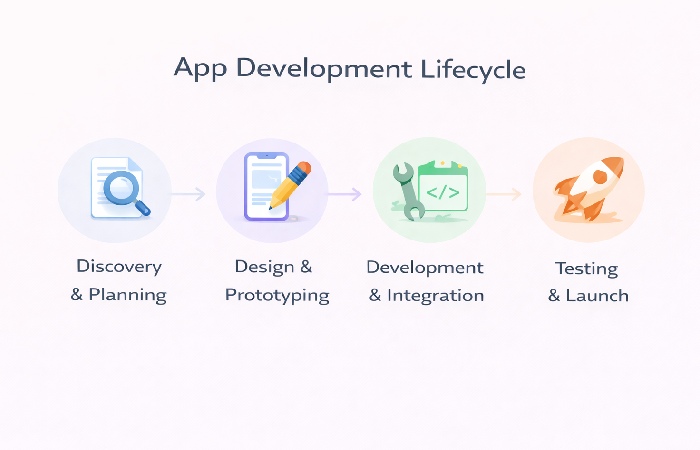
Typical Timeline Phases
- Discovery and planning– clarifying goals, users, and scope
- Design and prototyping– UX flows, wireframes, visual design
- Development and integration– building the app and connecting systems
- Testing and launch– QA, app store submission, rollout
A focused first version (MVP) for a typical business app often takes from several weeks to a few months, depending on scope and team structure.
Hidden Costs Businesses Forget
- App store accounts and compliance requirements
- Analytics, crash reporting, and monitoring tools
- Support, bug fixing, and OS updates after launch
Budget not just for building the app, but for running and improving it.
Launching and Growing Your Business App
A successful app launch is more than just submitting to the app stores.
Pre-Launch Checklist
- App store listings: name, description, keywords, screenshots, and videos
- Basic analytics and crash reporting configured
- Internal testing and a small pilot group of real users
- Clear support channel for early feedback and issues
Post-Launch: Onboarding and Adoption
- How will you drive installs?
- Website banners, email campaigns, in-store promotion, social media, ads
- What does the first-run experience look like?
- Simple onboarding, clear value proposition, quick path to the first success
Measuring Success
Track metrics that align with your original goals:
- Installs and active users
- Retention (how many users come back)
- Key actions (orders, bookings, tasks completed, forms submitted)
- Feedback: reviews, ratings, support tickets, direct comments
Use this data to decide what to improve next.
Security, Compliance, and Geo/Regulatory Nuance
Even if your app is “just” for marketing or internal use, you still need to think about security and privacy.
Basic Security Considerations
- Secure authentication and password handling
- Encrypted communication between app and server using HTTPS and TLS best practices
- Safe storage of sensitive data (avoid storing more than necessary on the device)
These are only baseline considerations; for production apps, you should follow platform security best practices and, where relevant, consider professional security review or penetration testing.
Data Privacy and Regulations
Depending on your region and industry, you may need to comply with privacy laws such as the EU General Data Protection Regulation (GDPR), CCPA, and other regional data‑protection regulations, as well as sector-specific rules for health, financial, or children’s data.. Because these rules change over time, it’s important to confirm requirements with a legal or compliance expert when you plan your app.
Because app store policies and review guidelines also change over time, check the latest Apple App Store Review Guidelines and the current Google Play policies when planning your launch.
Regional App Store and Localization Issues
- Different countries may have different app store requirements and content rules.
- Localizing language, currency, and content can significantly improve adoption in each market.
Common Mistakes Businesses Make with Mobile Apps
Learning from others’ mistakes can save you time and money.
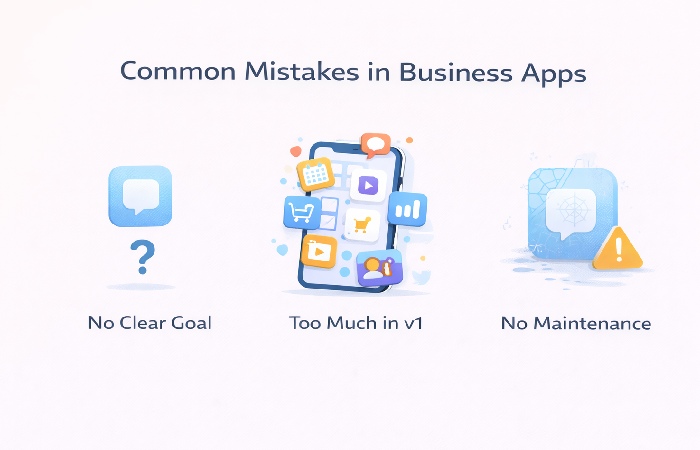
Building Without a Clear Business Case
- “We need an app because competitors have one” is not a strategy.
- Without a clear goal and metric, it’s hard to prioritize features or measure success.
Overbuilding Version 1 and Underfunding Maintenance
- Huge scope for v1, then no budget left for iteration.
- The app launches with fanfare, then stagnates.
Ignoring Analytics and User Feedback
- No tracking of key actions or retention.
- No process for collecting and acting on user feedback.
Treating the App as a One-Time Project
- Mobile platforms, devices, and user expectations change.
- If you don’t plan for updates, your app will feel outdated quickly.
Checklist – Are You Ready to Invest in Mobile App Development?
Use this quick checklist before you commit budget:
- We have a clear primary business goal and metric for the app.
- We know who the main users are and what top 3–5 jobs the app will help them do.
- We have a rough idea of budget and timeline, including post-launch maintenance.
- We know who will own the app internally after launch (product owner).
- We understand any basic security and compliance requirements for our industry.
If you can tick most of these boxes, you’re in a good position to start serious conversations with internal teams or external partners.
Conclusion – Treat Your App as a Business Product, Not Just an IT Project
Mobile app development for business is not about chasing trends or copying competitors. It’s about creating a focused, useful product that supports your customers or employees and moves real business metrics.
If you:
- Start from clear goals and user needs,
- Choose a development approach that fits your context,
- Launch a focused MVP and commit to learning and iteration,
your app can become a genuine asset—not just another line item in your IT budget.
If you’re at the “we think we need an app” stage, your next step is simple: write a one-page brief that captures your goal, users, top use cases, and success metrics. That document will be more valuable than any feature list—and it’s the best foundation for a successful mobile app project.
If you want a deeper dive into how companies actually plan, build, and launch their apps, this guide on mobile app development for business walks through real-world considerations for choosing features, platforms, and partners.
FAQs on Mobile App Development for Businesses
1. How do I know if my business really needs a mobile app?
A dedicated mobile app starts to make sense when there’s a clear, repeatable task your customers or employees struggle to do on mobile today. If people frequently order, book, check status, or submit information and your current mobile experience is clunky, an app can add real value. If you can’t clearly define who would use the app and what job it would do for them, improving your website or internal processes may be a better first step.
2. What are the main business benefits of developing a mobile app?
A well-designed mobile app can help increase customer engagement, support repeat purchases, and make it easier for people to interact with your business when it is actively maintained. Internally, it can streamline workflows, reduce manual data entry, and give managers better real-time visibility. The real benefit comes when the app is tied to specific business goals and becomes part of users’ regular habits.
3. Is a mobile app better than a mobile website for my business?
A mobile website is often enough for basic information and occasional interactions. A mobile app makes more sense when users need to perform frequent, repeatable tasks and when you want deeper engagement through features like push notifications, offline access, or device integrations. In many cases, the right approach is to first ensure your mobile website is strong, then add an app when you have a clear, app-specific use case.
4. How much does it cost to develop a mobile app for a business?
There is no single price, but costs are driven by scope, complexity, number of platforms, and who builds it. A simple internal tool usually costs much less than a complex, customer-facing app with custom design and multiple integrations, so budgets can vary widely. Instead of focusing on an “average cost,” define your goals and features, then get project-specific estimates from one or more experienced partners.
5. How long does it take to build a business mobile app?
A focused first version (MVP) for a typical business app often takes from several weeks to a few months. The timeline depends on how many features you include, how many platforms you target, and how quickly decisions are made during design and development. You should also factor in time for testing, app store review, and a gradual rollout to real users.
6. Should I build my app in-house, hire an agency, or use no-code tools?
If you have a strong internal tech team and plan to evolve the app long term, building in-house can give you more control. If you lack internal skills or need to move quickly, an agency or development partner is often the best option, especially for customer-facing apps. No-code or low-code platforms can work well for simpler internal tools and prototypes, but may be limiting for complex or highly branded consumer apps.
7. What’s the best way to define the first version (MVP) of my app?
The best MVP focuses on the smallest set of features that deliver real value to your primary users and support your main business goal. Start by listing your top 3–5 use cases and design flows that make those tasks fast and easy. Leave “nice to have” features for later releases so you can launch sooner, learn from real usage, and invest in what actually matters.
8. What are the biggest risks or mistakes in mobile app development for business?
The biggest risks are building an app without a clear business case, overloading version one with too many features, and underestimating the need for ongoing maintenance. Many businesses also fail to track analytics or listen to user feedback, so they don’t know what’s working and what isn’t. Treating the app as a one-time project instead of a product that needs care and iteration is another common mistake.
9. Are there legal or compliance issues I should consider for a business app?
Yes, especially if your app collects personal, financial, or health-related data. You may need to comply with privacy regulations like GDPR, CCPA, and other regional data-protection laws, as well as sector-specific rules if you operate in areas such as healthcare or finance. Even for simpler apps, you should handle authentication, data storage, and permissions carefully, and consult legal or compliance experts for sensitive use cases or when operating across multiple regions.
10. How do I measure whether my business app is successful?
You measure success by comparing results against the goals you set at the start. Useful metrics include installs, active users, retention, and key actions such as orders, bookings, or tasks completed. Qualitative feedback from reviews, support tickets, and direct user conversations is also important. If the app is improving your chosen business metrics and users are returning to it regularly, it’s doing its job.