
Most reviews of AI voice tools talk about features. Very few talk about whether those tools actually fit into a real content workflow. MicMonster.com is useful only if it helps you create better voiceovers faster, without hurting quality where it matters. In this review, we look at MicMonster from a practitioner’s perspective: where it genuinely helps, where it falls short, and when you should still use a human voice.
If you need fast, affordable voiceovers for videos, training, or internal content, MicMonster can be a strong option. If you need emotional storytelling or high-end brand work, it probably isn’t. This article will help you decide which side you’re on.
Disclosure:
This content is based on publicly available information and AI-assisted research and writing. It is intended as a general guide, not as professional, medical, financial, or legal advice. Products, services, pricing, features, and terms can change over time, so always check the official website or trusted sources for the latest information before making decisions or using any tool for commercial purposes.
For this review, please refer to MicMonster’s official website and current terms for up-to-date details on plans, features, and licensing.
Table of Contents
Who This Review Is For (And What You’ll Learn)
This review is for people who create content regularly and are tired of fighting with voiceovers:
- YouTube creators and faceless video channels
- Marketers and agencies producing explainer videos, ads, and social content
- Course creators and trainers building e-learning modules
- Small businesses that need voiceovers but don’t have budget for voice talent every time
The core problem is simple: you need clear, consistent audio, but you don’t have the time, budget, or voice skills to record everything yourself.
In this article, you’ll learn:
- Where MicMonster fits into real workflows like YouTube, training, and agency work
- When MicMonster is better than recording your own voice or hiring talent
- The limitations and who should avoid it
- Practical tips to get the best results if you decide to use it
Why AI Voiceovers Like MicMonster Exist
AI voice tools like MicMonster exist to make voiceovers faster, cheaper, and easier to update than traditional recording or hiring voice talent.
Problem:
Traditional voiceovers are slow and expensive. Recording your own voice means dealing with background noise, retakes, and editing. Hiring voice talent means briefs, revisions, and waiting on someone else’s schedule.
Agitation:
You delay publishing videos because you dread recording. You avoid updating courses or product demos because re-recording a few lines feels like a full project. If you work with clients, every script change can turn into another round of voiceover costs and delays.
Solution:
MicMonster offers AI-generated voices that can turn scripts into audio in minutes. For many explainer, training, or internal videos, the output may be “good enough” or even more consistent than rushed DIY recordings, as long as you invest a bit of time in script and settings. The key is understanding where MicMonster fits and where it doesn’t.
What MicMonster.com Actually Is
MicMonster.com is a text-to-speech (TTS) platform. You paste or upload your script, choose a voice and language, adjust a few settings, and export an audio file you can drop into your video editor or LMS.
Specs at a Glance (At the Time of Writing)
As of early 2026, MicMonster:
- Languages & voices:Supports over a hundred languages and many accents, with hundreds of AI voices in its library.
- Plans & tiers:Offers free or trial options and several paid tiers (such as Pro and Pro Max). Plan names, inclusions, and lifetime deals can change over time.
- Character limits:Uses per‑clip and monthly character limits that vary by plan and voice type. Current paid tiers generally range from hundreds of thousands to several million characters per month.
- “Unlimited” clarification:If you see “unlimited” in marketing, it typically refers to unlimited projects or exports, not unlimited characters. Each plan still has a monthly character cap, and the exact cap may change.
- Output formats:Provides audio exports in common formats such as MP3 and WAV, and can generate subtitle files (e.g., SRT) for many use cases.
- Audio quality:Delivers high‑quality audio output suitable for YouTube, e‑learning platforms, and internal training. Exact audio quality settings can be checked in the app or current documentation.
- Commercial rights:Certain paid plans include commercial‑use rights that can cover monetized YouTube channels, client work, and paid courses. Free or trial tiers are generally intended for personal or testing use only.
Pricing, plan limits, and available features can change over time. Always double‑check MicMonster’s current plans and terms on the official website before making a final decision. If you are planning monetized or large‑scale use, it is worth understanding the basics of AI voice licensing for commercial projects so you know what typical rights and restrictions look like.
Core Features in Plain Language
At a high level, MicMonster typically offers:
- A large library of AI voices across many languages and accents
- Controls for speed, pitch, volume, and emphasis (especially in the advanced editor on paid plans)
- Editor options to adjust pauses and pacing so speech sounds less robotic
- The ability to generate and download audio files (e.g., MP3, WAV) and export subtitles for your projects
You don’t need to understand the underlying AI models. What matters is whether the voices sound natural enough for your audience and whether the tool fits into your production process.
Typical Use Cases
Common ways people use MicMonster include:
- YouTube tutorials and faceless channels– turning scripts into voiceovers without recording
- Product demos and onboarding videos– explaining features with consistent audio
- E-learning and internal training– narrating slides, modules, and microlearning content. If you work with accessibility requirements, it helps to align your audio and subtitles with established web accessibility guidelines for audio and video, especially for public or compliance-related training.
- Social media content– adding voice to shorts, reels, and TikToks quickly
If your work looks like any of these, MicMonster is worth a closer look.
If you are exploring more ways to bring automation into your training stack, AI tools can help you generate scripts, voices, and videos much faster than traditional production workflows. To understand the foundations and what’s possible, our overview of artificial intelligence breaks down core concepts and tools without the jargon.
Where MicMonster Fits in a Real Content Workflow
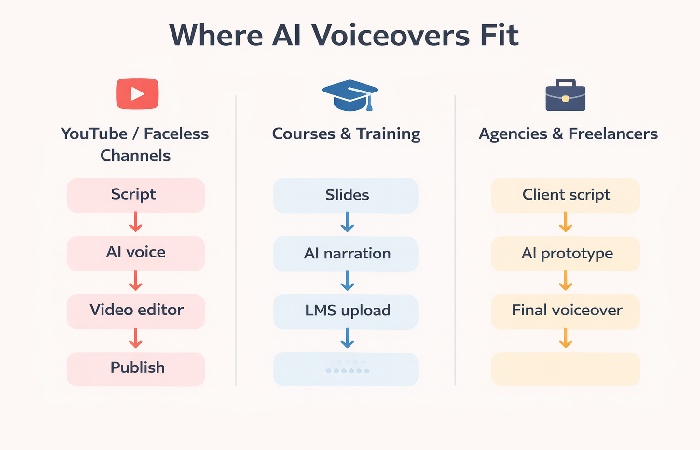
Instead of thinking about MicMonster as “AI magic,” think of it as a tool that either speeds up your existing workflow or doesn’t. Here’s how it fits into three common scenarios.
Workflow 1 – YouTube / Faceless Video Channels
For faceless channels, the process often looks like:
- Research and script the video
- Record voiceover
- Edit video and sync audio
- Publish and iterate
MicMonster changes step 2:
- You paste the script into MicMonster
- Choose a voice and adjust speed/pitch/volume
- Generate and download the audio
- Drop it into your editor and sync with visuals
Where it helps:
- You can test different hooks or intros quickly.
- You can produce more videos per week because audio is no longer a bottleneck.
- You don’t need a perfect recording environment.
Where it may hurt:
- If your channel is built on your personality and voice, AI audio can feel distant.
- Some audiences are sensitive to AI voices and may comment on it.
Workflow 2 – Course and Training Content
For course creators and trainers, the pain is often in updates. You might have:
- 20–50 lessons
- Slides or screen recordings
- Voiceover for each module
When a policy changes or a feature is updated, re-recording everything is painful. With MicMonster:
- You update the script for the affected sections.
- Regenerate only those audio segments.
- Replace them in your LMS or video editor.
This makes it realistic to keep content up to date without full re-records.
Workflow 3 – Agencies and Freelancers
Agencies and freelancers can use MicMonster in two ways:
- Prototyping:Generate quick voiceovers to show clients how a script will sound before committing to final production.
- Production:For lower-budget projects or internal content, use MicMonster as the final voiceover.
This can reduce back-and-forth and help clients sign off on scripts faster. For high-end campaigns, you can still switch to human talent for the final version.
Strengths – Where MicMonster Makes Sense
MicMonster is not a universal solution, but it has clear strengths.
Speed and Iteration
- You can go from script to audio in minutes.
- You can test different intros, CTAs, or explanations without booking studio time.
- You can update content quickly when information changes.
Cost and Scalability
- Once you’re on a paid plan, generating more audio doesn’t require new negotiations or invoices.
- For high-volume content (e.g., many short videos or lessons), this can be significantly cheaper than repeated voice talent bookings.
- Occasional lifetime or promotional deals can be cost‑effective for heavy users, but they change over time.
Consistency and Multilingual Support
- The same voice can be used across many assets, which helps with brand consistency.
- With support for over a hundred languages and many accents, you can localize content faster if MicMonster covers your target markets.
- Having hundreds of AI voices gives you flexibility to match different brands, audiences, and formats.
Quick Checklist: MicMonster Is Likely a Good Fit If…
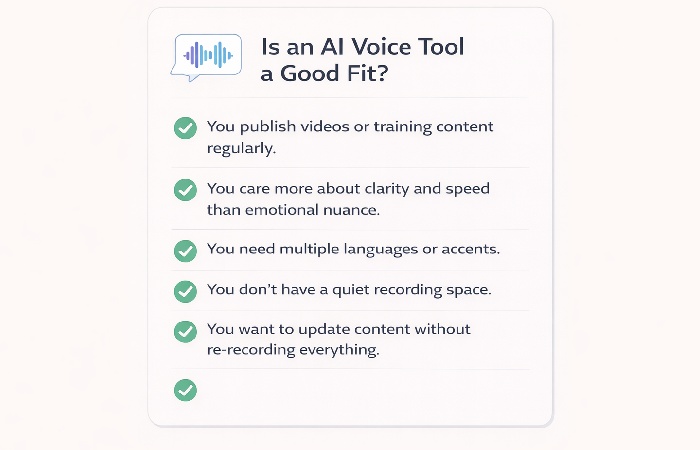
MicMonster is worth testing if:
- You publish videos or training content regularly.
- You care more about clarity and speed than emotional nuance.
- You need to support multiple languages or markets.
- You don’t have a quiet recording environment or strong voice skills.
Limitations and Who MicMonster Is NOT For
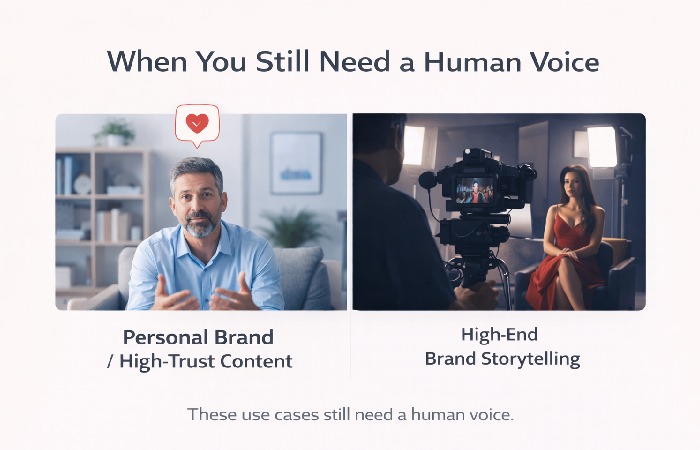
No AI voice tool is perfect. It’s important to be clear about where MicMonster is a bad fit.
Where AI Voices Still Fall Short
- Emotional storytelling, subtle humor, and deep brand voice are still better with humans.
- Long-form narrative content (e.g., podcasts, documentaries) can feel flat with AI voices.
Content Types That May Suffer
MicMonster is probably NOT for you if:
- Your personal voice is central to your brand (coaches, influencers, therapists).
- You produce high-end commercials or brand films where emotional nuance is critical.
- You work in sensitive areas (e.g., mental health, grief support) where human empathy is non-negotiable.
Technical and Workflow Constraints
- You still need to learn how to write scripts that sound natural when read by AI.
- You must manage audio files, naming, and versioning in your projects.
- If your internet connection is unstable, cloud-based tools can slow you down.
MicMonster vs Alternatives (Without Generic Feature Tables)
Instead of a long feature table, it’s more useful to compare MicMonster to the real alternatives you’re considering.
MicMonster vs Recording Your Own Voice
MicMonster tends to win when:
- You don’t have a quiet space or good microphone.
- You need to produce a lot of content quickly.
- You dislike hearing your own voice and it slows you down.
Your own voice tends to win when:
- Your personality and tone are part of the value.
- You can record in decent quality and are willing to practice.
- You want maximum control over emotion and delivery.
MicMonster vs Hiring Voice Talent
MicMonster tends to win when:
- Budgets are tight or projects are frequent and small.
- You need many small updates over time.
- You’re producing internal or low-stakes content.
Voice talent tends to win when:
- You’re producing flagship brand content.
- You need a very specific style or accent.
- You want a unique voice that competitors can’t easily copy.
MicMonster vs Other TTS Tools (High-Level)
Different TTS tools vary in:
- Voice quality and naturalness
- Language and accent coverage
- Pricing models and limits
- Workflow features (e.g., project organization, collaboration)
MicMonster is worth considering if its voices, language coverage, audio quality, and pricing align with your needs. If you care most about ultra-realistic voices for high-end work, you may need to compare it directly with other premium TTS platforms.
How to Get the Best Results from MicMonster
You’ll get much better results if you treat MicMonster as a tool that needs good input.
Writing Scripts for AI Voices
- Use short, clear sentences.
- Add punctuation where you want pauses.
- Avoid long, complex sentences that are hard to follow when spoken.
- Read your script out loud once before generating audio.
Strengths vs Weaknesses at a Glance
Strengths (Pros)
- Iteration speed: script-to-audio in minutes; easy to test different CTAs.
- Scalability: lower cost for high-volume content (e.g., e-learning modules).
- Updates: facilitates quick updates to specific segments without full re-records.
- Environment: eliminates the need for a quiet studio or professional microphone.
Weaknesses (Cons)
- Sensitivity: some audiences may react negatively to AI-generated voices.
- Nuance: cannot replicate high-end brand film performance or human empathy.
- Learning curve: requires trial and error to master speed/pitch/emphasis settings.
- Disclosure: sensitive topics may require disclosure of AI use to maintain trust.
Tuning Voice Settings
- Experiment with speed, pitch, volume, and emphasis to avoid robotic delivery.
- If a voice sounds too flat, try a slightly slower speed.
- Generate short samples first to test settings before rendering long audio.
Integrating Audio into Your Production Flow
- Use consistent file naming (e.g., mp3).
- Keep a simple folder structure per project.
- Always keep the final script version alongside the audio files for future updates.
Learning Curve: What to Expect
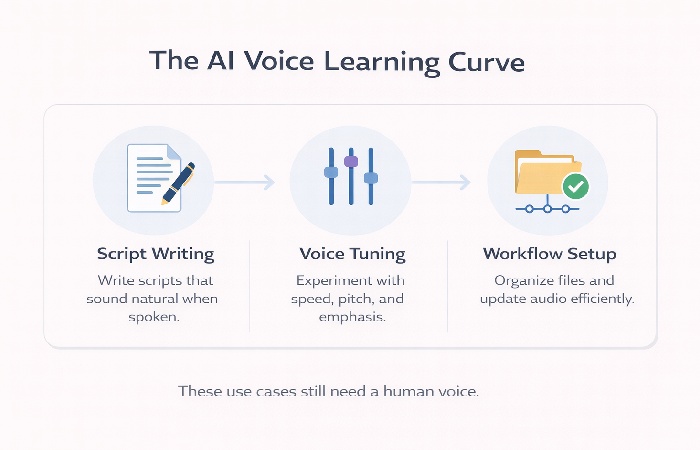
Even with AI voices, there is a learning curve. You’ll need to write scripts that sound natural when spoken, experiment with speed and pitch to avoid robotic delivery, and build a simple process for naming, storing, and updating audio files. The tool is easy to start with, but you get the best results after a few projects of trial and error.
Quick Pre-Render Checklist
Before you render your final audio:
- Have you read the script out loud once?
- Are there any long sentences that should be split?
- Did you test a short sample with your chosen voice and settings?
- Does the tone match the content (serious vs casual)?
Trust, Safety, and Ethical Considerations
AI voice tools raise real questions about transparency and ethics. Many of the same principles that show up in broader AI transparency and accountability guidance also apply to how you disclose synthetic voices and set expectations with your audience.
Disclosure and Transparency
- For most educational and explainer content, using AI voice is acceptable if the audio is clear and respectful.
- If your audience expects a human host, consider disclosing that you use AI voiceovers, especially in sensitive topics.
Licensing and Usage Rights
Before using MicMonster audio in monetized channels, client projects, or paid courses, check which specific plans include a commercial license. Free or trial tiers are usually intended for personal or testing use only; commercial publishing typically requires a paid plan that explicitly grants commercial-use rights. Always verify your own plan and the latest terms.
Future-Proofing Your Content
- AI voice quality will continue to improve.
- Plan for the possibility that you may want to re-record key assets in the future as tools get better.
- Keep your scripts organized so re-generation is easy.
Conclusion – When MicMonster Is the Right Choice
MicMonster.com is not a magic button, but it can be a powerful tool if you use it in the right context. It shines when you need:
- Fast, consistent voiceovers for explainer videos, training, and internal content
- Affordable audio for many small projects or frequent updates
- Multilingual or multi-accent support without hiring multiple voice actors
It is not the best choice when:
- Your personal voice is central to your brand
- You’re producing high-end, emotionally rich campaigns
- You work in areas where human empathy is non-negotiable
If your workflow matches the use cases in this article, MicMonster is worth testing on a small project. If you find that it speeds you up without hurting quality where it matters, it can become a reliable part of your content production stack.
Frequently Asked Questions About MicMonster
1. What is MicMonster and how does it work?
MicMonster is an AI text-to-speech tool that turns written scripts into spoken audio. You paste or upload your text, choose a voice and language, adjust settings like speed and pitch, then export an audio file (such as MP3 or WAV) to use in your videos, courses, or other content.
2. Is MicMonster good enough for YouTube videos?
MicMonster can be good enough for many YouTube videos, especially faceless channels, tutorials, and explainer content where clarity and speed matter more than emotional performance. If your channel is built around your personal voice and personality, a human recording is usually still the better choice.
3. Can I use MicMonster for commercial projects?
You can usually use MicMonster for commercial projects if you are on a paid plan that explicitly includes commercial-use rights. Free or trial tiers are typically intended for personal or testing use only. Always check the current MicMonster terms and your plan details before using AI audio in monetized channels, client work, or paid courses.
4. How many languages and voices does MicMonster support?
At the time of writing, MicMonster supports over a hundred languages and many accents, with hundreds of AI voices. The exact number of voices and languages can change as the platform is updated, so it’s best to check the current list on the MicMonster website or inside the app.
5. Is MicMonster better than recording my own voice?
MicMonster is often better than recording your own voice when you lack a quiet space, a good microphone, or the time to re-record scripts and updates. Your own voice is usually better when your personality is part of your brand, or when you need emotional nuance and a very human feel in your content.
6. How does MicMonster compare to hiring a voice actor?
MicMonster is faster and usually cheaper than hiring a voice actor, especially for frequent, small projects or content that needs regular updates. A professional voice actor is still the better choice for high-end commercials, brand films, or any content where performance, emotion, and uniqueness are critical.
7. Who should not use MicMonster?
MicMonster is not a good fit if your personal voice is central to your brand, if you produce high-end commercials or storytelling content, or if you work in sensitive areas like mental health where human empathy is essential. In those cases, a real human voice is usually the safer and more effective option.
8. Does MicMonster have a learning curve?
Yes. Even though MicMonster is easy to start with, you still need to learn how to write scripts that sound natural when spoken, experiment with speed and pitch settings, and build a simple process for naming, storing, and updating audio files. Most users get noticeably better results after a few projects of trial and error.
9. Is MicMonster safe and ethical to use?
MicMonster is generally safe to use if you follow its terms of service and use AI voices responsibly. You should avoid using AI audio to impersonate real people or mislead audiences, and consider disclosing AI voice use in sensitive or trust-heavy contexts. For commercial use, always confirm that your plan includes the necessary rights.
Author Bio:
Abdul Rahman is a professional content creator and blogger with over four years of experience writing about technology, health, marketing, productivity, and everyday consumer tools and services. He focuses on turning complex topics into clear, practical guides that help readers make informed decisions and improve both their digital work and daily lives.