
Table of Contents
Introduction: The Hidden Assumption Behind Most iOS MDM Advice
iOS MDM software is almost always presented as a tool for control.
Control the device. Control the user. Control updates, apps, data, and behavior.
Nearly every top-ranking guide follows the same logic: the more restrictions you apply, the safer your iPhones and iPads become. This assumption is rarely questioned—and that’s the problem.
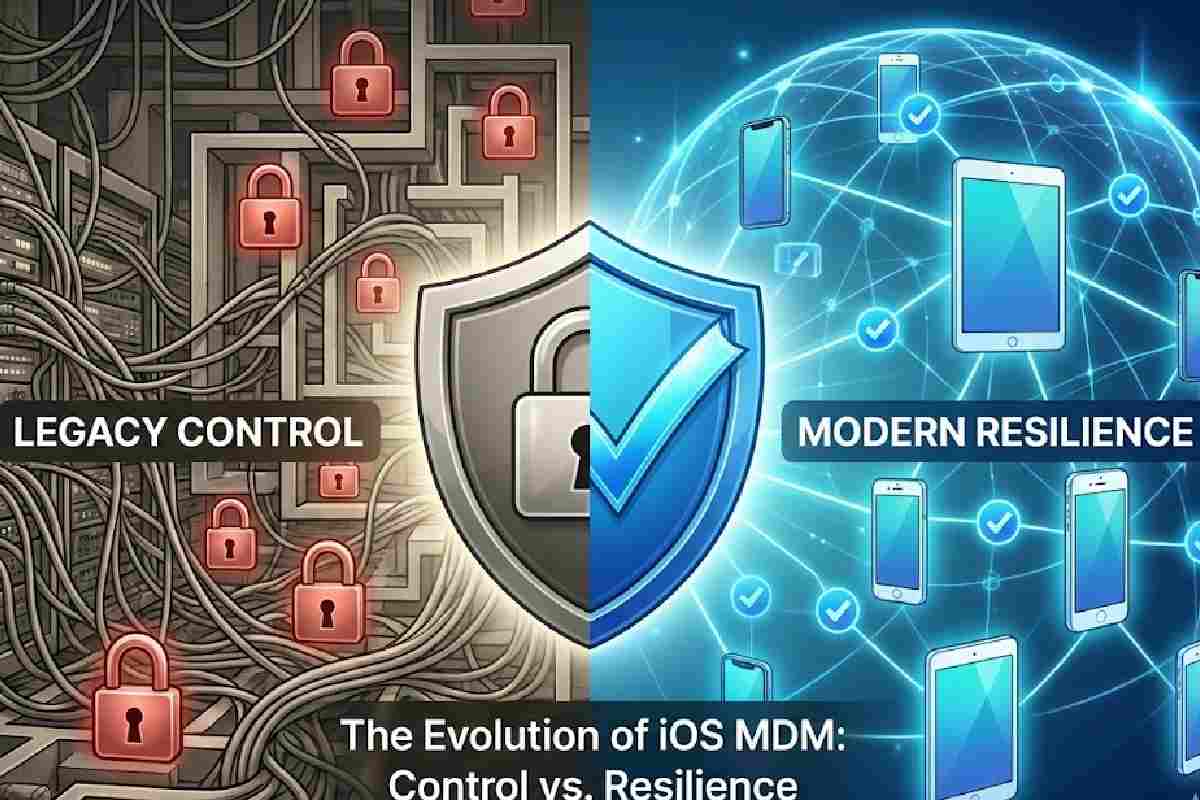
Modern iOS environments are no longer static, centrally owned, or obedient to rigid command-and-control models. Apple’s platform design, real-world IT failures, and security outcomes increasingly show that maximum control often produces minimum resilience.
This article argues something deliberately uncomfortable:
Over-managed iOS MDM environments are becoming riskier, not safer.
What iOS MDM Software Is Supposed to Do (And Why That Definition Is Outdated)
At its core, iOS MDM software exists to:
-
Enroll devices into organizational management
-
Apply configuration profiles
-
Enforce security policies
-
Deploy and manage apps
-
Execute remote actions (lock, wipe, reset)
-
Monitor compliance
Historically, this model made sense
Early iOS deployments were:
-
Fully corporate-owned
-
Centrally issued
-
Updated infrequently
-
Used in predictable environments
MDM functioned like a remote control—IT pushed commands, devices obeyed.
Why this model breaks today
Modern iOS ecosystems now include:
-
Continuous OS updates
-
Mixed ownership (corporate + personal)
-
Privacy-first enforcement limits
-
Always-connected but context-variable devices
-
Users who expect autonomy, not supervision
The use of mobile devices continues to accelerate across enterprise environments. Most professionals now carry multiple Apple devices—iPhone, iPad, and Mac—creating complex management challenges.
Modern mobile device management systems help organizations address these challenges, but only when properly aligned with platform capabilities rather than fighting against them.
The role of iOS MDM software hasn’t disappeared—but the mental model behind it is obsolete.
The Control Fallacy: Why More Restrictions Often Reduce Security
The most dangerous assumption in iOS MDM strategy is this:
“If we restrict more settings, we reduce risk.”
In practice, excessive control introduces new categories of risk.
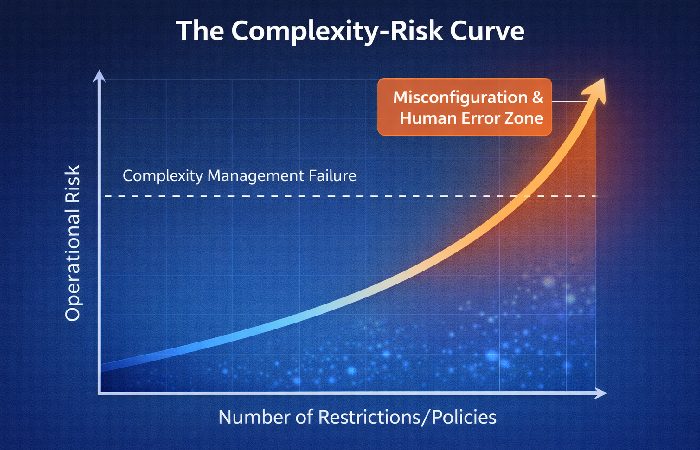
1. Configuration complexity becomes a vulnerability
Each additional restriction:
-
Adds configuration surface area
-
Increases interaction effects between profiles
-
Raises the probability of misconfiguration
Security systems fail not when controls are absent—but when they become too complex to reason about. OWASP’s Mobile Security guidelines explicitly identify security misconfiguration as one of the top mobile threats, noting that complexity directly increases risk exposure.
Organizations that understand how to choose the right technology for their business recognize that more features don’t automatically mean better security—strategic simplicity does.
2. Human error scales with authority
Highly privileged MDM environments:
-
Enable destructive actions in fewer clicks
-
Increase blast radius during mistakes
-
Depend on perfect execution under pressure
No IT team operates perfectly—especially during incidents.
3. Over-control creates compliance illusions
Devices may appear compliant:
-
Until users find workarounds
-
Until updates are delayed
-
Until policies drift from real usage patterns
Rigid systems fail quietly—then suddenly.
Apple’s Strategic Shift: From Command-Based Control to Policy-Based Autonomy
Apple’s platform evolution tells a story most MDM content ignores.
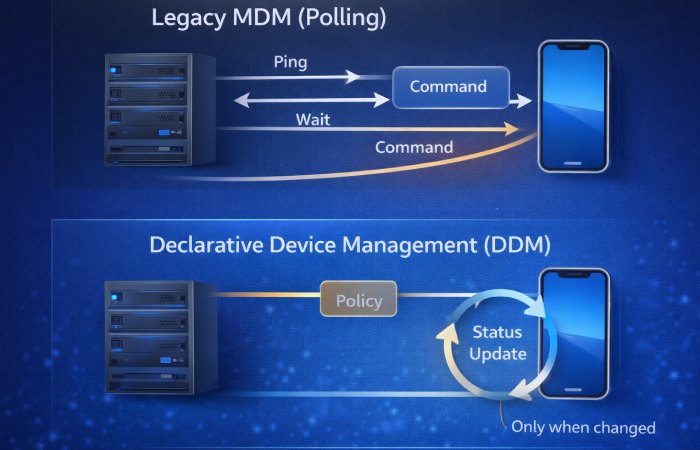
Rather than increasing centralized control, Apple has strategically moved toward:
-
Local compliance evaluation
-
State-based enforcement
-
Declarative policies instead of constant commands
This shift is not subtle or undocumented. Apple formalized this transition at WWDC 2025, announcing the deprecation of legacy MDM software update management in favor of Declarative Device Management across all platforms (iOS, macOS, visionOS, tvOS). Legacy command-based update enforcement will be removed entirely in 2027.
This shift matters because it reveals Apple’s philosophy
Resilience matters more than obedience.
Devices are expected to:
-
Autonomously monitor their compliance state and remediate policy deviations—for example, if a user disables required encryption, the device automatically re-enables it
-
Report status changes asynchronously rather than waiting for admin polling
-
Reduce dependency on continuous admin intervention
iOS MDM software that fights this direction creates friction—not security.
Why the Common Advice on iOS MDM Software Is Failing
Let’s examine widely repeated advice—and why it no longer holds up.
“Disable everything you don’t need”
This creates brittle configurations that:
-
Break with OS changes
-
Require constant maintenance
-
Encourage user resistance
Security improves with clarity, not blanket restriction.
“Delay updates until fully tested”
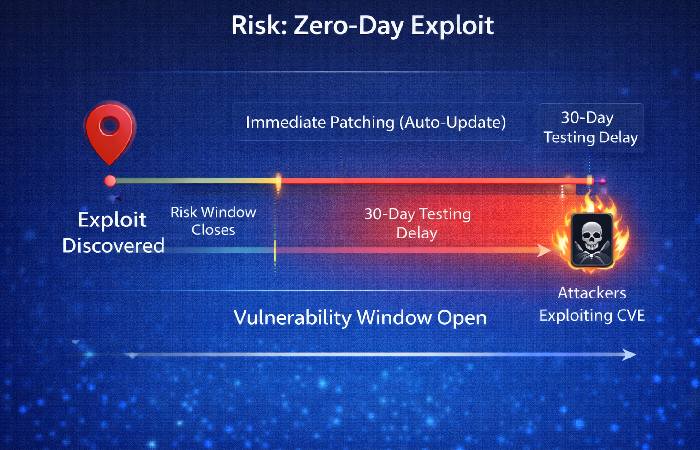
In modern iOS environments:
-
Update delays increase exposure windows
-
Threat models evolve faster than test cycles
-
Security patches are cumulative and time-sensitive
Real-world evidence from December 2025: Apple patched two actively exploited zero-day vulnerabilities (CVE-2025-43529 and CVE-2025-14174) that targeted iOS and iPadOS devices. Security researchers confirmed that delaying these patches—even by days—significantly widened the exploitation window for attackers.
Blocking updates is no longer a neutral decision—it’s an active risk.
“More features mean better protection”
Feature density:
-
Increases admin cognitive load
-
Masks configuration debt
-
Encourages reactive security instead of systemic design
Security maturity is operational, not checkbox-based.
The Real Risk Nobody Mentions: Human Error at Scale
Most iOS MDM failures don’t start with attackers.
They start with:
-
Time pressure
-
Ambiguous interfaces
-
Incomplete device labeling
-
Overconfidence in reversible actions
Highly controlled environments magnify these risks:
-
Bulk operations affect more devices
-
Recovery paths are unclear
-
Accountability becomes reactive
Security systems must be designed for imperfect humans, not ideal operators.
A Better Mental Model: iOS MDM as a Safety Net, Not a Leash
Modern iOS MDM software should function as:
-
A compliance safety net
-
A recovery mechanism
-
A guardrail against catastrophic error
Not as:
-
A surveillance system
-
A behavioral controller
-
A constant command pipeline
Design principles that matter more than features
- Reversibility: Mistakes should be recoverable
- Transparency: Compliance states should be obvious
- Minimalism: Fewer controls, better understood
- Autonomy: Devices should self-correct where possible
This approach improves:
-
Security outcomes
-
Admin confidence
-
User cooperation
-
Long-term sustainability
What to Actually Evaluate When Choosing iOS MDM Software
Instead of feature lists, evaluate platforms by asking:
- How does the system behave during failure?
- How easy is it to make irreversible mistakes?
- How clearly are compliance states communicated?
- How much admin intervention is required weekly?
- How does it handle OS updates by default?
These questions reveal maturity far better than vendor comparisons. Small organizations struggling with tech decisions should prioritize operational clarity over feature density when evaluating MDM platforms.
These questions reveal maturity far better than vendor comparisons.
When High Control Is Justified (And How to Apply It Safely)
There are legitimate high-control scenarios:
-
Unattended devices (kiosks, shared iPads)
-
Regulated environments (healthcare, finance)
-
Safety-critical deployments (industrial, transportation)
But these environments differ because:
-
Ownership is explicit
-
Scope is narrow
-
Wipe authority is documented
-
User autonomy is irrelevant
High control should be exceptional, not standard practice.
Conclusion: The Future of iOS MDM Software Is About Resilience
iOS MDM software is not struggling because it lacks power.
It’s struggling because:
-
We overestimate the value of control
-
We underestimate operational reality
-
We ignore the human cost of complexity
The most secure iOS environments are not the most restrictive.
They are:
-
Predictable
-
Forgiving
-
Transparent
-
Aligned with platform evolution
Organizations implementing effective knowledge management systems understand this principle: structure should enable work, not obstruct it. The same philosophy applies to iOS MDM—the best setups are the ones you interfere with the least.
Top iOS MDM Solutions That Align With Modern Strategy
While this article critiques over-restrictive approaches, several MDM platforms are embracing Apple’s declarative direction and the principles outlined above.
Jamf Pro
Deep Apple ecosystem integration with native support for Declarative Device Management. Strong focus on automated compliance and minimal admin intervention. Best for organizations committed to Apple-only environments.
Kandji
Purpose-built for Apple devices with automated compliance remediation. The platform autonomously corrects policy deviations without constant admin oversight. Particularly strong in zero-touch deployment scenarios.
Hexnode UEM
Cross-platform MDM with robust iOS support and DDM capabilities. Offers policy-based management with clear compliance visibility. Good option for mixed-device environments requiring unified management.
What to Look For
When evaluating any MDM platform, prioritize:
-
Declarative Device Management support – Ensures alignment with Apple’s platform direction
-
Autonomous remediation capabilities – Devices self-correct policy violations
-
Clear compliance visibility – Status changes are obvious, not buried in logs
-
Reversible operations – Mistakes can be undone without device wipes
-
Update enforcement flexibility – Supports rapid security patching
These platforms represent the strategic approach this article advocates: security through clarity and resilience, not maximum restriction.
For detailed vendor comparisons, pricing, and implementation guides, consult platform-specific documentation or schedule demos directly with vendors.
FAQ: iOS MDM Software
What is iOS MDM software?
iOS MDM software is a system used by organizations to enroll, configure, secure, and manage iPhones and iPads remotely through policy-based controls.
Is more restrictive iOS MDM software more secure?
Not necessarily. Overly restrictive MDM setups often increase misconfiguration risk, human error, and update delays, which can weaken security rather than strengthen it.
What features should I prioritize in iOS MDM software?
Prioritize clarity, recoverability, compliance visibility, update handling, and minimal destructive actions over raw feature volume. Operational maturity matters more than checkbox features.
Is iOS MDM software still necessary in 2026?
Yes—but its role has shifted from constant device control to policy-based compliance and risk mitigation. Modern MDM should function as a safety net, not a surveillance system.
How does Apple’s direction affect iOS MDM software?
Apple increasingly favors declarative, state-based management through DDM, signaling a move away from command-heavy, admin-driven control models. Organizations should align their MDM strategies with this platform evolution.
Is over-restrictive MDM security theater?
In many cases, yes. When organizations apply maximum restrictions without operational justification, they create complexity that obscures real security while providing the illusion of control. Effective security requires intentional design, not blanket lockdown.
What does Apple recommend for iOS MDM in 2026?
Apple’s official guidance emphasizes Declarative Device Management, autonomous device compliance remediation, and thoughtful software update enforcement. The company discourages deferring updates beyond necessary testing windows (typically 30–90 days maximum) due to cumulative security risks.
Old Advice vs. Modern Reality
The shift from control-heavy to resilience-focused iOS management represents a fundamental change in how organizations should think about device security.
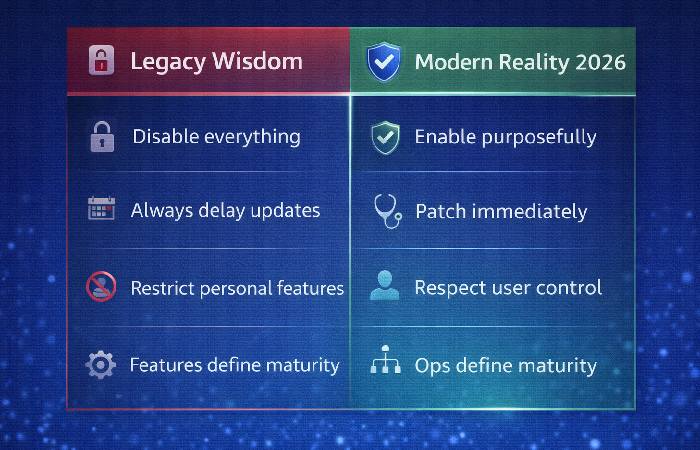
| Traditional MDM Wisdom | Why It’s Outdated | Modern Best Practice |
|---|---|---|
| “Disable everything by default” | Creates brittle configurations that break with OS updates | Enable purposefully; restrict minimally |
| “Delay updates for full testing” | Increases exposure to known vulnerabilities | Test rapidly; deploy security patches within days |
| “More restrictions = more security” | Complexity breeds misconfiguration and policy drift | Maintain clarity over coverage |
| “Control users tightly” | Encourages workarounds and resistance | Design for cooperation, not obedience |
| “Maximize MDM feature usage” | Increases admin cognitive load and error risk | Prioritize operational simplicity |
This content has been prepared using publicly available Apple platform documentation, industry security practices, and enterprise device management research. AI assistance was used to structure, analyze, and synthesize complex technical concepts for clarity and accessibility.
Last updated: January 2026. Based on Apple WWDC 2025 announcements, official Apple Platform Deployment documentation, OWASP Mobile Security standards, and analysis of December 2025 zero-day security incidents affecting iOS and iPadOS.