

Many guides describe indown.io as a simple, free, and safe downloader and emphasize that it does not ask for your Instagram login details for public content. That framing is incomplete.
This article takes a different approach. Instead of repeating how to paste a link and click download, it explains what actually happens behind the scenes, what risks are real (and which are exaggerated), and why tools like InDown sometimes work flawlessly — and sometimes don’t.
If you already know how Instagram downloaders work at a surface level, this guide is for you.
Table of Contents
“No Login” Is a Privacy Claim — Not a Security Model
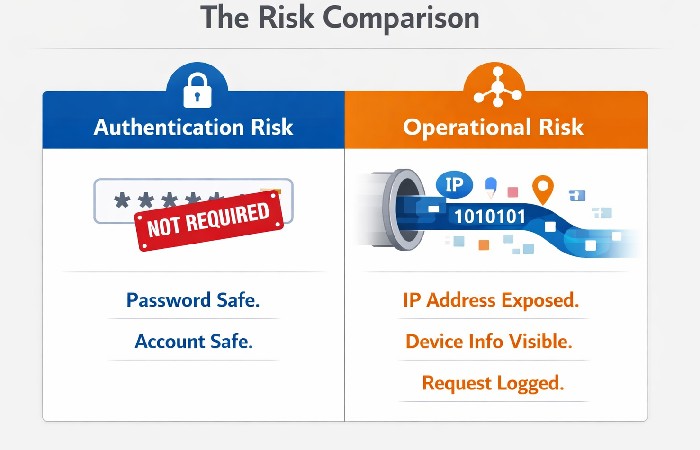
No login required” reduces one specific risk: credential theft.
It does not eliminate exposure, tracking, or misuse vectors.
This “no login” promise applies to public downloads; the separate private downloader still requires you to be logged into Instagram in the same browser and to use the page source of the private post, even though you do not type your password into InDown itself.
When sites emphasize “no login,” they are addressing authentication risk, not operational risk. These are different layers:
-
Authentication risk: Are your Instagram credentials requested or stored?
-
Operational exposure: What data flows through the downloader’s servers during processing?
For public posts, InDown does not ask for your Instagram username or password. Tools like its separate private downloader, however, do require you to be logged into Instagram in the same browser session.
Understanding this distinction is critical if you care about privacy, security, or reliability rather than convenience alone.
What Actually Happens When You Paste an Instagram Link
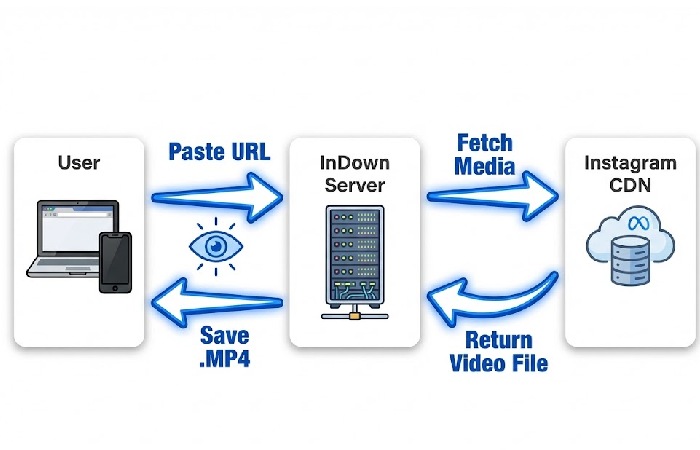
At a high level, InDown’s workflow looks like this:
-
Your browser sends a request to InDown’s server with the pasted Instagram URL.
-
InDown’s backend fetches media references from Instagram’s public infrastructure (typically via CDN endpoints).
-
The media file is temporarily processed and re-served to you as a downloadable asset.
Even without login credentials, certain data is unavoidably exposed during this flow:
-
Your IP address
-
Browser and OS identifiers (user-agent headers)
-
Request timing and frequency
-
The specific Instagram URL requested
What isn’t exposed:
-
Instagram passwords
-
Account sessions
-
Private messages or feeds
This is normal web behavior — not misconduct — but it contradicts the implied idea that “no login” equals “no visibility.”
“No Login” vs “No Data Collection”: Why the Terms Are Misleading
Many users interpret no login as no data collection. Technically, that’s incorrect. Even privacy‑focused browsers explain that websites routinely receive IP addresses, user agents, and basic request metadata as part of normal HTTP traffic, as outlined in the Brave browser privacy guide.
Any server-based tool typically maintains temporary request logs for debugging and abuse prevention, plus some form of rate limiting and caching to keep the service stable.
Privacy policies often stay vague here, not because something malicious is happening, but because users rarely ask the right questions.
The correct takeaway is not “InDown is unsafe,” but rather:
No web-based downloader can avoid seeing basic technical metadata such as your IP address and browser headers when you make a request.
Some Instagram downloaders explicitly state that they do not collect user data or save download history, but they rarely explain in detail how long technical logs like IP addresses are retained.
Why InDown Works One Day — and Fails the Next
Download failures are often blamed on user error. In reality, platform-side changes are the dominant factor.
Instagram frequently modifies:
-
CDN URL formats
-
Media manifests
-
Access tokens for stories and reels
-
Delivery logic for music-licensed content
As a result:
-
Some reels download without issue
-
Others return low-resolution files
-
Private or music-heavy reels fail entirely
InDown and similar tools operate reactively. They adapt after Instagram updates roll out — not before.
This is why promises like “always works” or “guaranteed HD” are technically unsound.
Watermark-Free Downloads: Marketing Promise vs Platform Reality
Watermark-free reels are often advertised as a permanent feature, but in reality results vary between posts.
Watermark behavior likely depends on how Instagram prepares and serves each video, as well as regional and licensing factors.
Some reels are delivered as clean video streams, while others appear to use composed overlays.
When watermark-free downloads fail, it’s not necessarily a tool limitation — it can be a content-delivery choice made upstream by the platform.
The “Free Tool” Trade-Off Most Pages Don’t Explain
InDown is free because it operates on a standard web-tool model:
-
Display advertising
-
High-volume traffic
-
Minimal friction
This model introduces ecosystem risks, not necessarily tool risks.
Common issues users encounter:
-
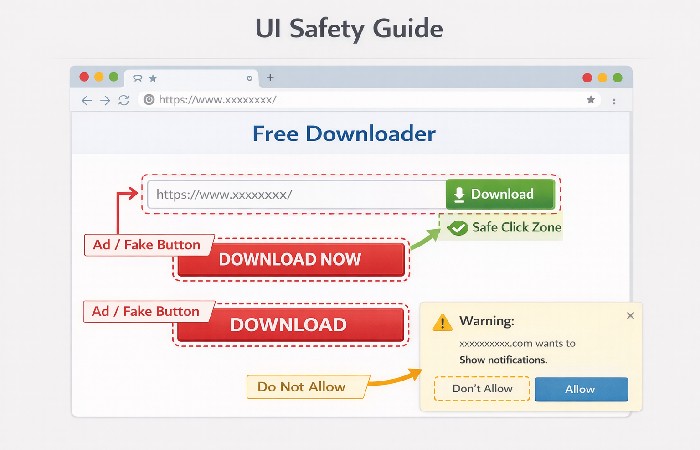
Aggressive ads mimicking download buttons
-
Redirects triggered by third-party scripts
-
Clone sites impersonating popular tools
These problems come from the ad layer, not the downloader logic itself — a nuance most pages ignore.
Real Security Risks — and Overstated Ones
Legitimate risks
-
Malvertising via fake buttons
-
Browser notification abuse
-
Redirect chains on mobile
Overstated risks
-
“Your Instagram account will be hacked”
-
“Pasting a link steals your data”
Practical mitigation is mostly about tightening your browsing environment, not chasing a perfectly “safe” downloader.
Using a modern browser with built‑in tracking protection, keeping it updated, and avoiding notification prompts or unknown extensions follows the same baseline best practices recommended for any site that runs third‑party scripts.
Resources like Google’s Safe Browsing documentation explain how modern browsers identify malicious sites, deceptive redirects, and unsafe downloads, and surface clear warnings before you interact with them.
Security here is about environment control, not fear.
If you rely on a VPN or privacy tools to reduce tracking when using these sites, you still need to understand how they actually protect your traffic, just as you would when reading a guide like why and how VPN plays a role in promoting data security.
When Using InDown Makes Sense — and When It Doesn’t
Reasonable use cases
-
Personal archiving
-
Referencing public content
-
One-off downloads
Poor use cases
-
Commercial redistribution
-
Bulk scraping
-
Reliance on private content access
-
Automation at scale
InDown also offers a separate private downloader that asks you to log into Instagram in the same browser and paste the page source of the private post into its form.
This workflow still relies on your authenticated Instagram session, even though your username and password are not entered on InDown itself.
Web downloaders are convenience tools, not infrastructure.
A Brief Legal Reality Check
Public visibility does not equal usage rights. Instagram’s own Terms of Use prohibit using content without permission in ways that infringe or violate someone else’s rights, and copyright laws in many jurisdictions treat commercial reuse or redistribution as a separate, higher‑risk category.
Downloading for personal reference is often tolerated in practice, but if you plan to repost, remix, or monetize someone else’s reel, you should assume you need explicit permission from the creator.
Final Takeaway: Understand the System, Not Just the Tool
InDown reduces friction. It does not eliminate exposure.
“No login” protects your password — not your metadata, context, or responsibility. Used with awareness, tools like InDown are convenient. Used blindly, they create misplaced trust.
The difference lies in understanding how the system works, not just clicking “Download.”
Key FAQs: InDown.io Download
What is InDown.io used for?
InDown is a web-based tool used to download publicly available Instagram content such as videos, reels, photos, stories, and profile pictures by pasting a post URL.
Is InDown.io safe to use?
InDown does not require Instagram login credentials, which reduces account-compromise risk. However, like any free web tool, users should be cautious of ads, fake download buttons, and redirects.
Does InDown.io collect user data?
No login is required, but basic technical data (such as IP address and browser headers) may be processed temporarily for service operation, as is standard for web-based tools.
Why does InDown.io sometimes fail to download reels or stories?
Failures usually occur due to Instagram-side changes, private account restrictions, region-based media delivery, or music licensing limitations—not because of user error.
Can InDown.io download private Instagram content?
Only if the content is accessible via a valid link and permitted by Instagram’s current delivery logic. Private content downloads are unreliable and frequently blocked.
Are downloads from InDown.io watermark-free?
Some reels download without watermarks, but this is not guaranteed. Watermark behavior depends on how Instagram serves the media, which varies by content and region.
Does InDown.io work on mobile devices?
Yes, it works in mobile browsers as well as on desktop. In practice, desktop browsers usually handle file downloads more consistently than some mobile browsers.
Is it legal to download Instagram videos using InDown.io?
Downloading content for personal use is typically tolerated, but redistributing or using downloaded content commercially may violate Instagram’s terms or copyright laws.
Why are there multiple “Download” buttons on the site?
Free tools often rely on advertising. Users should identify the correct download button and avoid enabling notifications or installing unrelated apps.
When should InDown.io not be used?
It is not suitable for bulk downloads, automated scraping, commercial reuse, or reliable access to private or copyrighted content.
Disclosure:
This content has been prepared based on publicly available technical documentation, platform policies, web security research, and reputable industry sources.
AI assistance was also utilized to compile, organize, and simplify complex technical concepts and observational analysis for clarity and reader understanding.
About the Author:
Abdul Rahman is a professional content creator and blogger with over four years of experience writing about technology, health, marketing, productivity, and everyday consumer products.
He focuses on turning complex topics into clear, practical guides that help readers make informed decisions and improve their digital and daily lives.