
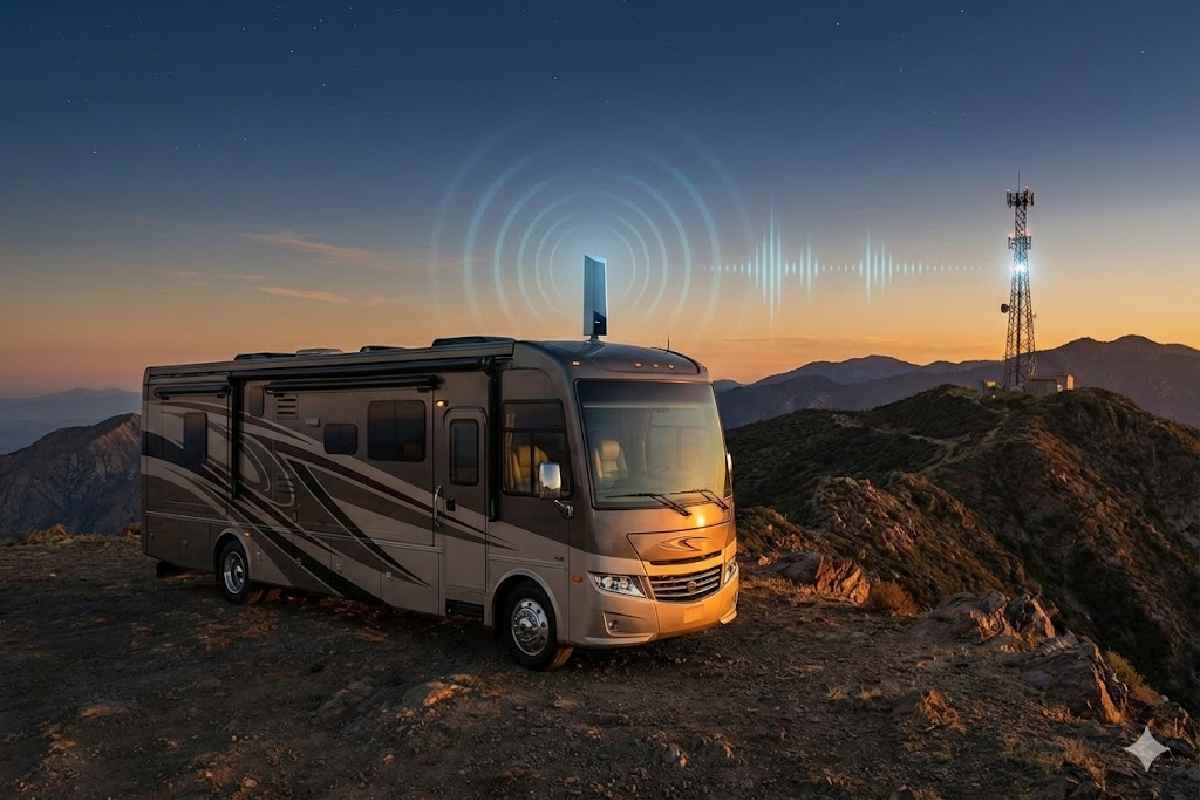
Staying connected on the road is no longer optional.
Owning an RV lets you take your home on the road and enjoy a flexible outdoor lifestyle, but it also means you will regularly drive through areas with weak or inconsistent cellular coverage. A dedicated RV cellular booster helps turn those dead zones into usable coverage so you can work, stream, and navigate more reliably.
To get the most benefit, it’s important to choose the right cellular signal booster for RV and understand how to install and use it correctly, so your setup delivers real-world performance instead of just looking good on paper.
In 2026, dependable cell signal is one of the most important factors shaping how RVers work, stream, and travel. Whether you’re navigating, working remotely, or calling family from a national park, reliable connectivity can make the difference between freedom and frustration.
That’s where cell boosters for RVs come in — and the weBoost Drive Reach RV remains one of the strongest, FCC-certified mobile signal boosters on the market.
Let’s break down what modern boosters actually do, what real users report, and how to choose the right system for your travel style.
Table of Contents
What Is a Cell Booster — and Why It Matters for RVers
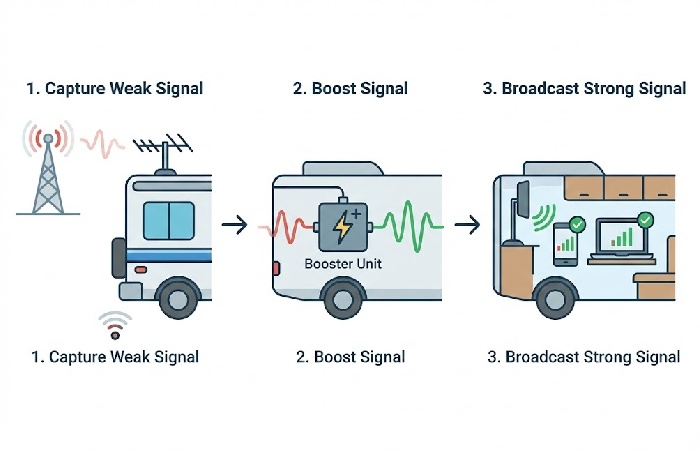
A cell phone signal booster amplifies existing cellular signals from nearby towers, improving both download speeds and call reliability inside your RV. It does not create a new signal — it enhances the one already available.
According to weBoost, their Drive Reach RV can “reach towers up to 74% farther than the Drive X RV,” providing stronger uplink and downlink performance for 4G LTE and 5G devices across all major U.S.
carriers. This behaviour aligns with FCC guidance that consumer boosters are designed to enhance licensed carrier signals while respecting strict gain and interference limits described in the FCC signal booster overview.
Unlike older models, it supports multi-carrier connectivity (Verizon, AT&T, T-Mobile, UScellular, and others) simultaneously — no need for multiple systems.
Why RVs Struggle with Cell Signal
Even as mobile networks expand, RV connectivity still faces unique obstacles in 2026.
1. Remote Locations and Sparse Towers
Most campgrounds, national parks, and scenic routes sit far from cell infrastructure. Mountains, dense forests, and hilly terrain naturally weaken or block signal.
2. The “Faraday Cage” Effect
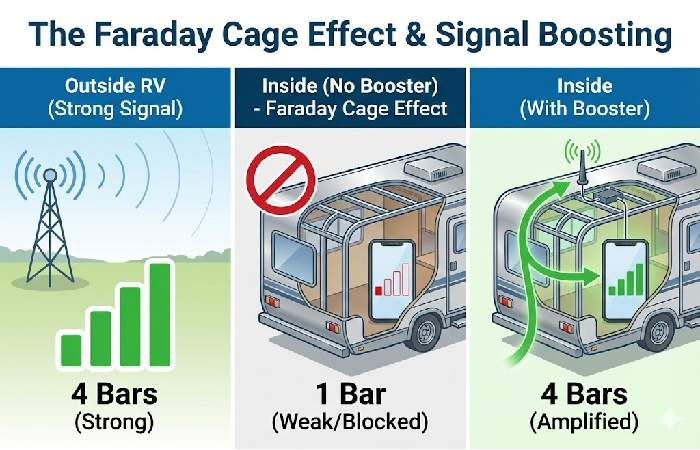
Many RVs use aluminum framing, fiberglass walls, and rubber membranes, all of which reflect or absorb radio frequencies — a phenomenon called the Faraday Cage Effect. This means even if you have decent signal outside, it may drop significantly inside.
3. Increased Reliance on Mobile Data
Today’s RVers use mobile connections as full-time internet — for Zoom calls, streaming, cloud storage, and navigation.
The RV Industry Association (RVIA) confirms connectivity continues to rank as one of the top technological features influencing RV purchasing decisions.
The 5G Factor — Why Boosters Still Matter
5G’s high-frequency “millimeter wave” signals offer great speed but poor range — easily blocked by walls or trees. That makes boosters even more essential for mobile users traveling through rural or obstructed areas.
All major carriers are expanding mid-band 5G, but coverage remains inconsistent in rural regions.
Boosters bridge that gap by strengthening existing mid- and low-band signals that travel farther, complementing the kind of sub‑6 GHz deployments described in technical explainers from chipset vendors such as Qualcomm’s 5G millimeter wave and sub‑6 GHz guide.
Real-World Performance: Field Test Highlights
While every environment differs, user tests and field reviews show clear, measurable improvements when boosters are correctly installed.
Test 1 — Highway Performance
Drivers report that the Drive Reach RV maintains a usable signal longer along remote highways and mountain passes — especially when using navigation apps.
Test 2 — Campsite Improvements
Measurements using RSRP (Reference Signal Received Power) show meaningful gains. Typical results shift from weak “-110 dBm” (barely connected) to “-80 dBm” (strong) inside the RV once boosted.
Test 3 — Speed & Hotspot Results
Independent reviewers commonly see 2× – 6× faster download speeds depending on initial conditions — for instance, from 0.5 Mbps to 3 Mbps in rural zones. Claims of “24× speed improvements” appear anecdotal and vary by tower proximity.
Choosing the Right Booster for Your RV
Mobile vs. Stationary Systems
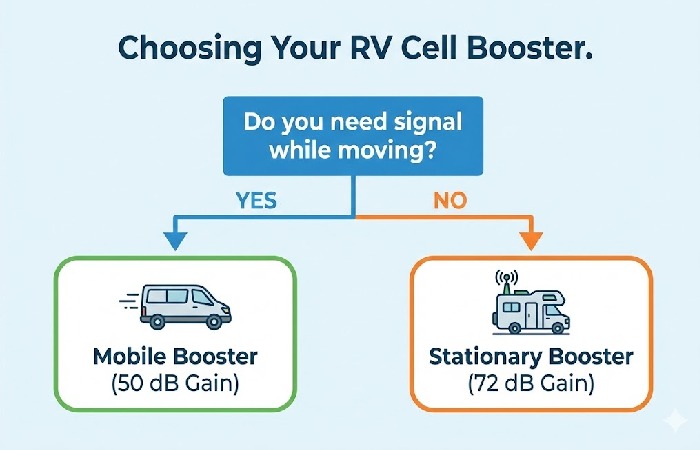
Mobile boosters like the Drive Reach RV are capped at about 50 dB of gain, in line with U.S. regulations that limit amplification in moving vehicles to prevent harmful interference.
Stationary systems, such as RV or home boosters used only while parked, can legally provide higher gain (often 65–72 dB) for fixed locations. These limits match current U.S. rules for wideband consumer boosters set out in the FCC’s Part 20 signal booster regulations.
| Booster Type | Gain Limit | Works While Driving | Ideal Use |
|---|---|---|---|
| Mobile (e.g., Drive Reach RV) | Up to 50 dB (FCC limit) | ✅ Yes | Frequent travelers |
| Stationary (e.g., Destination RV) | Up to 65–72 dB | ❌ No | Parked long-term stays |
Antenna Choices
-
Omnidirectional antennas capture signals from all directions — great for driving.
-
Directional antennas (Yagi type) focus on one tower, offering stronger fixed-site performance.
Power & Installation
Most RV boosters offer both 12 V DC and 110 V AC options.
Installation generally takes under an hour, and the weBoost App provides guided setup instructions.
Common Installation Mistakes to Avoid
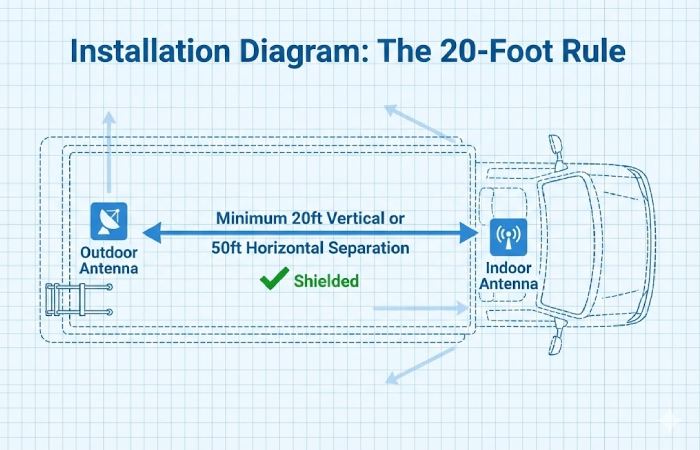
1. Antennas Too Close Together
Maintain at least 20–30 feet of vertical or 50 feet horizontal separation between outdoor and indoor antennas to prevent oscillation (feedback loops).
2. Wrong Booster Type
Don’t use stationary (home) boosters while driving — FCC prohibits it, and performance will degrade.
3. Skipping Signal Tests Before Setup
Use field-test mode on your phone to check tower strength before installing; boosters can’t amplify a signal that doesn’t exist.
Editor’s Pick: Best RV Boosters for 2026
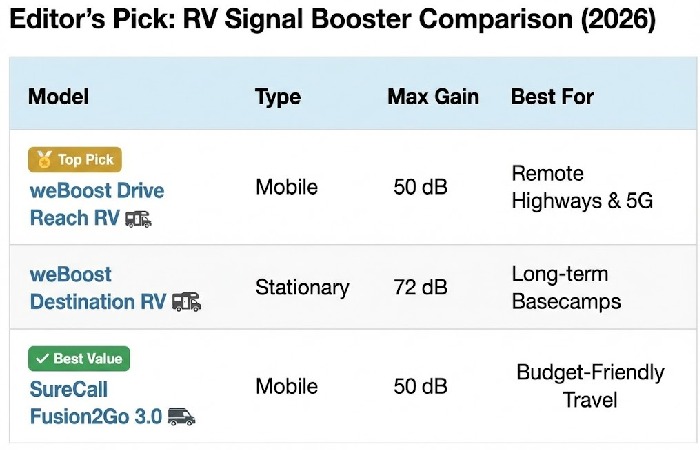
| Rank | Model | Type | Key Advantage |
|---|---|---|---|
| 🥇 weBoost Drive Reach RV (2024 edition) | Mobile | Strongest uplink power; simple install | |
| 🥈 weBoost Destination RV | Stationary | Highest gain for parked setups | |
| 🥉 SureCall Fusion2Go 3.0 RV | Mobile | Competitive price; good for mid-range use |
Key Takeaways
✅ Boosters don’t create signal — they amplify what exists.
✅ Metal RV construction weakens cellular reception (Faraday effect).
✅ FCC limits mobile gain to 50 dB for safety and interference control.
✅ Proper installation (antenna spacing, grounding, power stability) determines 80% of success.
✅ weBoost Drive Reach RV remains the top all-around performer for most travelers in 2026.
FAQ
Q1. Do RV cell boosters really work?
Yes — when properly installed and used in areas with at least a minimal signal. Typical gains range from 2× – 6× stronger reception.
Q2. Do they require monthly fees?
No. Once purchased, boosters operate with no subscription costs.
Q3. Do they support 5G?
Yes. Modern boosters amplify low- and mid-band 5G frequencies (sub-6 GHz).
Q4. What’s the best system for long-term campers?
A stationary booster (e.g., Destination RV) with a directional antenna for maximum gain.
Q5. Can I install it myself?
Yes — most RV kits take under an hour with basic tools and clear app guidance.