

Table of Contents
Introduction — Problem, Agitation, Quick Solution
Problem
You know your team needs better call center quality assurance tools, but every platform promises AI, automation, and “next‑level insights.” It’s hard to see which solution actually fits your size, tech stack, and QA maturity.
Agitation
Demos all sound the same, pricing models are confusing, and stakeholders want different things—ops wants simple workflows, IT worries about integration, compliance wants airtight auditing, and finance wants clear ROI. Meanwhile, your current QA process is mostly manual and sample‑based, so you miss patterns in the majority of interactions and struggle to coach consistently.
Quick Solution
This guide breaks down modern call center quality assurance tools in plain language, shows the best‑known platforms, and gives clear selection criteria. By focusing on features that actually change outcomes—automated scoring, AI analytics, coaching workflows, omnichannel monitoring, and integration—you can shortlist tools that scale QA instead of adding another unused dashboard.
What Call Center Quality Assurance Tools Do
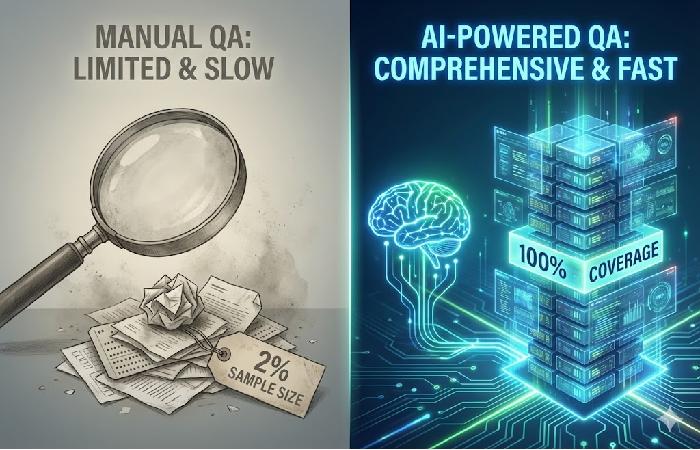
Call center quality assurance tools centralize recording, evaluation, and analysis of customer interactions so you can monitor and improve quality at scale. They typically offer omnichannel interaction capture, configurable QA scorecards, dashboards, and workflows to share evaluations and track coaching.
Most leading tools now include AI capabilities such as speech‑to‑text transcription, keyword and topic tagging, sentiment detection, and automated scoring against your criteria.
This allows QA teams to move from manually reviewing a small sample of calls to analyzing a far larger portion of interactions across voice, chat, email, and messaging, as shown in modern AI quality management platforms.
Key Features to Look for in QA Tools
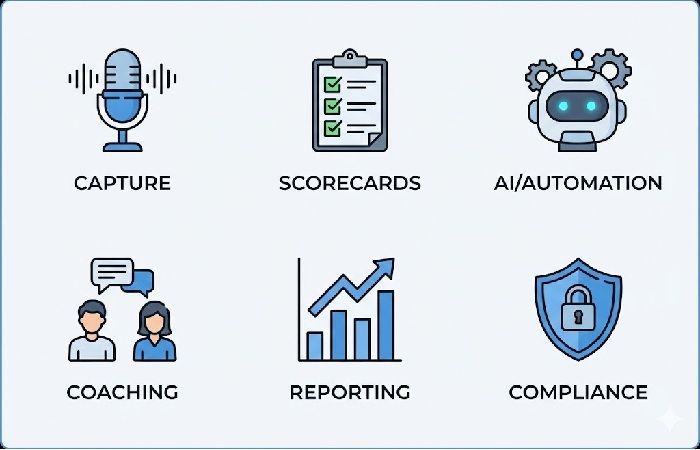
When assessing call center quality assurance tools, several feature areas drive day‑to‑day value.
- Interaction capture: Reliable recording and storage for voice, chat, email, and messaging, with suitable retention controls.
- Configurable scorecards: Flexible, role‑ and channel‑specific scorecards that mirror your QA framework instead of forcing a generic form.
- AI and automation: Auto‑scoring, keyword/phrase detection, topic tagging, and sentiment analysis to expand coverage and surface patterns quickly.
- Coaching workflows: Built‑in tools to share evaluations, schedule coaching, log action items, and track follow‑up.
- Reporting and analytics: Dashboards and exports by agent, team, queue, and topic, with filters and trend views for operational and strategic reviews.
- Compliance and security: Role‑based access, redaction, configurable retention, and audit trails appropriate for your regulatory environment.
Focusing evaluation on these areas helps you avoid being distracted by superficial features that look impressive in demos but don’t change QA outcomes.
Types of Call Center QA Tools
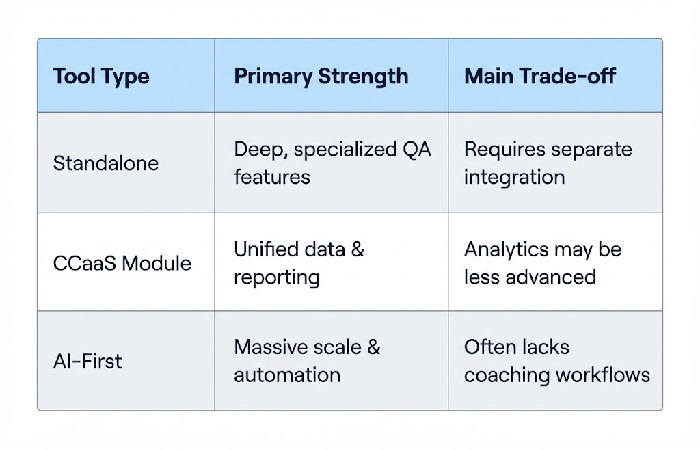
Broadly, call center quality assurance tools fall into three categories.
- Standalone QA platforms: Dedicated QA and coaching tools that integrate with multiple telephony or contact center systems.
- Modules in contact center suites: QA components embedded in larger CCaaS or CX platforms, tightly integrated with routing, WFM, and CRM data.
- AI analytics and speech platforms: Tools specializing in transcription, analytics, and auto‑scoring, often layered on top of existing QA or WEM solutions.
Each type has trade‑offs. Standalone platforms often provide deeper QA functionality and flexible scorecards but require separate integration and administration.
Embedded modules can simplify deployment and data flow if you already use that ecosystem, while AI‑first tools excel at large‑scale analysis but may need more configuration to match your specific QA criteria and coaching workflows.
How AI Enhances Call Center Quality Assurance Tools
AI capabilities in call center quality assurance tools generally focus on scaling coverage and surfacing patterns that manual review would miss. Common functions include:
- Transcription and search: Converting calls into searchable text so you can filter by keyword, phrase, or topic.
- Auto‑scoring: Evaluating interactions against your scorecard logic or trained models to flag likely pass/fail behaviors at scale.
- Sentiment and emotion detection: Identifying interactions with strong negative sentiment, frustration, or risk cues for targeted follow‑up.
- Topic and root‑cause analysis: Grouping calls by issue or product so you can spot emerging problems and process gaps earlier.
These features help you review a far larger share of interactions and prioritize where to spend human QA time. AI does not remove the need for human judgment, but it can sharply reduce the manual effort involved in finding the most coachable and high‑risk moments.
Best Call Center Quality Assurance Software (2025)
Selection here focuses on tools repeatedly cited in 2025 round‑ups for automated scoring, AI analytics, customizable scorecards, coaching workflows, omnichannel support, and integration flexibility.
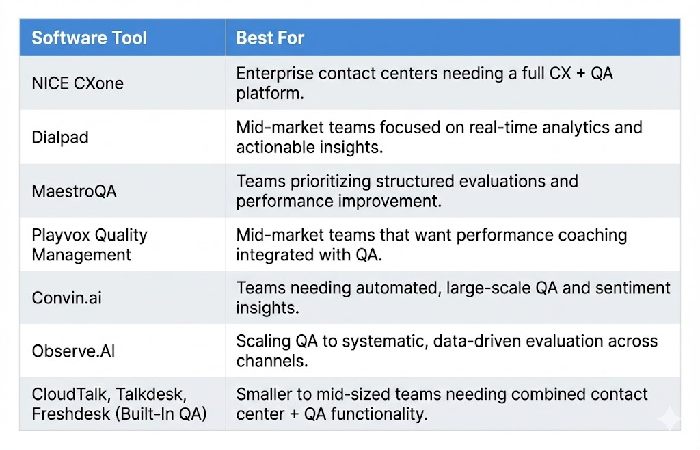
NICE CXone
- Best for: Enterprise contact centers needing a full CX + QA platform.
- Combines QA scoring, workforce optimization, compliance tracking, and advanced voice analytics inside a broader CX suite.
- Provides deep multi‑channel integration and robust reporting suited to complex, regulated environments.
Dialpad
- Best for: Mid‑market teams focused on real‑time analytics and actionable insights.
- Offers AI‑powered QA built into a unified communications and contact center platform, including live transcription and real‑time conversation analysis.
- Supports automated QA scoring and coaching prompts directly tied to agent communication workflows.
MaestroQA
Best for: Teams prioritizing structured evaluations and performance improvement. Dedicated QA workflow software that supports manual and semi‑automated QA, flexible scorecards, calibration tools, and detailed reporting, similar to the capabilities outlined in the MaestroQA quality assurance platform.
A strong fit when human review, clear criteria, and coaching cycles are central to your call center quality assurance program.
Playvox Quality Management
- Best for: Mid‑market teams that want performance coaching integrated with QA.
- Pairs QA scoring with built‑in coaching and performance workflows, making it easier to close the loop from evaluation to behavior change.
- Often praised for ease of use and structured QA processes that suit growing teams.
Convin.ai
- Best for: Teams needing automated, large‑scale QA and sentiment insights.
- AI‑driven QA and analytics across speech and text, including sentiment, intent detection, and real‑time agent assist.
- Designed to extend QA coverage toward near‑full interaction analysis, reducing reliance on small manual samples.
Observe.AI
Call center quality assurance tools are essential for scaling QA from a handful of sampled calls to systematic, data‑driven evaluation across channels, especially when they sit on top of a well‑defined call center quality assurance program.
Integrates QA with workforce optimization and performance insights for larger or more complex operations.
CloudTalk, Talkdesk, Freshdesk (Built‑In QA)
- Best for: Smaller to mid‑sized teams needing combined contact center + QA functionality.
- These contact center platforms include built‑in recording, analytics, and quality monitoring with basic scorecards and dashboards.
- A good option when you prefer an all‑in‑one CCaaS solution instead of separate call center quality assurance tools.
Pros and Cons of Common QA Tool Approaches
Different approaches to call center quality assurance tools come with predictable strengths and weaknesses.
- Standalone QA platforms
- Pros: Deep QA functionality, flexible scorecards, strong coaching tools.
- Cons: Another system to integrate and manage; may require more initial setup and governance.
- QA inside CCaaS/WEM suites
- Pros: Shared data model, simpler integration, unified reporting across routing, QA, and WFM.
- Cons: QA features may lag behind best‑of‑breed tools in analytics depth or AI sophistication.
- AI‑first analytics tools
- Pros: Strong transcription, auto‑scoring, and insight generation; excellent for high‑volume operations and pattern detection.
- Cons: Often require careful configuration and QA oversight, and may not cover coaching workflows on their own.
Understanding these trade‑offs helps you align tool choices with your priorities, resources, and existing stack.
Matching QA Tools to Team Size and Needs
Team profile strongly influences which call center quality assurance tools make sense.
- Small to mid‑sized teams: Often need easy deployment, intuitive interfaces, and out‑of‑the‑box scorecards and reports; a simple standalone QA platform or a strong QA module in an existing CCaaS can work well.
- Large or multi‑site operations: Typically require advanced analytics, multi‑region support, integration with WFM/WEM and CRM, and granular role‑based access; suite‑based QA or enterprise‑grade standalone platforms are common choices.
- Highly regulated sectors: Need robust redaction, audit trails, and strong compliance reporting; tools with mature governance and policy controls are critical.
- High‑volume digital/omnichannel teams: Benefit from AI‑driven tools that can auto‑analyze large numbers of short chat, email, or messaging interactions and surface trends quickly.
Clarifying which profile you fit makes shortlisting tools more objective and faster.
Step‑by‑Step Process for Selecting a QA Tool
A structured selection process saves time and reduces the risk of choosing a call center quality assurance tool your team will not adopt.
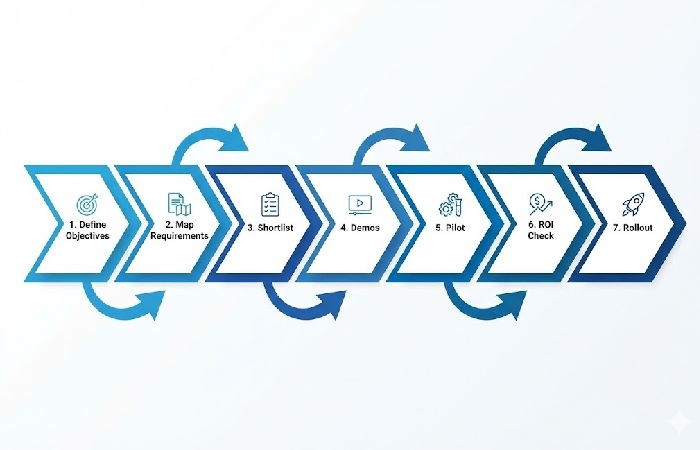
- Define QA objectives: Clarify whether your primary goals are more coverage, better consistency, stronger compliance, improved coaching, or all of these.
- Map requirements: List must‑haves and nice‑to‑haves across capture, scorecards, AI, analytics, integrations, security, and compliance.
- Shortlist vendors: Choose a small set of tools that appear to match your size, channels, tech ecosystem, and regulatory needs using public comparisons and peer input.
- Run focused demos: Use realistic scenarios and your own scorecards or sample criteria; avoid generic demo flows that hide gaps.
- Pilot with real teams: Test with a limited group; monitor usability, data quality, evaluator productivity, and coaching adoption.
- Evaluate ROI: Compare QA time saved, coverage gained, and impacts on QA scores and key CX metrics such as CSAT, FCR, or complaint volume.
- Plan rollout: Define training, support, and a phased deployment strategy by team, region, or function.
Following a clear process makes it easier to justify decisions internally and reduces change‑management friction.
Integrating QA Tools into Your QA Framework
QA tools deliver the most value when embedded in a broader call center quality assurance framework, not used in isolation. To integrate them effectively:
- Configure scorecards and workflows in the tool to match your documented QA criteria and coaching rhythm.
- Use dashboards for regular QA and performance reviews rather than ad‑hoc reports.
- Tie insights from the tool to updates in scripts, knowledge bases, training content, and process design.
- Maintain clear ownership and governance so QA configuration evolves with your products and goals.
This ensures technology supports your strategy and culture rather than dictating them.
Conclusion
Call center quality assurance tools are essential for scaling QA from a handful of sampled calls to systematic, data‑driven evaluation across channels, especially when they sit on top of a well‑defined call center quality assurance program.
By focusing on the right feature set, understanding tool types and trade‑offs, matching solutions to your team profile, and following a structured selection and rollout process, you can choose tools that genuinely improve quality rather than just measure it. Embedded in a clear QA framework, the right platform turns QA into a strategic engine for better CX, more consistent performance, and stronger business results.
Short FAQs about Call Center QA Tools
Do small teams need dedicated QA tools?
Yes—lightweight tools can simplify recording, scoring, and coaching, even for small teams, and reduce manual admin overhead.
Is AI auto‑scoring enough by itself?
No. AI is valuable for coverage and prioritization, but complex or high‑risk cases still benefit from human review.
Should QA tools replace manual evaluations completely?
They should reduce manual workload and focus human effort on the most impactful interactions, not remove human evaluation entirely.
What’s the biggest mistake when buying QA tools?
Picking based on flashy features instead of alignment with your QA framework, goals, and existing tech stack.
How long does implementation usually take?
A focused pilot can often be set up in a few weeks, with broader rollout over 1–3 months depending on size and complexity.
Disclosure:
This guide mentions third‑party call center quality assurance tools and platforms solely for educational and comparison purposes. It is not sponsored, and no vendor has paid for inclusion or placement. Parts of this article were created and refined with the assistance of AI tools; all recommendations and descriptions have been reviewed by a human editor for accuracy, fairness, and relevance.
About the Author:
Abdul Rahman is a professional content creator and blogger with over four years of experience writing about technology, health, marketing, productivity, and everyday consumer products. He focuses on turning complex topics into clear, practical guides that help readers make informed decisions and improve their digital and daily lives.