

Most businesses don’t fail at automation because of bad software—they fail because they try to automate a mess. BPM software gives you a way to see, fix, and then scale the way work actually gets done.
Table of Contents
Quick Answer
BPM (Business Process Management) software helps businesses model, automate, monitor, and improve processes like approvals, onboarding, and service workflows to boost efficiency and reduce errors. It provides visibility into operations and supports workflow optimization to meet business goals.
Key Takeaways
-
BPM software streamlines repeatable business processes across teams.
-
Core benefits include increased efficiency, reduced costs, and better compliance.
-
Essential features include low-code modeling, automation, integrations, and analytics.
-
Choosing the right BPM tool depends on business size, process complexity, and integration needs.
-
BPM is most effective when processes are clearly defined and supported by change management.
What Is BPM Software?
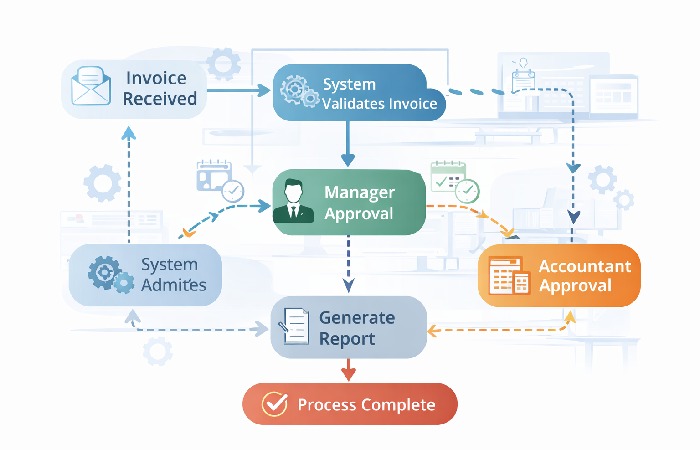
Business Process Management (BPM) software is a technology platform that lets organizations design, execute, monitor, and optimize core business processes, as described in this business process management overview from IBM. Instead of relying on spreadsheets or manual handoffs, BPM tools provide structured workflows that improve how work gets done across departments and are often grouped alongside workflow management software used to coordinate tasks across teams.
You may also see vendors and analysts refer to these platforms as BPMS (Business Process Management Systems), especially when they emphasize the underlying engine that executes and monitors defined processes.
These platforms support the full process lifecycle:
-
Modeling & design: Visual workflow creation
-
Execution & automation: Triggering tasks and approvals
-
Monitoring & analytics: Tracking performance and bottlenecks
-
Optimization: Continuous improvement based on data insights
Modern BPM platforms increasingly use AI and low‑code capabilities to speed up documentation, mapping, and changes, so teams can adapt faster to new market or regulatory requirements.
Why Businesses Use BPM Software
BPM software delivers value by focusing on repeatable processes that are critical to business performance:
These benefits are consistent with what many independent business process management guides highlight when explaining why organizations adopt BPM software.
-
Increased Efficiency: Eliminates repetitive manual work and reduces delays.
-
Improved Productivity: Frees teams to focus on higher-value tasks.
-
Cost Reduction: Optimizes resource usage and reduces rework.
-
Better Visibility & Control: Dashboards expose bottlenecks and performance gaps.
-
Compliance & Standardization: Ensures consistent execution of rules and policies.
BPM can also reduce Shadow IT risk by giving departments a governed platform to build workflows, instead of each team buying its own unapproved tools.
Key Features to Look For
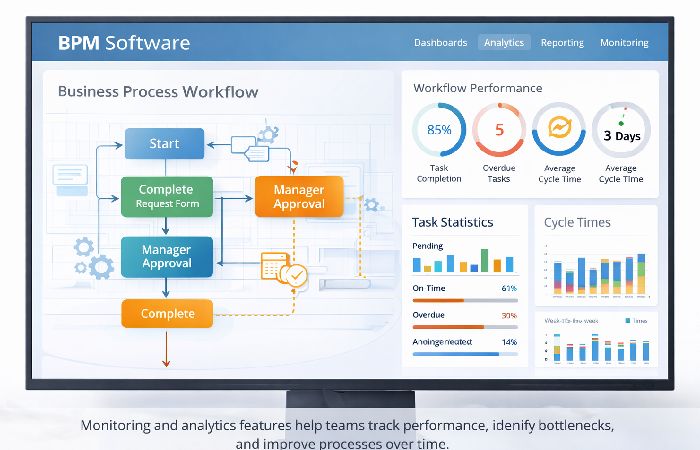
BPM tools vary in depth, but effective solutions usually include:
| Feature | What It Does |
|---|---|
| Low-code / No-code Design | Enables non-technical users to build workflows |
| Automation Engine | Routes tasks, approvals, and notifications |
| Integrations | Connects with CRM, ERP, email, and databases |
| Monitoring & Analytics | Tracks KPIs, cycle time, and bottlenecks |
| Mobile & Collaboration | Supports remote access and teamwork |
| Visual Process Modeling | Drag-and-drop mapping, often using standards like BPMN |
| Process Mining | Uses system data to reveal how processes actually run |
Many “best BPM software” lists go deeper with large comparison tables and detailed pros/cons for individual tools. For a complete beginner’s guide, this higher‑level feature checklist is enough to understand what matters before you dive into those heavier comparisons.
How to Choose the Right BPM Software
Before you compare tools, get clear on which processes you want to fix, how deeply the new platform must integrate with existing systems, and how much autonomy your teams really want versus what they can realistically support.
1. Define Your Business Needs
A useful shortcut is to decide whether you need a department-level fix or an enterprise-wide platform. If your main pain is a single process like invoice approvals or HR onboarding, a lighter, no-code tool is often enough; if you need to coordinate dozens of workflows across regions and systems, you’ll likely benefit from an enterprise-grade BPM suite.
Identify the processes that matter most and the problems you want to solve. Focus on workflows that are repeatable, cross-team, and currently slow, error-prone, or hard to track.
2. Assess Automation Maturity
-
Manual stage: You mainly need visual mapping and basic routing.
-
Automated stage: You want strong workflow automation and possibly RPA to handle older systems without APIs.
-
More autonomous stage: You’re ready to use process mining and AI to drive more “hands‑off” execution.
3. Evaluate Features Against Requirements
Pay special attention to integration depth. A tool that only connects to email and spreadsheets is fine for simple workflows, but if you rely on CRM, ERP, or industry-specific systems, you’ll want a platform with proven connectors and APIs so data flows cleanly instead of creating new silos.
Ensure automation, analytics, and integrations support your use cases. Check whether the tool can model your real processes, not just simple to‑do lists or linear checklists.
4. Consider Usability & Support
The platform should be usable by business teams, with training and vendor support available. A tool that requires constant IT intervention can slow adoption and increase total cost.
5. Total Cost of Ownership
Look beyond the subscription price when you budget for BPM. Implementation services, internal time spent mapping and testing processes, data migration, and ongoing change management often add up to more than the license itself. It’s wise to ask each vendor for an estimate that includes setup, integrations, and training—not just per‑user fees.
6. Decide on Integration Depth
Ask how deeply your BPM tool needs to plug into existing systems:
- Light integration: You mainly need email notifications, simple data sync, or basic SaaS connections.
- Deep integration: You must connect core systems like ERP, CRM, or legacy line-of-business apps and keep data in sync reliably.
If you need deep integration, prioritize platforms with proven connectors for your stack and a strong API story.
7. Understand Your Automation Maturity
Match the platform to where you are today and where you want to go:
- Stage 1 – Manual to digital: You need to map processes and remove email/spreadsheet chaos; basic workflow automation is enough.
- Stage 2 – Automated: You are ready for richer routing, SLAs, and possibly RPA to handle older systems without APIs.
- Stage 3 – Data-driven: You want process mining, better analytics, and more “hands-off” automation driven by real execution data.
You don’t have to jump to Stage 3 on day one, but choosing a tool that can grow with you will prevent painful re-platforming later.
8. Trial Period & Testing
Test the software with real workflows before committing. Use a pilot project to see how well it fits your data, users, and existing systems.
Practical guidance:
If you’re a small business, start with simpler low-code tools that are easy to deploy. If you’re an enterprise with complex legacy systems, prioritize integration depth, governance, and scalability.
Example BPM Software Options
These tools are commonly evaluated across industries:
-
Pega BPM — Suited for large enterprises with complex, rules-driven workflows.
-
Bizagi — Strong for process modeling and cross-department collaboration.
-
Appian — Enterprise-grade low-code platform with strong automation capabilities.
-
Kissflow — User-friendly option for small to mid-sized teams.
-
Nintex — Well-known for workflow automation and integrations.
-
Microsoft Power Automate — Popular for organizations already using Microsoft 365.
At a high level, you can think of two categories:
-
Department-level tools (e.g., Kissflow, Monday‑style platforms): faster setup, very user-friendly, good for specific teams.
-
Enterprise-wide platforms (e.g., Appian, Pega, Power Automate, Nintex): more complex to implement but better for deep integration and large-scale automation.
Note: Detailed pricing and feature comparisons are beyond the scope of this beginner guide. Always validate fit, pricing, and support directly with vendors.
Types of BPM Platforms
| Category | Ease of Use | Typical Cost Level | Best For |
|---|---|---|---|
| Enterprise-Grade BPM | Medium | High | Banks, government, large enterprises |
| SMB-Focused BPM | High | Low–Medium | Agencies, retailers, growing SMBs |
| No-Code BPM | Very High | Medium | HR, Finance, Operations teams |
| Cloud-Native BPM | Medium–High | Medium | Distributed or remote-first teams |
| Industry-Specific BPM | Medium | Medium–High | Healthcare, finance, manufacturing |
Beyond individual vendors, most BPM tools fall into a few broad categories. Knowing which category fits you will narrow your shortlist faster than starting from a giant “best tools” list.
Enterprise-Grade BPM Platforms
Best for large organizations with complex, regulated workflows.
These platforms are built to handle high-volume transactions, strict compliance requirements, and complex logic that spans multiple systems. They typically offer low-code development, strong integration capabilities, and advanced analytics.
**Typical strengths:**
- Deep integration with ERP, CRM, and legacy systems
- Role-based security and compliance features
- Advanced analytics and process mining options
Examples: Appian, Pega, IBM BAW.
SMB-Focused BPM Tools
Best for small to mid-sized businesses that need simplicity and value.
These tools prioritize an intuitive interface, quick setup, and clear pricing. They’re ideal if you want to standardize a handful of core processes without a long implementation project.
**Typical strengths:**
- Easy-to-use visual workflow builders
- Affordable, transparent pricing tiers
- Good templates for common processes (approvals, onboarding, basic service requests)
Examples: Kissflow, Zoho Creator, Pipefy.
No-Code BPM Platforms
Best for non-technical teams that want to build their own workflows.
No-code platforms let “citizen developers” in HR, Finance, or Operations design and maintain workflows using drag-and-drop tools instead of code.
**Typical strengths:**
- Visual form and workflow designers
- Pre-built templates for department use cases
- Self-service portals and simple approvals
Examples: Kissflow, Nintex Workflow Cloud, Monday Work Management (for lighter scenarios).
Cloud-Native BPM Suites
Best for distributed teams that need flexibility and remote access.
Cloud-native BPM platforms are hosted entirely online, offering automatic updates, elastic scalability, and browser-based access for global teams.
**Typical strengths:**
- No servers to manage or upgrade
- High availability and disaster recovery options
- Easy access for remote and hybrid teams
Examples: Appian Cloud, Microsoft Power Automate, ServiceNow workflows.
Industry-Specific BPM Solutions
Best for sectors with heavy regulation or specialized processes.
These solutions come with pre-configured workflows and compliance features tailored to industries like healthcare, banking, and manufacturing.
**Typical strengths:**
- Pre-built, industry-aligned process templates
- Built-in support for sector regulations and audit trails
- Specialized dashboards and reports
Examples: Healthcare-specific case management suites, banking onboarding platforms, manufacturing quality/work-order solutions.
Common BPM Use Cases
-
Invoice and approval processing: Automate multi-step approvals and routing.
-
Employee onboarding: Standardize HR tasks, document collection, and access provisioning.
-
Customer service workflows: Ensure consistent handling of requests, escalations, and follow-ups.
-
Compliance workflows: Embed checks and approvals into processes that must meet specific regulations.
Across industries, examples include automated invoice matching in retail, patient intake and referral flows in healthcare, and engineering change approvals in manufacturing.
Common Challenges When Adopting BPM Software
While BPM tools are powerful, adoption can fail without proper planning:
-
Unclear or undocumented processes before automation begins
-
Insufficient training for business users and process owners
-
Over-customization, which increases complexity and maintenance costs
-
Poor change management, leading to low user adoption
-
“Automating a mess” — putting a broken process into a tool without redesigning it first

Addressing these early—by mapping processes, involving stakeholders, and planning training—improves outcomes significantly.
When BPM Software May Not Be the Right Fit
BPM software may not be necessary if:
-
Processes are informal, infrequent, or constantly changing
-
The organization lacks process ownership or governance
-
A simple task automation tool would solve the problem more effectively
In these cases, BPM can add overhead rather than value. Starting with lighter workflow tools or revisiting basic process design may be a better first step.
2026 Trends: Where BPM Is Heading
BPM is evolving beyond basic workflow automation into a more intelligent, data‑driven capability:
-
AI‑assisted design: Some platforms can now generate draft workflows from natural‑language descriptions (“text‑to‑process”), which teams then refine.
-
Process mining as standard: Instead of redesigning based only on interviews, organizations use system logs to see how work actually flows and where real bottlenecks and shortcuts appear.
-
From BPM to Digital Process Automation (DPA): Many vendors frame BPM as part of broader digital process automation that connects customer‑facing and back‑office processes.
-
Towards “dark processing”: For stable, high‑volume tasks (like straightforward invoices), systems increasingly aim for straight‑through processing—handling most cases in the background and only surfacing exceptions to humans.
You don’t have to adopt every advanced capability on day one, but choosing a BPM platform that can grow toward process mining, richer analytics, and more “hands‑off” automation will keep your investment aligned with where operations and compliance are heading over the next few years.
Key BPM Terms (Quick Glossary)
-
Process Mining: Using system data to discover how processes actually run in practice, not just how they were designed.
-
Dark Processing: Workflows that run fully in the background; humans only see exceptions that need judgment or special handling.
-
Digital Twin of an Organization (DTO): A live, virtual model of your processes that lets you simulate changes and see likely impacts before you implement them.
-
Hyper‑automation: The strategy of automating as many compatible processes as possible using a mix of BPM, RPA, and AI.
-
Human‑in‑the‑Loop (HITL): Automation patterns that intentionally keep humans at key checkpoints in high‑risk or complex decisions.
-
Citizen Developer: A non‑technical employee who builds or maintains workflows using low‑code or no‑code tools.
-
Straight‑Through Processing (STP): A transaction that completes end‑to‑end without manual touch, unless an exception occurs.
-
Intelligent Document Processing (IDP): Using AI to read and interpret documents (like invoices or forms), not just extract text.
Frequently Asked Questions
Is BPM software worth using for most businesses?
BPM software is worth using for businesses with repeatable, cross-team processes that suffer from delays, errors, or lack of visibility. It delivers value by standardizing workflows, reducing manual handoffs, and exposing bottlenecks through data. Organizations that rely on approvals, onboarding, compliance steps, or service requests typically benefit most. If processes are informal or rarely repeated, BPM may add unnecessary complexity.
What are the main risks or downsides of BPM software?
The main downsides of BPM software include poor user adoption, excessive customization, and automating inefficient processes without first redesigning them. If workflows are unclear or staff are not trained, BPM can slow work instead of improving it. Complex implementations can also increase costs and maintenance effort. BPM works best when processes are well-defined and supported by change management.
How much effort and cost does BPM software usually require?
BPM software requires upfront effort for process mapping and configuration, with costs varying by platform type, scale, and integration needs. SMB-focused tools often use per-user monthly pricing, while enterprise platforms are typically sold as annual contracts that include licenses, implementation, and support. Always confirm total costs for setup, integrations, and training, not just the base subscription.
How do I know if BPM software is the right fit for my organization?
BPM software is a good fit for organizations with structured, repeatable processes involving multiple roles, systems, approvals, and clear ownership. It is especially useful when consistency, compliance, and operational visibility matter. If your team mainly handles ad-hoc tasks or simple automation needs, lighter workflow tools may be more appropriate.
Author Bio
TechnologyFord covers gadgets, technology, and automation with clear, practical guides for everyday readers. Our content is created from publicly available information and AI assistance, then reviewed by editors to keep it current, accurate, and easy to understand.
Disclaimer
This article is based on publicly available information and peer‑reviewed sources, with AI assistance used in drafting. While we review and update our content, the information is for general guidance only and should not be taken as professional, legal, or financial advice.