

Online hackathons sound simple. Move the event to Zoom, set up a Slack channel, and let participants code for 48 hours — right?
The reality is more nuanced. Without the shared energy of a physical room, virtual hackathons face unique challenges: timezone conflicts, participant dropout, communication breakdowns, and unclear judging processes. Yet when done well, online hackathons often outperform in-person events in reach, diversity, and cost-efficiency.
This guide breaks down the best practices for an online hackathon from two perspectives — the organizer’s playbook and the participant’s edge. Whether you’re hosting your first virtual hackathon or refining your fifth, you’ll find actionable frameworks, platform comparisons, and strategies used by experienced hackathon programs globally.
This guide is for: event organizers, developer community managers, corporate innovation leads, and hackathon participants.
Table of Contents
Key Takeaways
- What is an online hackathon? → A time-bound virtual event where distributed teams build solutions to defined challenges using digital collaboration tools.
- Why host one? → Global reach, lower cost, measurable innovation output, and stronger developer community growth.
- How to plan one? → Follow a 5-phase lifecycle: Plan → Promote → Execute → Judge → Follow Up.
- Biggest mistake organizers make? → Ignoring timezone design and skipping post-hackathon engagement.
- Best participant strategy? → Validate your idea early, assign roles, and practice your pitch from day one.
What Is an Online Hackathon?
An online hackathon is a time-bound innovation event where geographically distributed participants collaborate virtually to build software prototypes, solve challenges, or develop creative solutions. Unlike in-person hackathons, online formats use digital platforms for communication, submission, and judging — enabling global participation without travel.
How Online Hackathons Differ from In-Person Events
In-person hackathons thrive on proximity — shared whiteboards, spontaneous conversations, and the pressure of a physical countdown clock. Online hackathons replace these dynamics with structured digital alternatives.
The key differences include:
- Participation window — Online events typically run 48 hours to 4 weeks, versus 24–48 hours in-person
- Team formation — Remote teams form through digital matching, not hallway conversations
- Communication — Relies on Slack, Discord, and Zoom instead of face-to-face coordination
- Submission — Projects are submitted through platforms like Devpost or HackerEarth
Synchronous vs. Asynchronous Formats
Not all online hackathons run in real-time. Synchronous hackathons require participants to be online during set hours — ideal for short, high-energy sprints. Asynchronous hackathons allow participants to contribute on their own schedule over several days or weeks — better for global audiences spanning multiple timezones.
The format you choose directly shapes participant engagement, scheduling logistics, and judging workflows.
Why Host an Online Hackathon?
Benefits for Organizations
Online hackathons unlock advantages that in-person events struggle to match:
- Global reach — No travel barriers. A company in Berlin can attract developers from Lagos, São Paulo, and Bangalore simultaneously.
- Cost efficiency — No venue, catering, or travel reimbursement. According to the Linux Foundation’s research on open-source community growth, virtual events significantly reduce barriers to participation in open-source innovation.
- Talent discovery — Online hackathons serve as distributed talent pipelines, surfacing skilled developers who may not attend physical events.
- Rapid prototyping — Compressed timelines force creative, focused solutions that organizations can evaluate for real-world potential.
Benefits for Participants
- Accessibility — Participate from anywhere with an internet connection
- Flexibility — Asynchronous formats let participants balance hackathon work with jobs or studies
- Portfolio building — Projects built during hackathons become tangible portfolio pieces
- Networking — Exposure to mentors, judges, sponsors, and peers across the global tech community
| Factor | Online Hackathon | In-Person Hackathon |
|---|---|---|
| Reach | Global, unlimited | Local/regional, limited by venue |
| Cost to organize | Low ($500–$5,000 typical) | High ($10,000–$100,000+) |
| Duration | 48 hours to 4 weeks | 24–48 hours |
| Participant diversity | High | Moderate |
| Networking quality | Structured, async | Spontaneous, high-energy |
| Engagement risk | Higher dropout risk | Lower (physical commitment) |
How to Plan an Online Hackathon Step by Step
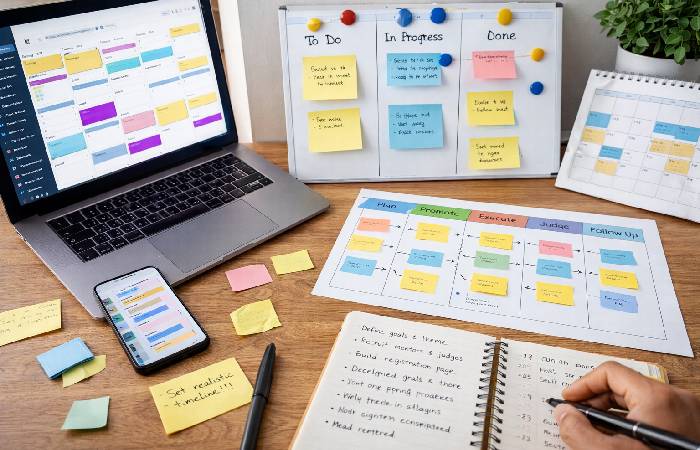
Follow this 5-phase lifecycle to avoid common planning traps.
Define Goals and Choose a Theme
Start with a precise problem statement. Vague themes like “Build something cool” lead to unfocused submissions and frustrated judges.
Strong goal examples:
- “Build an AI-powered tool that improves accessibility for visually impaired users”
- “Create a prototype that reduces food waste in restaurant supply chains”
Your theme should be specific enough to guide innovation but broad enough to allow creative freedom.
Set a Realistic Timeline
Allow at least 4 weeks of planning before the event goes live. A common mistake is underestimating the time needed for promotion, mentor recruitment, and platform setup.
Recommended timeline:
- Week 1–2: Define goals, secure sponsors, recruit judges and mentors
- Week 3: Launch promotion, open registration
- Week 4: Host pre-hackathon webinar, finalize platform and rules
- Event window: 48 hours to 2 weeks (depending on format)
- Post-event: Judging, announcements, follow-up (1–2 weeks)
Select the Right Platform and Tools
Your platform choice determines participant experience. Here’s how leading options compare:
| Platform | Best For | Free Tier | Key Feature |
|---|---|---|---|
| Devpost | Public hackathons, large communities | Yes | Built-in submission + judging |
| HackerEarth | Enterprise + internal hackathons | Limited | Assessment + innovation mgmt |
| GitHub + Discord | Budget-friendly / open-source | Yes | Full customization, developer-native |
| Airmeet | Hybrid / multi-format events | Limited | Virtual networking + breakout rooms |
| Unstop | Student hackathons, India-focused | Yes | Campus outreach integration |
Choose based on your audience size, budget, and whether you need built-in judging or prefer external evaluation.
Recruit Mentors, Judges, and Sponsors
- Mentors should be subject-matter experts available for drop-in sessions during the event — not just names on a page
- Judges should represent diverse perspectives: technical, business, and user-experience viewpoints
- Sponsors need clear activation plans — logo placement alone won’t justify their investment. Offer branded challenges, speaking slots, or API-integration workshops
Build Your Promotion Strategy
Effective promotion combines multiple channels:
- Developer communities — Post on Dev.to, Hashnode, Reddit (r/hackathons, r/programming)
- Social media — Twitter/X, LinkedIn, and Instagram stories with countdown timers
- Email marketing — Target past participants and developer newsletter audiences
- Partner amplification — Have sponsors and judges share via their networks
Best Practices for Running a Successful Online Hackathon
Designing for Time Zones and Inclusion
This is the most underestimated variable in virtual hackathons. If your participants span 12+ timezones, a “9 AM kickoff” is midnight for someone else.
Best practices:
- Offer staggered kickoff sessions — Record the opening ceremony and share it for async viewing
- Set submission deadlines in UTC and provide a timezone converter link
- Ensure all critical information is documented — Don’t rely on live-only announcements
- Follow the W3C’s guidelines on accessible virtual event design to ensure screen-reader compatibility and captioning
Structuring Communication Channels
Communication breakdown is the #1 cause of participant frustration in online hackathons. Structure channels intentionally. Alongside clear channels, a solid hackathon planning process ensures organizers present problems clearly to developers and reduce miscommunication during the event.
- #announcements — Organizer-only channel for official updates
- #general — Open discussion for all participants
- #team-matching — For individuals seeking teammates
- #tech-support — For platform, API, or tooling issues
- #ask-a-mentor — For scheduled or async mentor Q&A
Use pinned messages and daily digests so participants who join late don’t miss critical context.
Keeping Participants Engaged Throughout
Dropout rates in multi-day online hackathons are often significantly higher than at in-person events.
Combat this with:
- Milestone check-ins — Schedule progress submissions at 25%, 50%, and 75% marks
- Fun breaks — Trivia, lightning talks, or show-and-tell sessions
- Leaderboards — If competitive, show real-time standing to maintain motivation
- Swag and micro-rewards — Small prizes for “best question,” “most helpful participant,” etc.
Creating Fair and Transparent Judging Criteria
Define and publish your rubric before the hackathon begins. Common criteria categories include:
- Innovation — Is the idea novel or a creative application of existing concepts?
- Technical execution — Does the prototype function? Is the code clean?
- Impact potential — Could this solution create real-world value?
- Presentation quality — Was the demo clear, compelling, and well-structured?
Assign 3–5 judges per submission to reduce individual bias. Use a standardized scoring template (e.g., 1–10 scale for each category).
Maximizing Post-Hackathon Impact
The best hackathon outcomes happen after the event ends. Yet most organizers treat the closing ceremony as the finish line.
Post-hackathon priorities:
- Publish a winners showcase — Blog posts, social media highlights, and video demos
- Connect standout teams with internal stakeholders — For potential incubation or hiring
- Send a feedback survey within 48 hours — Capture insights while the experience is fresh
- Archive all submissions — Create a searchable repository for future reference
- Measure outcomes — Track metrics like participant NPS, submissions completed vs. registered, and post-event community growth
Best Practices for Participants in an Online Hackathon
Preparing Before the Event
Preparation separates winning teams from scrambling ones. Before the hackathon begins:
- Read the rules, theme, and judging criteria thoroughly — Don’t assume; verify
- Familiarize yourself with required APIs, tools, or datasets — Set up your development environment in advance
- Draft 2–3 project ideas and validate their feasibility within the time constraint
- Identify your strengths — Know whether you’ll lead on frontend, backend, design, or pitch
Collaborating Effectively as a Remote Team
Remote teamwork during a hackathon requires intentional structure:
- Assign roles immediately — Project lead, developer(s), designer, presenter
- Use a shared task board — Notion, Trello, or GitHub Projects to track progress
- Daily standups — Even a 10-minute video call keeps alignment
- Version control from minute one — Use Git branches to avoid merge conflicts during crunch time
According to Stanford’s research on virtual team collaboration, structured check-ins and role clarity significantly improve outcomes in distributed teams.
Presenting a Winning Project
Judges evaluate hundreds of submissions. Your presentation must communicate value in under 3 minutes.
- Lead with the problem — What real pain does your solution address?
- Demo the solution — Show working functionality, not just slides
- Explain your technical approach — Briefly highlight architecture choices
- State the impact — Who benefits? How much? How soon?
- Be concise — Practice until your pitch is sharp and timed
Common Mistakes to Avoid in Online Hackathons
For organizers:
- Launching promotion less than 2 weeks before the event
- Using only live announcements without written documentation
- Skipping post-hackathon follow-up and feedback collection
- Choosing a platform without testing it with a small group first
- Vague judging criteria that leave participants guessing
For participants:
- Starting to code without validating the idea with the theme
- Ignoring the judging criteria until submission day
- Over-scoping — building features that can’t be completed in time
- Submitting without a demo video or clear documentation
- Not sleeping — fatigue kills creativity faster than deadlines do
Who Should Host an Online Hackathon — And Who Shouldn’t
Best for:
- Tech companies building or growing a developer community
- Startups validating product-market fit through rapid prototyping
- Universities running innovation or entrepreneurship programs
- Enterprises seeking cross-functional innovation from distributed teams
Not for:
- Organizations without at least one dedicated organizer who can manage logistics
- Teams using hackathons as one-off marketing stunts with no post-event plan
- Companies unwilling to invest time in platform setup, mentor recruitment, and participant support
Final Verdict
Online hackathons are one of the most effective formats for distributed innovation — when planned with intention. The difference between a forgettable event and a career-defining experience comes down to execution quality.
Focus on three things above all: timezone-conscious design, structured communication, and post-event follow-through. These best practices for an online hackathon separate professional events from chaotic experiments.
Start with clear goals. Choose a platform that fits your audience. Invest as much thought in what happens after submissions close as in what happens before.
Frequently Asked Questions
Q: How long should an online hackathon last?
A: Most successful online hackathons run between 48 hours and 2 weeks. Shorter sprints (48–72 hours) generate urgency and reduce dropout, while longer formats (1–2 weeks) allow more polished submissions from globally distributed teams.
Q: What is the best platform for hosting a virtual hackathon?
A: It depends on your needs. Devpost is ideal for public developer hackathons with built-in submission management. HackerEarth suits enterprise use cases. For budget-friendly options, a GitHub + Discord setup provides full flexibility without platform fees.
Q: How do you keep participants engaged during a multi-day online hackathon?
A: Use milestone check-ins, fun breaks (trivia, lightning talks), mentor Q&A sessions, and micro-rewards. Structured communication channels and daily progress updates reduce the dropout rates that plague poorly managed virtual events.
Q: How should judging criteria be communicated in an online hackathon?
A: Publish the judging rubric before the event begins. Include categories like innovation, technical execution, impact potential, and presentation quality. Assign 3–5 judges per submission to minimize bias.
Q: Can online hackathons be run without a dedicated hackathon platform?
A: Yes. A combination of GitHub (for code), Discord or Slack (for communication), and a simple form or spreadsheet (for submissions and judging) can work effectively for smaller, budget-conscious events.
Q: What happens after an online hackathon ends?
A: The post-hackathon phase is critical. Publish a winners showcase, send feedback surveys within 48 hours, connect standout teams with stakeholders, and archive all submissions. Measure success through participant NPS and submission completion rates.