

If your website pages aren’t showing up in Google search results, the problem might not be your content — it might be that Google simply hasn’t found those pages yet. That’s where the sitemap generator on UploadArticle.com comes in.
This guide explains what the tool does, why an XML sitemap matters for your SEO, and exactly how to create, upload, and submit yours — step by step. Whether you’re running a .com.au/.au site, a local Australian business website, or a growing AU‑focused blog, this is one technical fix worth getting right for Australian search results.
Table of Contents
Quick Answers
- What is it? A free online service that will crawl your website and create a correctly formatted XML sitemap file.
- Important? XML sitemaps enable Google and other search engines to find and get to all your pages, including those some clicks deep into your website.
- Who needs it? Any website owner who wants faster indexing, more efficient crawling and less missed pages in search results.
- What is the duration? Usually, most sitemaps takes less than 2 minutes to generate, addition to another few minutes of Google Search console submission.
- Is it free? Yes the sitemap generator on UploadArticle.com is free.
What Is the Sitemap Generator on UploadArticle.com?
Use the free UploadArticle.com sitemap generator. It is a search engine optimizer tool which will make a complete site scan, grabbing all available links and then make and output an xml sitemap file ready to submit. Just providing your home page address and it crawls your site up every internal link and in a few minutes your ready to pick a sitemap.xml file.
It’s part of the broader UploadArticle.com SEO toolkit — a platform originally built around article submission and guest posting that has expanded to include practical technical SEO utilities for bloggers, small business owners, and digital marketers.
This tool is made so that it can be used by anyone, without any knowledge of how to program. There is no need for you to understand the syntax of XML files, nor do you have to manually list your URLs the generator takes care of the formatting for you, providing search engines with a plain, error-free file.
XML Sitemaps vs. HTML Sitemaps: What’s the Difference?
These two types of sitemaps serve completely different audiences — and confusing them is a common mistake.
| Feature | XML Sitemap | HTML Sitemap |
|---|---|---|
| Audience | Search engine crawlers | Human visitors |
| Format | .xml file |
Web page |
| Purpose | Index discovery and crawl guidance | Site navigation aid |
| SEO impact | Direct — submitted to Google Search Console | Indirect — improves internal linking |
| Required? | Recommended for most sites | Optional |
| Location | Root directory (/sitemap.xml) |
Any page URL |
From an SEO point of view, the important thing is the XML sitemap. This is the file you create, upload and (if you want) submit through to Google Search Console. The HTML sitemap, should you decide to create one, is simply a user convenience.
Why Your Website Needs an XML Sitemap
Search engines find pages by crawling links. But not a single page from you website does have a link pointing to it and even well-linked pages can take a few weeks to crawl organic on a expanding website. An XML sitemap is a direct and dependable way tell Google: here are the pages, they should be seen as you‘ve got them and here‘s when there last were.
Let‘s say you have a 200 post blog that has just moved to a new domain, changing the URL structure. A new XML sitemap will enable Google to rapidly understand the new setup to help the 200 posts be rediscovered and crawling the new URLs.
Faster Discovery for New and Updated Pages
This helps Google discover your content when you add new pages or upgrade/modify existing ones. Since it doesn‘t crawl until its next tour, Google won‘t be aware of your updates until that crawls upon it. A sitemap with a <lastmod> date tags notify search engines about the latest modifications done to particular url, which stimulates the crawler to focus more on them. This will turn out to be of significant help in minimizing the publishing-indexing latency.
Rescuing Orphan Pages
Orphan page a page on your site with no internal links pointing to it. Since search engine crawlers discover pages by traversing links, search engine spiders lack a direct method to discover them without a sitemap. For content websites, orphan pages are reportedly one of most common and detrimental technical SEO issues, research has shown. Keeping a well-updated sitemap will guarantee their inclusion for indexing separate from your site structure.
Smarter Use of Crawl Budget
Search engines assign a limited crawl budget to every site the number of pages they‘ll crawl on a site during a specific time window. For large sites, it‘s a poor use of this budget to include every “less valuable” URL in your site map tag pages, search result filters, duplicate pages, etc. Instead, a lean site map optimized for your most important pages guides Google to put your crawl budget to its best use.
Better Visibility in AI-Powered Search
By 2025 and 2026, search engines will be using structured site data more and more to surface AI-Created answers(Google AI Overviews, Bing Copilot). While good site data submission routes your content through to appear often enough for it to be good quality on the Answer surface, badly indexed sites will be cut out of AI Overview references altogether.
How the UploadArticle.com Sitemap Generator Works
The tool works just like a search engine crawler itself beginning at your homepage and tracking every internal link it encounters and storing each accessible URL. Instead of making an index of the content however it aggregates those URLs into a formatted XML file you can instantly download.
Here‘s what happens under the hood:
- You navigate to your website root URL (e.g., https://www.yoursite.com)
- The tool crawls your site by following internal links, just like Googlebot.
- Collects all reachable URLs and give them an entry with optional meta information (<lastmod>, <changefreq>, <priority>)
- Generates a valid XML file called sitemap.xml that can be uploaded immediately.
A major benefit of using an automated generator instead of creating sitemaps by hand: you won‘t run into XML syntax errors. A single mis-typed tag could abort search engines from parsing the entire file. The tool takes care of all formatting requirements for xml compliance to the protocol found at sitemaps.org.
Step-by-Step: Generate, Upload, and Submit Your Sitemap
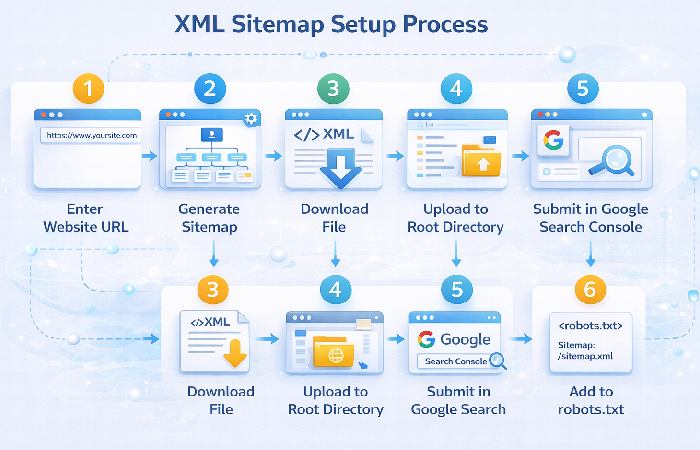
Step 1 — Generate the Sitemap
- Go to the sitemap generator tool on UploadArticle.com
- Enter your website’s homepage URL in the input field
- Adjust optional settings if needed (crawl depth, change frequency, URL priority)
- Click Generate
- Wait for the crawl to complete (seconds to a few minutes depending on site size)
- Download the resulting
sitemap.xmlfile
Tip: For sites with more than 50,000 URLs, you will have to create more than one sitemap file and include all of them in a sitemap index file. Standard limit for each XML sitemap file is 50,000 URLs or 50MB uncompressed.
Step 2 — Upload the Sitemap to Your Root Directory
Your sitemap.xml needs to be located in your websites root directory. So the final URL should be:
https://www.yourwebsite.com/sitemap.xmlUse your hosting control panel (cPanel), FTP, or file manager on your CMS to upload your file. If your site is on WordPress, plugins such as Yoast SEO and Rank Math produce and automatically save sites maps for your website that you can find at /sitemap_index.xml.
Step 3 — Submit to Google Search Console
Google Search Console is Google‘s free source for keeping track of how your site is doing in search submissions. Assuming you have your sitemap uploaded, submitting it here will tell Google immediately where it is and gives you an indication of if it‘s being indexed.
- Log in to Google Search Console
- Select your property (your website)
- In the left sidebar, click Sitemaps (under Index)
- In the “Add a new sitemap” field, enter
sitemap.xml - Click Submit
Google will start processing. You can revisit the Sitemaps area anytime to see the number of submitted URLs against those that were actually indexed. If there‘s a discrepancy e.g. 200 submitted but only 140 indexed, then you should look into finding out why some pages aren‘t making it into the index (thin content, noindex tags, canonical issues etc.).
Also consider submitting to Bing Webmaster Tools at the same time. Bing’s market share is modest but real, and submission takes less than two minutes.
Step 4 — Reference Your Sitemap in robots.txt
All the instructions you give to search engines are in your robots.txt file. This file is located in the root of your website. Direct a line to tell search engines in what location your sitemap is:
Sitemap: https://www.yourwebsite.com/sitemap.xmlThis is a simple one-line addition that requires no technical expertise. Most CMS platforms allow you to edit robots.txt directly from the admin panel.
Common Mistakes to Avoid
Getting a sitemap live is straightforward. But a few easy mistakes can quietly undermine its effectiveness.
- Including noindex pages. If a page has a noindex meta tag, you‘re telling Google not to index it. Including it in your sitemap sends a conflicting message. Audit your sitemap on a regular basis to ensure that all the URLs you are submitting are ones you want to be indexed.
- Forgetting to update your sitemap. Six months ago, your sitemap may have been created, but there could be new articles, altered URLs and additional/deleted pages since then. When updating a considerable number of pages, always update and re-submit your sitemap.
- Adding redirect chains or broken URLs. If a URL in your sitemap redirects to another page or responds with a 404 it uses up your crawl budget, while causing disruption to Google‘s indexing signals. Only use URLs that return a true 200 OK response.
- Missing the reference in robots.txt. The number of site owner is submitting to Google Search Console but missing in robots.txt reference. Just add that single line and inform every crawler, which hit your website that your sitemap is available automatically.
- Submitting a sitemap early. If you submit a sitemap pre-launch, while the site is still under construction, then you will get “thin content” placeholder pages indexed that could have been prevented by a proper launch plan. Wait until things are ready to go before submitting.
Who This Is For (and Who Should Skip It)
Best for:
- Bloggers and content publishers who update frequently and want faster indexing
- Small business owners building out their first website
- SEO beginners who want to cover the technical fundamentals without touching code
- Site owners who have recently restructured their URL architecture
- Anyone who has orphan pages — pages with no internal links pointing to them
Less critical if:
- Your site has fewer than 10–15 pages with strong internal linking (Google will likely find them all anyway)
- This means you‘re using a CMS such as WordPress and is logged in with an SEO plugin enabled that already auto-generates and submits your sitemap
- Already checked that your sitemap is(sitemap submitted)? Included, is correct format, signed and regularly changed
Even in those lower-priority cases, running a quick check with the UploadArticle.com generator is worthwhile — it takes two minutes and can surface URL issues you weren’t aware of.
Final Verdict
One of simplest low-hanging fruit technical SEO tasks you can do is an XML sitemap. There‘s no coding needed, it‘s free, and when implemented properly, it eliminates a true barrier between your content and search engines finding it.
Although the sitemap generator UploadArticle.com is a clean and accessible interface that does the formatting for you – produce the file, upload it to your root directory, submit it to Google Search Console, stick a line in your robots.txt, and you‘re ready. Monthly check for indexing time.
Talking about site setup and SEO, here is the second 15-minute-chore to add to your to-do list when you prepare the groundwork of your new site in 2026.
Frequently Asked Questions
Q1: What exactly does the sitemap generator on UploadArticle.com do?
Scans your website by crawling internal links to discover every page on the site. It then compiles a list of every page it finds and produces a pretty ‘xml formatted’ sitemap file for you to download and resubmit to the search engines. The formatting of the xml file is handled by the checker so there‘s less chance of syntax errors stopping crawlers from reading your file.
Q2: Is the sitemap generator on UploadArticle.com free to use?
Yes. It is completely free to use and download. When you wish to generate a sitemap and download it, there is no need to login or sign-up and give your credit card details.
Q3: How often should I update and resubmit my sitemap?
Any time you add a lot of new content to your site publish a cluster of new articles, adjust your URL structure, delete and redirect old pages. In the case of a frequently updated blog or news site, monthly regeneration sounds about right. Static sites that are not updated very often can be scheduled to regenerate quarterly.
Q4: What’s the difference between an XML sitemap and a robots.txt file?
They are similar but will have different roles. Your xml sitemap will inform your search engine of the pages that exist and should be indexed. Your robots.txt file will inform your search engine on where it is okay to crawl (or not crawl). Both are important but should be referenced along side each other – you robots.txt should not block pages you have listed in your sitemap.
Q5: My sitemap shows 200 URLs submitted but only 140 indexed. Why?
This gap is quite normal and should be explored but is not a distinct problem. You may find the pages are thin or of low quality, there is duplicate content on the pages (which Google has flagged), some pages have noindex tags or they are simply new. Use Search Console to check why some URLs are not being indexed.
Q6: Does submitting a sitemap to Google Search Console guarantee my pages will rank?
No. Sitemap submission helps Google discover and index pages; rank depends on content quality/relevance/authority and various other signals. Think of sitemap submission as merely ensuring that Google can discover your content what it does with that content after that depends on the content itself.
About Technologyford
Technologyford.com produces practical, relatable articles on health, technology, business, marketing and life. The pieces are primarily sourced from respected, public domain material and using AI is only to assist in researching, structuring and clarifying issues rather than to include in-depth specialist terms and irrelevant information to focus on realworld relevancy.
Disclaimer
The content of this article is for general educational use only and is based on publicly available search engine guidelines relevant in 2026. Features, capacities, limits, and policies of UploadArticle.com, Google Search Consoleand other service providers can all vary. Always use the documentation by your service provider and your analytics data to make your technical and business decisions.