
Have you ever clicked a link only to see a “Page Not Found” or “Access Denied” message? It’s frustrating, right? Often, these blocks aren’t because something is actually wrong with the internet — they’re intentional, put in place by a network admin, your school or workplace, your internet provider, or even your government. Understanding how these blocks work and what your options are can help you decide what to do next. If you also care about keeping your browsing private while you unblock sites, it’s worth learning more about why and how VPN plays a role in promoting data security.
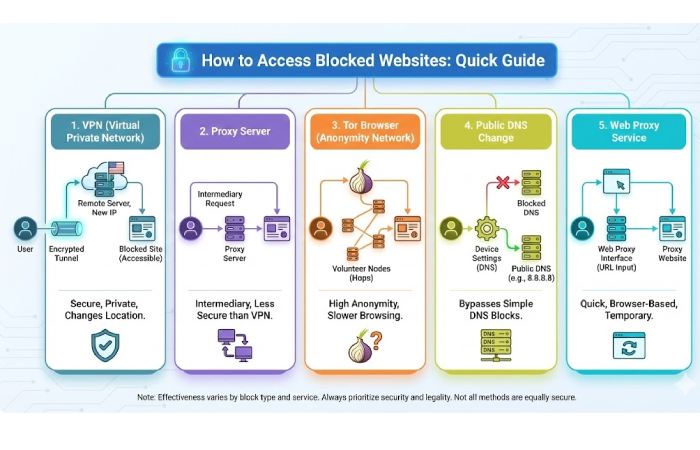
Table of Contents
Why Sites Get Blocked
- There are several reasons a site might be blocked:
Network filters at schools or offices to prevent distraction. - Firewalls that block traffic to or from certain websites.
- Geo-blocking, where content is limited based on your country.
- Government censorship aimed at controlling information access. NordVPN
Now let’s walk through some practical ways people commonly use to access blocked content — but remember to respect laws and rules wherever you are. If you are mainly interested in streaming, gaming, or browsing more freely, you can also look at tips on getting the best possible online experience using a VPN.
The Best Ways to Get Around Browsing Restrictions
Firewalls are commonly used to block access to specific sites or services. But it’s possible to bypass these pesky blocks. Here are some tried and true methods.
Comparison Table: Methods to Access Blocked Websites
| Method | Security | Privacy | Speed | Use Case |
|---|---|---|---|---|
| VPN | High | High | Medium | Best all-around solution |
| Proxy | Low | Low | Medium | Basic unblocking |
| Tor | Very High | Very High | Low | Strong anonymity |
| Smart DNS | Low | None | High | Geo-streaming only |
| IP Address | None | None | High | Very limited success |
Data synthesized from multiple sources including comparisons of VPN, proxies, and Smart DNS tools.
Modify or Mask the URL (Only Works Sometimes)
Sometimes a filter only looks for a specific domain name. In rare cases, you can work around that:
URL Translation Tools:
Services like Google Translate can act like a basic proxy — loading a blocked site by “translating” it through another language. This only works for simple pages and won’t help with video or interactive sites. newweborder.co
URL Shorteners:
Tools like Bitly or TinyURL change how a link looks. In some extremely basic filters, this might let you sneak by the restriction. But modern filters are smarter — so this trick rarely works anymore.
Quick tip: Think of these as temporary hacks — they’re not reliable or secure.
Try Entering the Website’s IP Address
Networks sometimes block a site’s name but not its numerical address. You can find a site’s IP by opening a terminal or command prompt and typing:
Then paste the numeric address into your browser. It might work — but only for very simple sites. Most modern secure sites rely on certificates tied to the domain name, so they’ll still refuse to load.
Use a Proxy Server
A proxy is like a middleman for your internet traffic. When you use one, your device sends requests through the proxy instead of directly connecting with the blocked site.
-
Web-based proxies:
You don’t install anything — just type the blocked URL into a proxy site and go. These are easy to use but don’t encrypt your connection. -
Hosted or paid proxy services:
These offer more reliability and speed but still generally lack full encryption.
Many people need help figuring out how to bypass proxy server restrictions.
Paid proxies provide faster connections with fewer limitations on bandwidth usage, so they’re ideal if speed is essential in whatever task you’re trying to accomplish.
Heads-up: Public proxies may log your data or slow your connection, and they usually don’t protect you.
Use a Virtual Private Network (VPN)
This is one of the most recommended and reliable methods to access blocked content.
A VPN encrypts all your internet traffic and routes it through a server in another location. As far as your school, workplace, ISP, or government is concerned, you’re just talking to a different server — not the blocked site directly.
Why VPNs work well:
✔ They hide your real IP address.
✔ They encrypt your data — increasing privacy and security.
✔ They work on phones, laptops, and tablets.
Considerations:
-
Free VPNs often have slow speeds and limited servers.
-
Some networks try to block VPN traffic — in that case, choosing a service with stealth or obfuscated servers can help.
Examples of popular VPN services include NordVPN, ExpressVPN, and Surfshark.
Example Tools Table
| Tool | Best For | Key Feature | Notes |
|---|---|---|---|
| NordVPN | Privacy & speed | Strong encryption | Works on many devices |
| ExpressVPN | Ease of use | Fast servers | Great for streaming |
| Tor Browser | Maximum anonymity | Multi-relay routing | Slow for general browsing |
| Psiphon | Free censorship circumvention | Combines VPN + SSH + proxy | Good for restricted regions |
Try Alternative Browsers (Like Tor)
If privacy is your top priority — and you don’t mind slower browsing — the Tor Browser is a powerful option. It routes your traffic through multiple encrypted relays, masking both your IP and activity.
Tor isn’t perfect — it can be slow, and in some networks it’s blocked entirely. But where it does work, it provides one of the strongest layers of anonymity outside of VPNs.
Legal and Ethical Considerations
Before you try any of these methods, it’s important to think about the rules around you:
At Work or School
Bypassing filters could go against your company’s or school’s policies, and may result in disciplinary action if you get caught.
At Home
Your ISP may block certain content for legal reasons — and trying to override that could break your service agreement.
In Countries with Censorship Laws
In places with strict internet laws, using tools like VPNs or Tor might be illegal or carry penalties. Always know the local laws before attempting to bypass blocks.
Conclusion
You can access blocked websites using various tools — from simple tricks like URL masking to powerful tools like VPNs and Tor. However, not all methods are equally effective or secure — and some may violate rules or local laws. VPNs are generally the most reliable all-around solution, but always balance your personal freedom with responsibility, legality, and safety.
Key FAQs
1. Is it legal to bypass a network block?
In many places, using tools like VPNs is legal. However, it might still break workplace or school rules and in some countries, using them is against the law.
2. Will a VPN make me completely anonymous?
No — a VPN protects your connection and hides your IP, but it doesn’t make you completely invisible online. Your VPN provider might also log data.
3. Why doesn’t trying an IP address always work?
Most modern websites use security certificates tied to domain names, so loading by IP often fails.
4. Are free proxies safe?
Not really. They usually lack encryption and can log or even alter your traffic, which poses privacy risks.
5. Can I use these methods on my phone?
Yes — many VPN apps and browsers like Tor are available for mobile devices.