

Software launches flop not because the code is faulty, but because it isn‘t what the user wanted. User acceptance testing (UAT) is the final fence before going live, and missing it is one of the most costly errors any development team can make.
This is a comprehensive compact book of the essential information to help you to run UAT properly, including: definitions, and step-by-step processes, types of UAT, common failure points, and a UAT readiness checklist you can work through before sign-off.
If you are a QA lead, business analyst, project manager or you are having your first enterprise roll-out rollout, this is your field guide.
Table of Contents
Key Takeaways
- What exactly is UAT?-> The last stage in software testing, When real users test software to ensure it can handle required tasks in real world scenarios, according to specifications.
- Why it matters -> UAT reveals usability issues in actual use that can be unseen through functional testing.
- Who currently operates it->Business stakeholders and end users not developers or QA engineers.
- When to run it -> After system integration testing passes. Before deploying to production.
- Time Duration for Implementation -> Usually 1-4 weeks depending on size of the system.
What Is User Acceptance Testing?
User acceptance testing (UAT) is the last phase of the software testing lifecycle (STLC) in which real users or business users test the software to make sure it can handle required tasks in real-world scenarios, according to specifications. It is executed by providing the actual system to the end user and asking them to perform the test cases.
(In practice this could mean that) User acceptance testing the intended users are testing the software product and the feedback is taken into account before the product is released to the market.this contributes to streamlining and speeding up the UAT process, and also improves coverage and confidence in go live decisions. For practical how-to on making this step more effective, see this detailed guide to user acceptance testing.
UAT is distinct from unit testing, integration testing, and system testing — all of which are run by development and QA teams. UAT is run by the business side. Its goal is not to find bugs in the code, but to confirm the software does what the business signed off on.
According to the IEEE 829 standard for software test documentation, acceptance testing must verify that a system satisfies its specified requirements and is accepted by the customer or authorised representative.
UAT vs. Other Testing Types
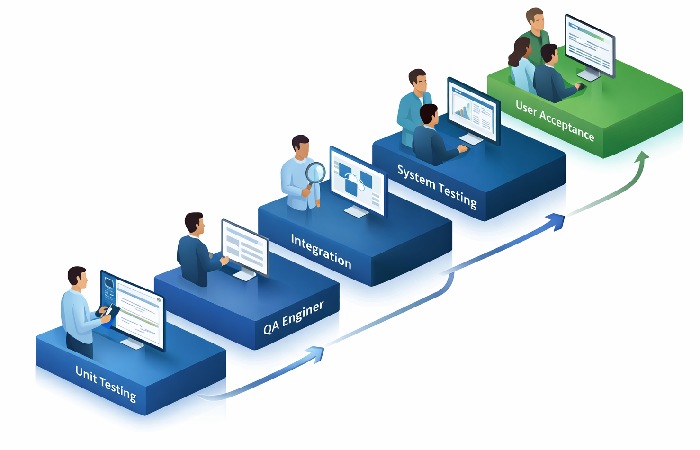
| Testing Type | Who Runs It | What It Tests | When It Runs |
|---|---|---|---|
| Unit Testing | Developers | Individual functions/modules | During development |
| Integration Testing | QA Engineers | Module interactions | After unit testing |
| System Testing | QA Engineers | Full system functionality | After integration testing |
| UAT | End Users / Business | Business requirements | Before production |
| Beta Testing | External users | Real-world use at scale | Optional pre-launch |
Why UAT Matters — The Business Case
Here’s the uncomfortable truth: a system can pass all internal QA checks and still fail in the hands of the user.
Functional testing confirms the code works as written. UAT confirms the code works as needed. That distinction costs organisations millions when missed.
Research on the cost of software defects shows that the cost of fixing a defect rises dramatically the later it is discovered in the development cycle — defects found post-release can cost many times more to fix than those caught during design. UAT is the last checkpoint before that cost multiplier hits.
UAT also protects the business commercially. For regulated industries — finance, healthcare, government — formal acceptance sign-off is often a contractual or compliance requirement. Skipping it isn’t just risky; it can be a breach of contract.
Key Benefits at a Glance
- Validates software against real business workflows, not just technical specs
- Reduces post-release defect rates and hotfix costs
- Provides documented evidence of acceptance for audits and compliance
- Builds user confidence and reduces change-resistance at go-live
- Surfaces usability issues that QA teams rarely catch from behind a test script
Types of User Acceptance Testing
Not all UAT looks the same. The format depends on the product, audience, and risk level.
1. Alpha Testing
Alpha testing is conducted internally by employees who are not part of the development team. It simulates real use in a controlled environment. Common in enterprise software and SaaS products before any external exposure.
2. Beta Testing
Beta testing involves external users — real customers or a limited public cohort — who use the software in their actual environment. Feedback is collected over a defined period. Common in consumer apps and platform releases.
3. Contract Acceptance Testing
Used when software is built to a formal contract. The client verifies that all contractual requirements have been met before final payment or handover. Test criteria are drawn directly from the contract specification.
4. Regulation Acceptance Testing
Required in industries like finance (FCA-regulated systems), healthcare (HIPAA, FDA-cleared devices), and government procurement. The software must meet specific regulatory standards before it can be deployed.
5. Operational Acceptance Testing (OAT)
Focuses on the operational readiness of the system: backup and recovery processes, failover, security procedures, and system administration workflows. Often overlooked but critical for large-scale enterprise deployments.
6. Black Box UAT
End users interact with the system with no visibility into the underlying code or architecture — only input/output behaviour is evaluated. This is the most common UAT format.
The UAT Process: Step-by-Step
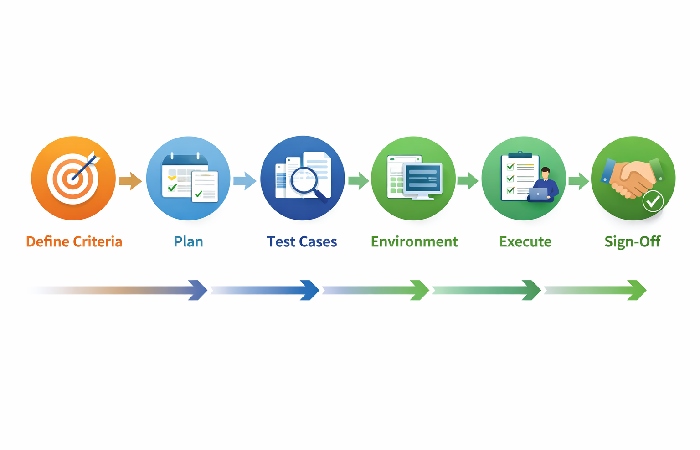
This is where most guides fall short. UAT isn’t simply “give users access and see what happens.” It’s a structured process with defined entry and exit criteria.
Step 1: Define Acceptance Criteria
Before a single test is written, the business and development teams must agree on acceptance criteria — the precise, measurable conditions the software must meet to be considered acceptable.
Poorly defined acceptance criteria is the single most common reason UAT fails. Criteria must be:
- Specific — not “the system should be fast” but “page load time must not exceed 3 seconds”
- Measurable — verifiable by a pass/fail outcome
- Agreed upon — signed off by both business and technical stakeholders before development begins
Step 2: Build the UAT Test Plan
The UAT test plan documents scope, objectives, schedule, resource assignments, entry/exit criteria, and risk mitigation. According to the ISTQB Foundation Level Syllabus, a valid test plan must include defined roles, environment requirements, and escalation procedures.
The plan answers: who is testing what, in which environment, by when, and what constitutes a pass or fail.
Step 3: Design UAT Test Cases
Test cases are written based on real business scenarios — not technical edge cases. Each test case should:
- Describe a specific user action or workflow
- State the expected outcome
- Link back to a specific acceptance criterion
- Assign a priority level (critical, high, medium, low)
Example test case format:
| Field | Detail |
|---|---|
| Test Case ID | UAT-TC-001 |
| Scenario | User submits a purchase order |
| Pre-condition | User is logged in with buyer role |
| Test Steps | 1. Navigate to Orders → 2. Add item → 3. Click Submit |
| Expected Result | Order confirmation email received within 60 seconds |
| Acceptance Criterion | AC-14: Order processing time ≤ 60 seconds |
Step 4: Prepare the UAT Environment
The UAT environment must mirror production as closely as possible — same server configuration, anonymised production data, and integrated third-party services. Testing on a degraded environment produces unreliable results and gives a false pass or fail.
Key environment checks:
- Production-equivalent data volumes loaded
- All integrations active (payment gateways, APIs, email services)
- Access provisioned for all testers
- Defect logging tool configured (e.g., Jira, Azure DevOps)
Step 5: Execute Tests and Log Defects

UAT testers execute test cases and log any deviation from the expected outcome as a defect. Each defect should capture:
- Severity (critical / major / minor / cosmetic)
- Steps to reproduce
- Screenshot or screen recording
- Environment details
Not every defect is a blocker. The team must triage defects against exit criteria — typically, zero critical defects and an agreed threshold for minor issues.
Step 6: Review, Retest, and Sign Off
Once defects are fixed, retesting confirms the resolution didn’t introduce new issues (regression). When exit criteria are met, business stakeholders issue formal UAT sign-off — a documented declaration that the software is accepted for production deployment.
UAT sign-off is not optional for high-risk systems. It is the contractual and operational gate between testing and go-live.
UAT Readiness Checklist (Pre-Launch Gate)
Use this checklist before UAT begins. If more than two items are incomplete, delay the start — testing on an unprepared system wastes time and produces noise.
Business Readiness
- Acceptance criteria documented and signed off by business owner
- UAT test plan reviewed and approved
- End-user testers identified, trained, and available
- Stakeholder availability confirmed for defect triage sessions
Technical Readiness
- System testing completed with no open critical defects
- UAT environment deployed and validated against production spec
- Test data loaded and verified
- Defect management tool configured and access granted
Process Readiness
- Test cases written, reviewed, and linked to acceptance criteria
- Defect severity and priority matrix agreed
- Exit criteria documented and approved
- Go-live rollback plan confirmed
UAT Roles and Responsibilities Matrix
One of the clearest gaps in most UAT guides: who actually does what. Here’s the full picture.
| Role | Responsibility |
|---|---|
| Business Owner / Sponsor | Defines acceptance criteria; provides final sign-off |
| UAT Manager / Test Lead | Plans, coordinates, and reports on UAT progress |
| End User Testers | Execute test cases; log defects; validate fixes |
| Business Analyst | Maps test cases to requirements; clarifies acceptance criteria |
| Development Team | Fixes logged defects; supports environment setup |
| QA Lead | Ensures entry criteria are met before UAT begins |
| Project Manager | Manages schedule, escalations, and stakeholder communication |
Common Mistakes in UAT (And Why UAT Fails)
Most UAT failures are predictable. The same root causes appear across projects:
1. Poorly Written Acceptance Criteria If criteria are vague or ambiguous, testers can’t produce consistent pass/fail results. Fix: write criteria in a Given/When/Then format before development begins.
2. Wrong Testers Using developers or QA engineers instead of actual end users defeats the purpose of UAT. The goal is to expose real-world workflow gaps, not technical bugs.
3. Insufficient Time Allocation UAT is routinely compressed when projects run late. But rushing UAT compounds risk — defects slip through and create a more expensive post-release crisis.
4. Inadequate Test Environment Testing in an environment that doesn’t match production generates misleading results. Issues that appear in UAT may not exist in production, and vice versa.
5. No Formal Exit Criteria Without defined exit criteria, UAT becomes open-ended. Stakeholders argue over whether “good enough” has been reached. Fix: document exit criteria in the test plan and hold the line.
6. Treating UAT as a QA Retread UAT is not a second round of system testing. If the development team expects UAT to catch their bugs, the process is fundamentally broken.
Who This Is For / Who Should Avoid Rushing This Step
UAT is most critical for:
- Enterprise software rollouts affecting large user populations
- Systems with contractual or regulatory acceptance requirements
- Projects with complex integrations (ERP, CRM, payment systems)
- Any release where business process disruption is high-risk
Can be simplified (not skipped) for:
- Internal tooling updates with a small, technical user base
- Low-risk patches to stable, well-understood systems
- Hotfixes to isolated components with minimal downstream impact
UAT should never be skipped when:
- Financial transactions, patient data, or legal records are involved
- The system is being handed over to a client or third party
- Regulatory sign-off is a contractual deliverable
Final Verdict: Make UAT a Gate, Not a Formality
User acceptance testing only delivers value when it’s treated as a genuine quality gate — not a box-ticking exercise squeezed into the last week of a project.
The organisations that get consistent value from UAT share three habits: they define acceptance criteria before a line of code is written, they involve real users (not QA proxies), and they hold the line on exit criteria even under schedule pressure.
Run UAT properly, and your go-live becomes a planned event. Skip it, or rush it, and your go-live becomes an incident response.
Frequently Asked Questions
Q: What is user acceptance testing in simple terms?
A: User acceptance testing (UAT) is the final phase of software testing where real end users or business representatives verify that a system works correctly for their actual needs before it’s deployed to production. It confirms the software meets business requirements, not just technical specifications.
Q: Who performs user acceptance testing?
A: User Acceptance Test is conducted by end users, business stakeholders or customers representatives, not by developers or QA engineer. The user acceptance test testers should be the people who will use the application in their daily work, thus the testing results are more relevant.
Q: What is the difference between UAT and system testing?
A: System testing is conducted by QA engineers to verify that the system as a whole works to the technical specifications; UAT is conducted by the business users to verify the system works to our business requirements. The difference is: System testing assures it works, UAT assures that it works for us.
Q: How long does user acceptance testing take?
A: UAT is generally 1-4 weeks depending on complexity of system, test cases and testers availability. If the project is of enterprise scale and has many integrations, then UAT could take longer. The duration of UAT should be factored in the project schedule from the outset of the project it should not be squeezed if the development slips.
Q: What are UAT exit criteria?
A: UAT exit criterias are the agreed upon requirements over which UAT testing passes. Common exit criterias are no open critical or high severity defects, at least the agreed low severity defects are closed, all business critical tests are run, sign-off from the business owner.
Q: What tools are commonly used for UAT?
A: Some of the most common: Jira (defect tracking), Microsoft Azure DevOps (test case management, defect tracking), Test Rail (test case management), Microsoft Excel, Confluence ( light-weight test management for smaller projects). The tool is not critical than discipline : any system with regular structure for test cases, results and defects registration will do.